How Raster to Weighted Points works
 Available with Spatial Analyst license.
The Raster to Weighted Points tool converts a continuous raster surface into a representative set of point features while preserving the spatial distribution and relative magnitude of the underlying values. Continuous rasters are used to represent spatial phenomena such as density, probability, suitability, risk, accessibility, and environmental gradients. However, many analytical, statistical, simulation, and machine learning workflows operate on vector inputs. This tool bridges that gap by providing a structured, value-preserving transformation from raster data structure to a point-based one.
The tool is designed as a representation and sampling mechanism, not a predictive or inferential model. The raster remains the authoritative source of information. The output points are a derived representation that enables downstream workflows that require discrete spatial samples.
Compare to common raster-to-vector workflows
Existing raster to vector conversion or sampling tools are suitable for direct conversion, categorical mapping or maintaining a balanced spatial coverage. The Raster to Weighted Points tool enables value-preserving, normalized, and proportionate sampling from continuous surfaces.
The Raster to Point tool creates one point per cell and ignores magnitude while the Create Random Points tool ignores raster values. The Create Spatially Balanced Points tool optimizes dispersion but does not preserve value magnitude. In contrast, the Raster to Weighted Points tool preserves spatial pattern and value relationships, supports normalization, and enables probabilistic and proportional sampling for modeling, simulation, and AI workflows.
The following table compares various characteristics across several tools.
| Characteristic | Raster to Point tool | Create Random Points tool | Create Spatially Balanced Points tool | Raster to Weighted Points tool |
|---|---|---|---|---|
| Primary purpose: | Direct cell-to-cell point conversion | Uniform random sampling | Even spatial coverage | Value-preserving and magnitude-proportional surface sampling |
| Uses raster values: | Yes (as attributes) | No | Indirect | Yes (drives spatial distribution, allocation, and attributes) |
| Preserves raster grid structure: | Yes | No | No | No |
| Preserves magnitude: | No | No | No | Yes |
| Proportional to cell values: | No | No | No | Yes |
| One point per cell: | Always | No | No | Optional |
| Control over maximum number of points: | No | Yes | Yes | Yes |
| Normalization support: | No | No | No | Yes |
| Probabilistic sampling: | No | No | Yes | Yes |
| Flexible point placement methods: | No (Cell center only) | No (Random only) | Optimized spacing | Yes (multiple deterministic and stochastic methods) |
| Value distribution among output points: | No | No | No | Yes |
| NoData cells handling: | Yes | Yes | Yes | Yes |
| Reproducible geometry: | Yes | No | Optional | Optional |
| Designed for continuous surface: | Limited | No | Limited (conversion required to binary raster) | Yes |
Normalization
Raster values can represent very different things, such as counts, intensities, indices, probabilities, or composite scores. Even when two rasters represent the same phenomenon, their numeric ranges and distributions may differ substantially. Without normalization, these numeric characteristics can dominate point allocation in unintended ways, leading to overrepresentation of extreme values or underrepresentation of meaningful variation.
Normalization determines how raster values are interpreted during point allocation, distribution, and in subsequent workflows. It does not change the spatial pattern of the surface, and it does not move points. However, it directly influences how the resulting point attributes behave in downstream analyses.
Normalization also prepares raster-derived values for statistical, modeling, and machine-learning workflows. Many analytical methods assume that inputs are bounded, comparable, or approximately standardized. Raw raster values often violate these assumptions, leading to unstable models, biased parameter estimates, or misleading interpretations.
Normalization exists to ensure that point allocation and downstream analysis reflect analytical intent rather than raw numeric artifacts.
What normalization does
Normalization transforms a raster cell value (xi) into a prepared value (xi′) which is then used to allocate points and populate output attributes. Notably, normalization preserves key structural properties of the raster. The relative order of values is usually preserved, meaning higher valued areas remain higher than lower valued areas. The spatial pattern of high and low regions remains unchanged. Only the relative influence of values on allocation and analysis is modified. In practical terms, normalization controls how strongly differences between cells influence point density and analytical weight, rather than whether those differences exist.
When to use normalization
Normalization is necessary when input raster values are not suitable for direct proportional allocation or downstream analysis. This commonly occurs when raster values span large numeric ranges. For example, a density surface with values ranging from 1 to 10,000 will cause the higher value cells to dominate allocation, even when differences among high values are not analytically meaningful. Normalization moderates this dominance so that spatial patterns are represented more evenly.
Normalization is also important for heavily skewed or long-tailed distributions, which are common in population density, crime density, exposure, and flow surfaces. In such cases, most cells receive few or no points, while a small number of extreme cells absorb nearly all points. Normalization redistributes influence so that moderate but meaningful variation is not lost.
When points are used as inputs to statistical or machine learning models, normalization improves numerical stability, comparability, and interpretability. Many models implicitly assume standardized or bounded inputs; raw raster values often violate these assumptions and can degrade model performance.
Finally, normalization is required when combining or comparing multiple rasters with different units or scales, such as population density, accessibility indices, environmental scores, or risk metrics.
When to avoid normalization
Normalization should be avoided when raster values already have a calibrated probabilistic or physical meaning that must be preserved. For example, if a raster represents true probabilities or empirically validated intensities, normalization may distort interpretation.
Normalization should also be avoided when absolute magnitude is critical. If one cell genuinely represents twice the quantity another in real-world units, normalization may weaken that relationship and obscure meaningful magnitude differences.
When preserving original units for reporting or interpretation is essential, normalization should be used cautiously. The output point features contain both normalized and original cell values, if normalization is applied.
Normalization methods
Use the Normalization Method parameter to specify how the input raster values will be processed before the tool generates the output points. Each of the available options are described below.
None (No normalization)
Input raster values will be used directly for point allocation and attribute assignment. Each cell's influence is strictly proportional to its original value. The numeric meaning and units of the raster are preserved without transformation. This option assumes that the raster is already appropriately scaled, distributed, and analytically meaningful for downstream use.
Example inputs could be a kernel density surface for crime or traffic crashes, or flood probability rasters produced by hydrologic models.
Min-Max normalization
The Min-max normalization option rescales raster values to a fixed range, typically from 0 to 1.
\(x' = \large \frac{x - x_{\min}}{x_{\max} - x_{\min}}\)
where:
\(x'\) is the new, normalized value.
\(x\) is the original cell value.
\(x_{\min}\) is the minimum value of the entire raster.
\(x_{\max}\) is the maximum value of the entire raster.
The transformation preserves the relative ordering of values while limiting the influence of extreme values. Differences between low and high values remain visible, but no single cell can dominate allocation purely because of scale.
This normalization method is well suited for rasters that represent relative scores or indices rather than physical quantities.
Example inputs could be land-use suitability indices from multi-criteria evaluation, or accessibility scores measuring proximity to services or infrastructure.
Z-Score normalization
The Z-Score normalization option expresses raster values in terms of their deviation from the mean.
\(x' = \large \frac{x - \mu}{\sigma}\)
where:
\(x'\) is the new, normalized value.
\(x\) is the original cell value.
\(\mu\) is the mean.
\(\sigma\) is the standard deviation.
Values above the mean become positive, values below the mean become negative and the magnitude reflects how unusual a value is relative to the overall distribution. This transformation emphasizes relative deviation rather than absolute magnitude.
This normalization method is most useful when identifying anomalies or departures from typical conditions rather than preserving proportional relationships.
Example inputs could be temperature anomaly raster's showing deviations from long-term averages, residual surfaces from regression or change-detection models.
Sigmoid normalization
The Sigmoid normalization option applies a logistic function to standardized values.
\(x' = \large \frac{1}{1 + e^{-z}}\)
where:
\(x'\) is the new, normalized value.
\(z\) is the standardized input value.
\(e\) is Euler's number (approximately 2.71828).
The transformation compresses extreme highs and lows while preserving variation near the center of the distribution. It reduces sensitivity to outliers and produces smooth transitions between low and high influence areas.
This normalization method is appropriate when gradual transition is analytically more meaningful than sharp contrasts.
Example inputs for this transformation includes social vulnerability indices where risk increases and decreases gradually, environmental sensitivity or exposure gradients.
Softmax normalization
The Softmax normalization option converts raster values into a global probability distribution.
\(x_i' = \Large \frac{e^{x_i}}{\sum_{j=1}^{K} e^{x_j}}\)
where:
\(i = 1, \ldots, K\) identifies each cell included in the normalization.
\(x_i'\) is the new, normalized value for cell \(i\).
\(x_i\) is the original value of cell \(i\).
\(x_j\) is the original value of cell \(j\) in the denominator summation.
\(K\) is the total number of cells included in the normalization.
\(e\) is Euler's number (approximately 2.71828).
All values become positive and sum to one, causing cells to compete for influence across the entire raster. Cells with higher values receive disproportionately greater weights, while lower values receive less. Softmax forces the weights to be mutually exclusive, meaning that increasing the probability of one cell decreases the probability of all others.
This normalization method is particularly useful when modeling choice, preference, or likelihood rather than magnitude.
Example inputs include site preference or attractiveness surfaces for facility location modeling or likelihood surfaces used in stochastic or agent-based simulations.
Log normalization
The Log normalization option reduces skew by compressing large values.
\(x' = \large \frac{\ln(x + C) - \ln(C)}{\ln(x_{\max} + C) - \ln(C)}, \quad C = |x_{\min}| + 1\)
where:
\(x'\) is the new, normalized value.
\(x\) is the original cell value.
\(x_{\min}\) is the minimum value of the entire raster.
\(x_{\max}\) is the maximum value of the entire raster.
\(C\) is the shift constant defined as \(|x_{\min}| + 1\).
\(\ln\) is the natural logarithm.
The transformation dampens the dominance of extreme values while preserving rank order and overall spatial pattern. It is especially effective for rasters with heavy-tailed distribution or values spanning multiple orders of magnitude.
This normalization method helps reveal meaningful variations among low and moderate values that would otherwise be overshadowed by extreme.
Example inputs include population density rasters in metropolitan regions, pollution or exposure concentration surface.
Sum-to-one normalization
The Sum-to-one normalization option converts raster values into proportional weights.
\(x_i' = \Large \frac{x_i}{\sum_{j=1}^{K} x_j}\)
where:
\(i = 1, \ldots, K\) identifies each cell included in the normalization.
\(x_i'\) is the new, normalized value.
\(x_i\) is the original cell value.
\(\sum_{j=1}^{K} x_j\) is the sum of all original cell values included in the normalization.
Each cell's value represents its share of the total raster value, ensuring that allocation and analysis are explicitly mass-preserving. The resulting values can be interpreted as proportions or probabilities.
This normalization method is particularly useful when the total quantity represented by the raster must be preserved across the output points.
Example inputs include population and employment density rasters used for demand modeling, resource allocation or service demand surface.
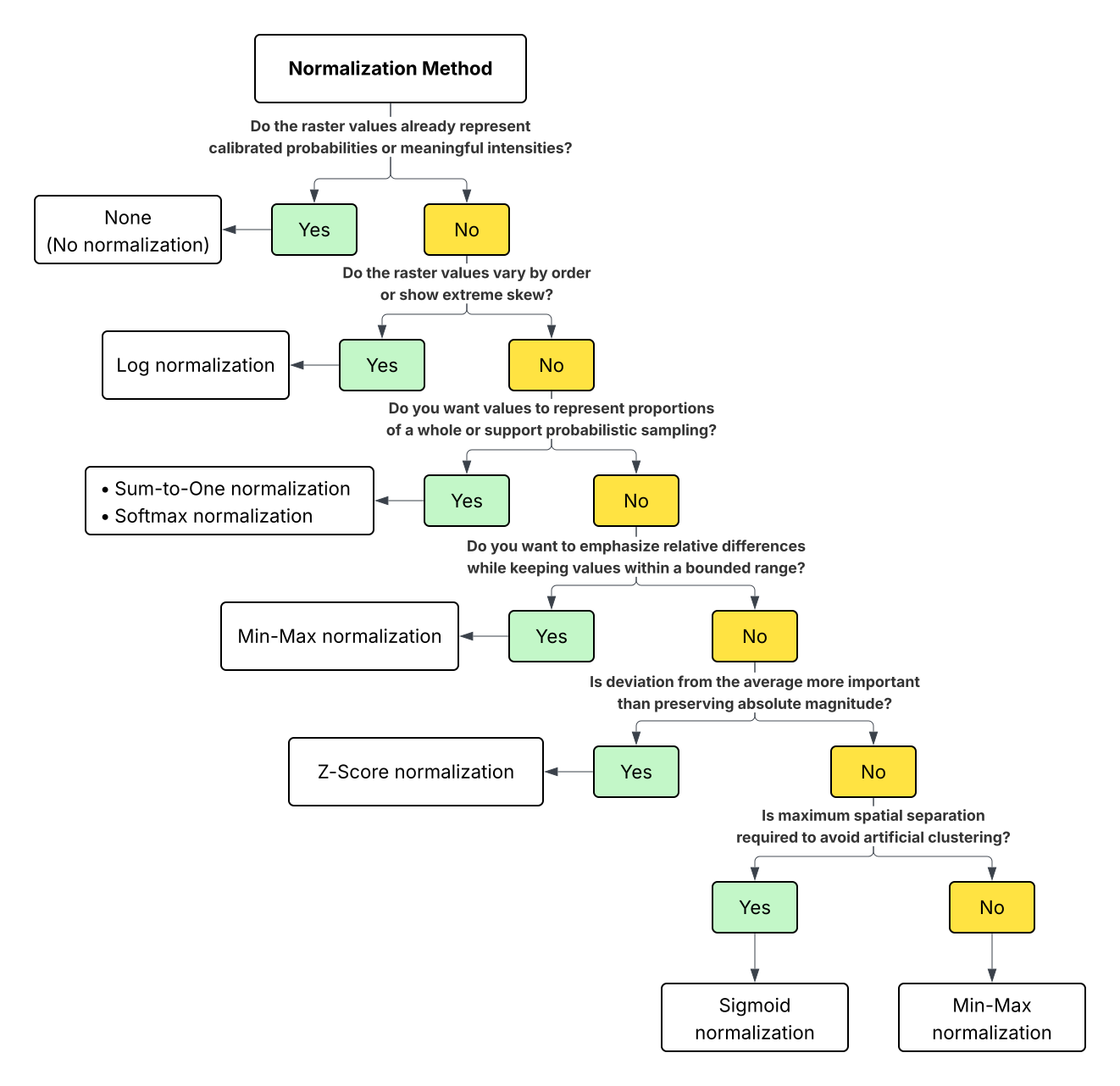
Normalization method decision tree
Use the following diagram to help determine which normalization method is most suitable for your analysis.
Point distribution
The purpose of allocation is to distribute a fixed total number of points across the raster in a way that reflects the relative magnitude of the cell values. The allocation process is global: all valid raster cells compete for a share of the total number of points based on their values.
Let \(V_i\) be the raster value of cell \(i\), and let \(V_T = \sum_{i=1}^{K} V_i\) be the sum of raster cell values across all valid cells. This represents the total mass or influence of the surface.
\(P_{\max}\) be the maximum number of points requested for the entire raster. This is the maximum number of points you define, not a per-cell limit.
The expected number of points assigned to each cell is calculated as:
\(P_i = P_{\max} \times \large \frac{V_i}{V_T}\)
where:
\(i = 1, \ldots, K\) identifies each valid raster cell.
\(P_i\) is the expected number of points allocated to cell \(i\).
\(P_{\max}\) is the maximum number of points requested for the raster.
\(V_i\) is the raster value of cell \(i\).
\(V_T\) is the total raster value across all valid cells.
Example
Assume a raster with four valid cells and the following values:
| Cell | Value (\(V_i\)) |
|---|---|
| A | 40 |
| B | 30 |
| C | 20 |
| D | 10 |
The total value is:
\(V_T = 40 + 30 + 20 + 10 = 100\)
If you request a maximum of 50 points:
\(P_{\max} = 50\)
Then the expected point allocation for each cell is:
\(P_A = 50 \times \large \frac{40}{100} \normalsize = 20\)
\(P_B = 50 \times \frac{30}{100} \normalsize = 15\)
\(P_C = 50 \times \frac{20}{100} \normalsize = 10\)
\(P_D = 50 \times \frac{10}{100} \normalsize = 5\)
In this case, each allocation is a whole number, so each cell receives exactly that many points. In most real-world cases, however, \(P_i\) is not an integer. The tool resolves fractional allocations using deterministic or probabilistic rounding.
Cells with NoData are excluded from the calculation and do not contribute value or points. If the Limit one point per cell parameter is checked, allocation is capped so that each cell receives at most one point, regardless of its value.
Advantages of point distribution methods
Point distribution controls spatial configuration of the output point dataset, not allocation (quantity). Different analytical goals require different spatial arrangements to avoid clustering artifacts, ensure reproducibility, or protect sensitive information.
Placement is not just visualization. It can change downstream results in vector workflows even when counts are identical, because many operations depend on point-to-point distances and local geometry (clustering analysis, distance-to-nearest, Voronoi zoning, network assignment, spatial join with distance constraints, and so on). In practice, placement methods are a set of controls to manage four competing goals:
Reproducibility. This goal ensures that the same point locations are produced each time the tool is run with identical inputs.
Uncertainty and simulation realism. This goal represents unknown within-cell locations by distributing points across the cell rather than fixing them at a single point.
Spatial separation. This goal reduces point overlaps and artificial clustering when multiple points are placed within the same cell.
Privacy and obfuscation. This goal prevents points from being interpreted as exact locations while preserving overall spatial patterns.
Point distribution determines where points are located inside a raster cell after the number of points has already been decided. It does not affect how many points are assigned to a cell; it only controls their geometry. This distinction is critical: allocation preserves value relationships in the surface, while placement controls how that representation behaves in vector-based analysis.
Let \(P_i\) denote the number of points allocated to raster cell \(i\). When \(P_i = 1\), the placement choice has negligible impact. However, as \(P_i\) increases, placement decisions strongly influence point spacing, clustering, reproducibility, and the validity of downstream spatial analysis.
Different placement methods exist because no single strategy is appropriate for all analytical goals. The tool therefore provides multiple placement options so you can choose a method that matches assumptions about uncertainty, precision, and analytical intent.
Point distribution methods
Point distribution methods exist to ensure that the geometry of output points matches the analytical assumption of the workflow. When only one point per cell is created, placement choice is usually inconsequential. As the number of points per cell increases, selecting an appropriate distribution method becomes essential to avoid artificial clustering, misinterpretation, or analytical bias.
The following section provide a details about the available point distribution methods and how to best use those in your workflows.
Cell center—All points allocated to a cell are placed at the geometric center of the cell. This method is simple, deterministic, and fully reproducible. It is most appropriate when only per cell is generated and when cell alignment and simplicity are more important than within-cell spatial realism.
Use this option when one point per cell is expected or when the exact within-cell location is not relevant. Cell center placement is best for simple, reproducible results where spatial precision within the cell is not required.
Random—Points are placed randomly within the cell boundary using a uniform distribution. This method assumes that the phenomenon represented by the raster is equally likely to occur anywhere within the cell. Random placement is useful when the exact within cell location is unknown, when representing uncertainty, or when anonymizing sensitive information. Results are not reproducible unless a fixed random seed is used (available through the environment).
Use this option when uncertainty, simulation, or privacy protection is important.
Circular—Points are placed evenly around a circle center within the cell. This method ensures that multiple points are visually and spatially separated while remaining close to the cell center. It is deterministic and avoids the overlap that occurs with center placement when more than one point is generated. Circular placement is primarily geometric convenience rather than a statistical model of spatial distribution.
Use this option when multiple points are expected, and reproducible, evenly spaced geometry is desired.
Fibonacci Lattice—Points are distributed using a low-discrepancy sequence based on the golden ratio to achieve near-uniform spacing. This method minimizes clustering and directional bias without forming a rigid grid. It is deterministic and produces well-spaced points even when many points are placed within a cell. Fibonacci lattice placement is useful when spatial separation matters but randomness is not desired.
Use this option when many points per cell are expected and even spacing is important for analysis.
Fibonacci Spiral—Points are arranged along a spiral pattern that expands outward from the cell center using golden-ratio spacing. This method produces near-uniform spacing while maintaining a structured, repeatable pattern. Compared to the Fibonacci lattice, the spiral emphasizes radial distribution from the center and is well suited for visual clarity and consistent spacing when point counts are high.
Use this option when deterministic placement with smooth, evenly expanding spacing is preferred.
Equal-area Voronoi—The cell is subdivided into equal-area regions, and one point is placed in each region. This method maximizes spatial separation between points by construction and avoids both overlap and clustering. It is deterministic and well suited for distance-based or neighborhood analyses where artificial proximity between points could bias results.
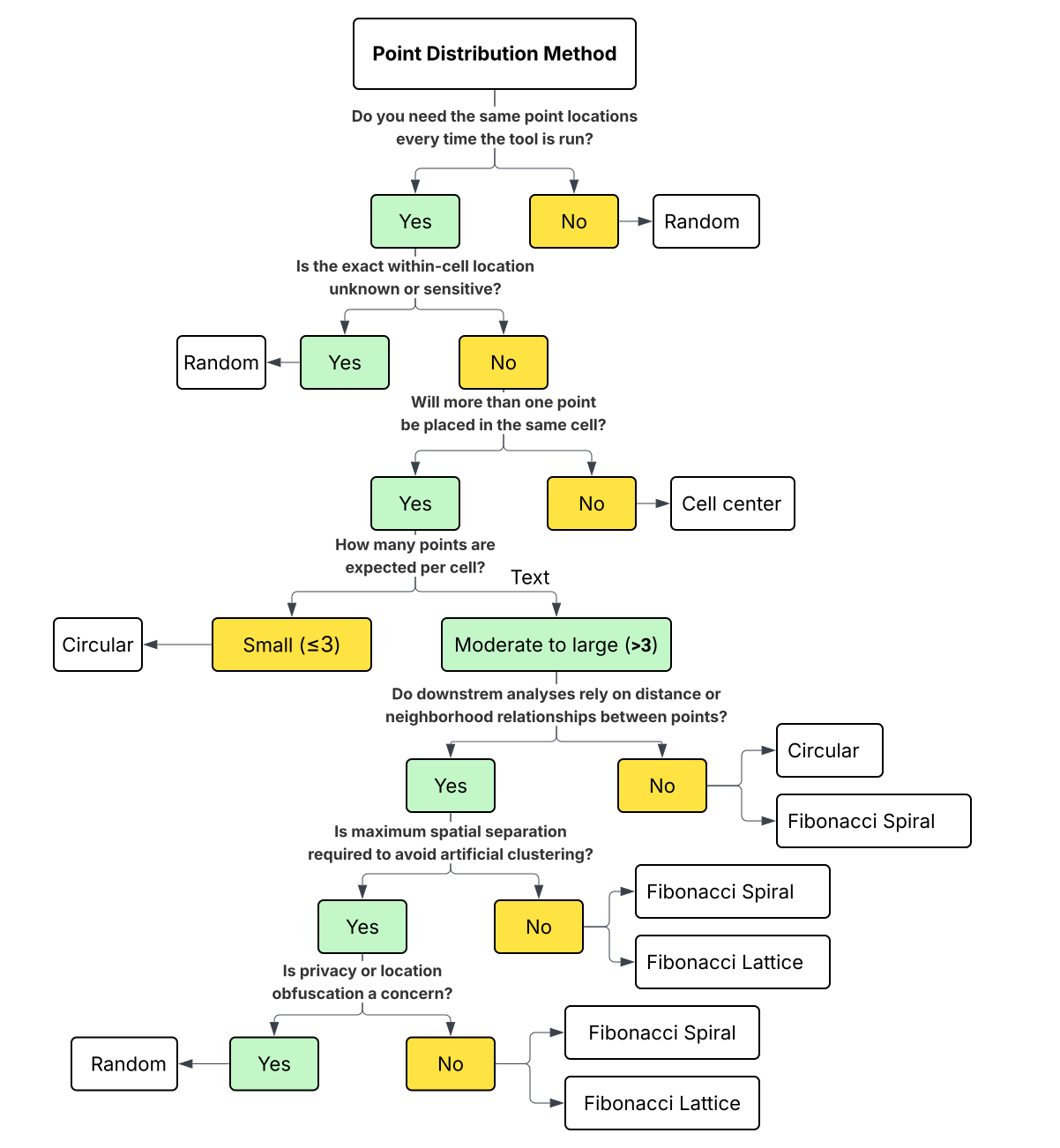
Point distribution method decision tree
Use the following diagram to help determine which point distribution method is most suitable for your analysis.
Understand output attribute values
Each output feature includes the following attribute values:
The original raster cell value
The distributed value
The normalized value (if applied)
The OriginalValue field records the input raster cell value. Each output point inherits the original raster value of the cell from which it was generated. If multiple points are created from the same cell, all those points carry the same original raster value.
This field is useful when raster values represent meaningful quantities or indices, when points are symbolic representations rather than fractional units, or when downstream analysis requires the original value scale.
When a normalization method is selected, each point is assigned the normalized value of its source cell. The exact field name depends on the selected normalization method. It will be one of the following: Norm_Log, Norm_ZScore, Norm_Sigmoid, Norm_Sum_to_1, Norm_Softmax, or Norm_Min_Max.
As with original values, all points generated from the same cell receive the same normalized value. This option is useful when normalized values are required directly as attributes for modeling, comparison, or machine-learning workflows. It ensures consistency between point allocation and point attributes.
The DistributedValue field records the distributed value. When multiple points originate from one cell, the cell contribution is divided evenly among all points. If a cell produces \(p_i\) points, each point receives a value of \(\frac{1}{p_i}\), such that the sum of distributed values within the cell equals one.
This option is designed for workflows in which points represent fractions of a total rather than symbolic copies of a value. It is especially useful for proportional sampling, mass-preserving workflows, and simulation-based analysis.
Multipoint output
The Create multipoint output parameter controls how points originating from the same raster cell are stored. It does not affect how they are allocated or placed.
When checked, all points generated from a single cell will be stored as one multipoint feature. Attribute values are stored at the feature level and apply collectively to all component points. This option reduces feature count while preserving value relationships. It is useful when cell-level identity matters more than individual point identity.
Use this option when:
Managing very large point outputs
Maintaining a one-feature-per-cell structure
Passing geometry to workflows that support multipoint
When unchecked, each point will be stored as an individual point feature. The output points originating from the same cell are independent features with identical or distributed attribute values. This option provides maximum flexibility for vector-based analysis, spatial joins, distance calculations, and machine-learning workflows that expect individual point records.
Use this option when:
Downstream analysis operates on individual points
Distance-based or neighborhood analysis is required
Machine-learning workflows expect one record per point
Best practices and warnings
The following sections describe important considerations for using this tool.
Understand the meaning of the input raster
Before using the tool, understand what the raster values represent. They may describe counts, densities, probabilities, indices, or composite scores. Each has different implications for normalization, distribution, and interpretation.
For example, rasters representing calibrated probabilities or empirically measured quantities may not require normalization. Applying normalization without understanding raster semantics can produce results that are numerically correct but analytically misleading.
Use normalization to match analytical intent
Select the Normalization Method parameter value based on how the points will be used, not only on the numeric range of raster values.
When the goal is proportional representation, such as distributing population or demand, Sum-to-One or Min-Max normalization option is often appropriate. When the goal is anomaly detection or relative deviation, Z-Score normalization option may be more suitable.
Be cautious with extreme values and skewed distributions
Highly skewed rasters can cause a small number of cells to dominate point allocation. While this may reflect underlying data, it can also obscure meaningful variation in moderate-value regions.
The Log or Sigmoid normalization options can reduce this dominance while preserving overall spatial patterns. However, excessive value compression may underrepresent legitimately extreme areas. The balance between preserving extremes and revealing broader patterns depends on analytical objectives.
Choose point distribution methods based on analysis, not appearance
Point distribution methods influence how points behave in subsequent vector-based analysis, not only how they appear visually. When multiple points are placed within one cell, poor placement choices can introduce artificial clustering that affects distance-based statistics, neighborhood analysis, or spatial joins.
Random placement better represents uncertainty and can support privacy-preserving workflows. Structured methods such as Fibonacci-based and equal-area Voronoi placement are recommended when many points per cell are expected and spatial separation is important.
Account for reproducibility and randomness
Random placement introduces variability by design. While this is useful for simulation, uncertainty analysis, or anonymization, it can complicate reproducibility.
Results may differ between runs unless controlled from the environment setting using a fixed seed. Deterministic placement ensures repeatability and is preferable when results must be audited, compared across scenarios, or reused in production workflows.
Interpret points as representations, not observations
Points generated by this tool are representations of a continuous surface, not direct observations or events. Their locations are determined by allocation and distribution logic, not by measured phenomena at exact coordinates.
Treating output points as observed data, such as incidents or measurements, can lead to incorrect conclusions.
Use caution when limiting one point per cell
The Limit One Point per Cell parameter simplifies outputs but suppresses magnitude information by collapsing variation into a binary presence or absence representation.
While useful for some classification or sampling workflows, this option removes the ability to represent intensity differences between cells.
Use original cell values for interpretation and validation
Retaining original cell values in output attributes improves transparency and supports validation. It also supports downstream auditing, reporting, and model diagnostics.
Potential applications
Some potential applications for this tool include the following:
Crime density surfaces can be converted into representative points to support patrol planning and resource allocation while preserving spatial intensity. The resulting points enable modeling and scenario testing without exposing exact incident locations.
Disease exposure or infection risk rasters can be sampled into probabilistic points for epidemiological modeling and risk assessment. These points retain relative exposure patterns and integrate cleanly with vector-based demographic or environmental data.
Population density surfaces can be transformed into synthetic demand points for transportation and infrastructure analysis. Each point represents a portion of the underlying population, enabling network-based accessibility and demand modeling.
Habitat suitability rasters can be converted into representative points for species distribution modeling and conservation planning. The points preserve relative suitability while supporting integration with field data and predictive models.
Climate anomaly or index surfaces can be sampled into standardized points for spatial modeling and machine-learning workflows. This enables efficient pattern detection, forecasting, and uncertainty analysis using vector-based workflows.
Summary
The Raster to Weighted Points tool provides a scientifically grounded, structured way to convert continuous raster surfaces into representative point features while preserving spatial patterns and value relationships.
By combining optional normalization, proportional point allocation, and flexible point placement strategies, the tool helps ensure that output points reflect the underlying surface in a numerically stable and analytically meaningful way. This allows continuous raster information to be integrated into vector-based workflows such as modeling, simulation, uncertainty analysis, and advanced spatial analytics without losing the spatial or quantitative characteristics that make the surface informative.
Additional References
Baddeley, A., Rubak, E., & Turner, R. (2015). Spatial Point Patterns: Methodology and Applications. CRC Press.
Bishop, C. M. (2006). Pattern Recognition and Machine Learning. Springer.
Diggle, P. J. (2013). Statistical Analysis of Spatial and Spatio-Temporal Point Patterns. CRC Press.
González, Á. (2010). "Measurement of Areas on a Sphere Using Fibonacci and Latitude–Longitude Lattices." Math Geosci, 42, 49–64. https://doi.org/10.1007/s11004-009-9257-x
Jain, A. K., Nandakumar, K., & Ross, A. (2005). Score normalization in multimodal biometric systems. Pattern Recognition.
Niederreiter, H. (1992). Random Number Generation and Quasi-Monte Carlo Methods. SIAM.