Dimension Reduction (Spatial Statistics Tools)
Summary
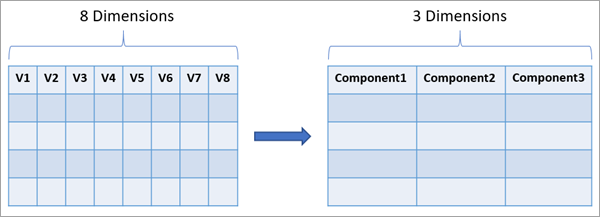
Reduces the number of dimensions of a set of continuous variables by aggregating the highest possible amount of variance into fewer components using Principal Component Analysis (PCA) or Reduced-Rank Linear Discriminant Analysis (LDA).
The variables are specified as fields in an input table or feature layer, and new fields representing the new variables are saved in the output table or feature class. The number of new fields will be fewer than the number of original variables while maintaining the highest possible amount of variance from all the original variables. Dimension reduction is commonly used to explore multivariate relationships between variables and to reduce the computational cost of machine learning algorithms in which the required memory and processing time depend on the number of dimensions of the data. Using the components in place of the original data in analysis or machine learning algorithms can often provide comparable (or better) results while consuming fewer computational resources.
Illustration
Usage
At least two numeric fields must be provided for the Analysis Fields parameter because the data must have at least two dimensions to have its dimensions reduced.
There are two options for the Dimension Reduction Method parameter:
Principal Component Analysis (PCA)—This method sequentially builds components that each capture as much of the total variance and correlations between the original variables as possible. The Scale Data parameter can be used to scale each original variable so that each variable is given equal importance in the principal components. If the data is not scaled, variables with larger values will account for most of the total variance and will be overrepresented in the first several components. This method is recommended when you intend to perform an analysis or machine learning method in which the components are used to predict the value of a continuous variable.
Reduced-Rank Linear Discriminant Analysis (LDA)—This method builds components that maximize the separability of the analysis variables and different levels of a categorical variable provided in the Categorical Field parameter. The components will maintain as much between-category variance as possible so that the resulting components are most effective at classifying each record into one of the categories. This method automatically scales the data and is recommended when you intend to perform an analysis or machine learning method in which the components are used to classify the category of a categorical variable.
The geoprocessing messages display the percent and cumulative percent of variance maintained by each component.
The number of components that will be created depends on whether you specify values for the Minimum Percent Variance to Maintain and Minimum Number of Components parameters.
If one parameter is specified and the other is not, the value of the specified parameter determines the number of components. The number of components will be equal to the smallest number needed to satisfy the specified minimum.
If both parameters are specified, the larger of the two resulting number of components is used.
If neither parameter is specified, the number of components is determined using several statistical methods, and the tool will use the largest number of components estimated by each of the methods. For both dimension reduction methods, the methods include the Broken-Stick Method and Bartlett's Test of Sphericity. For PCA, a permutation test is also performed if the Number of Permutations parameter value is greater than zero.
Information about the results of each test are displayed as geoprocessing messages.
If a table is created by the Output Eigenvalues Table parameter, a Scree Plot chart is created in the output table to visualize the variance maintained by each component.
If a table is created by the Output Eigenvectors Table parameter, a bar chart is created in the output table to visualize each of the eigenvectors.
You can append the component fields to the input table using the Append Fields To Input Data parameter. If you append the component fields, a related table is not provided.
The number of components cannot be greater than the number of records in the input. Also, records that have null values in any of the analysis fields will be excluded from the calculation. If many records have null values, the number of components specified in the Minimum Number of Components parameter may not be produced and the tool will fail. In this case, remove the analysis fields that have many null values or fill in the missing values using the Fill Missing Values tool.
For additional information about PCA and Reduced-Rank LDA, see the following reference:
- James, G., Witten, D., Hastie, T., Tibshirani, R. (2014). "An Introduction to Statistical Learning: with Applications in R." Springer Publishing Company, Incorporated. https://doi.org/10.1007/978-1-4614-7138-7
For additional information about the methods for determining the number of components, see the following reference:
- Peres-Neto, P., Jackson, D., Somers, K. (2005). "How many principal components? Stopping rules for determining the number of non-trivial axes revisited." Computational Statistics & Data Analysis. 49.4: 974-997. https://doi.org/10.1016/j.csda.2004.06.015.
Parameters
| Label | Explanation | Data type |
|---|---|---|
|
Input Table or Features |
The table or features containing the fields with the dimension that will be reduced. |
Table View |
|
Output Table or Feature Class (Optional) |
The output table or feature class containing the resulting components of the dimension reduction. |
Table |
|
Analysis Fields |
The fields representing the data with the dimension that will be reduced. |
Field |
|
Dimension Reduction Method (Optional) |
Specifies the method that will be used to reduce the dimensions of the analysis fields.
|
String |
|
Scale Data (Optional) |
Specifies whether the values of each analysis field will be scaled to have variance equal to one. This scaling ensures that each analysis field is given equal priority in the components. Scaling also removes the effect of linear units; for example, the same data measured in meters and feet will result in equivalent components. The values of the analysis fields will be shifted to have mean zero for both options.
|
Boolean |
|
Categorical Field (Optional) |
The field representing the categorical variable for LDA. The components will maintain the maximum amount of information needed to classify each input record into these categories. |
Field |
|
Minimum Percent Variance to Maintain (Optional) |
The minimum percent of total variance of the analysis fields that must be maintained in the components. The total variance depends on whether the analysis fields were scaled using the Scale Data parameter. |
Long |
|
Minimum Number of Components (Optional) |
The minimum number of components. |
Long |
|
Copy All Fields to Output Dataset (Optional) |
Specifies whether all fields from the input table or features will be copied and appended to the output table or feature class. The fields provided in the Analysis Fields parameter will be copied to the output regardless of the value of this parameter.
|
Boolean |
|
Output Eigenvalues Table (Optional) |
The output table containing the eigenvalues of each component. The values of the eigenvectors are rescaled to have unit norm (the sum of squared values equals one). |
Table |
|
Output Eigenvectors Table (Optional) |
The output table containing the eigenvectors of each component. |
Table |
|
Number of Permutations (Optional) |
The number of permutations that will be used when determining the optimal number of components. The default value is 0, which indicates that no permutation test will be performed. |
Long |
|
Append Fields to Input Data (Optional) |
Specifies whether the component fields will be appended to the input dataset or saved to an output table or feature class. If you append the fields to the input, the output coordinate system environment will be ignored.
|
Boolean |
Derived output
| Label | Explanation | Data type |
|---|---|---|
|
Updated Table or Feature Class |
The updated input table or feature class with the component fields appended. |
Table View |
Environments
Output Coordinate System, Random number generator
Licensing information
- Basic: Yes
- Standard: Yes
- Advanced: Yes