Export Feature Attribute To ASCII (Spatial Statistics Tools)
Summary
Exports feature class coordinates and attribute values to a space-, comma-, tab-, or semicolon-delimited ASCII text file.
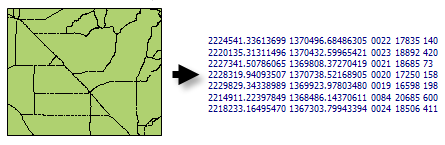
Illustration
Coordinates (X and Y) and user-specified feature attributes are written to an ASCII text file.
Usage
This tool can be used to export data for analysis with external software packages.
The X and Y coordinate values are written to the text file with eight significant digits of precision. Floating-point attribute values are written to the text file with six significant digits.
When null values are encountered for a field value, they will be written to the output text file as NULL.
Caution:
When using shapefiles, keep in mind that they cannot store null values. Tools or other procedures that create shapefiles from nonshapefile inputs may store or interpret null values as zero. In some cases, nulls are stored as very large negative values in shapefiles. This can lead to unexpected results. See Geoprocessing considerations for shapefile output for more information.
ExportFeatureAttributeToASCII example 2 (stand-alone script)
The following stand-alone Python script demonstrates how to use the ExportFeatureAttributeToASCII function.
# Export feature locations and attributes to an ASCII text file.

# Import system modules
import arcpy

# Local variables...
workspace = "c:/data"
input_features = "AidsByCaCnty.shp"
export_ASCII = "aidsbycacnty.txt"

# Set the current workspace (to avoid having to specify the full path to the
# feature classes each time).
arcpy.env.workspace = workspace

# Process: Export Feature Attribute to ASCII...
arcpy.stats.ExportXYv(
    input_features, "HEPRATE", "SPACE", export_ASCII, "NO_FIELD_NAMES")