Neighborhood Summary Statistics (Spatial Statistics Tools)
Summary
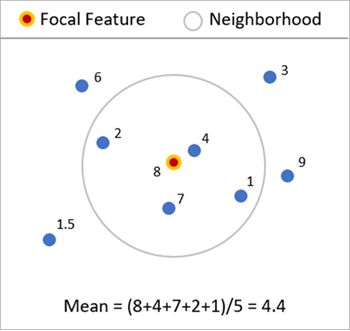
Calculates summary statistics of one or more numeric fields using local neighborhoods around each feature. The local statistics include mean (average), median, standard deviation, interquartile range, skewness, and quantile imbalance. All statistics can be geographically weighted using kernels to give more influence to neighbors closer to the focal feature. Various neighborhood types can be used, including distance band, number of neighbors, polygon contiguity, Delaunay triangulation, and spatial weights matrix files (.swm). Summary statistics are also calculated for the distances to the neighbors of each feature.
Illustration
Usage
In addition to any analysis fields provided, statistics based on distances to neighbors are calculated for each feature. This allows you to calculate, for example, the mean and standard deviation of the distances to each neighbor to see if the neighbors are generally close or far away from the focal feature. The statistics for distance to neighbors will not use the focal feature in its calculations because that distance is always zero. Additionally, these statistics will not be geographically weighted because it is not meaningful to weight distance values based on those same distances.
When the Delaunay triangulation option is specified for the Neighborhood Type parameter, the output feature class is called a Voronoi Map.
If the input features are polygons, all distances between polygons are defined by the distances between polygon centroids.
The local statistics can only be geographically weighted if the Neighborhood Type parameter is specified as Number of Neighbors or Distance Band because neighborhoods based on polygon contiguity or Delaunay triangulation should not be weighted by centroid-to-centroid distance. If Get spatial weights from file is specified for the Neighborhood Type parameter, the weights defined in the spatial weights file are automatically used for geographic weighting.
If the Output Coordinate System environment is set to a geographic coordinate system with latitude and longitude coordinates, all distances are calculated using chordal distance. Otherwise, all distances are calculated using straight-line (Euclidean) distance.
If you choose to ignore null values using the Ignore Null Values in Calculations parameter, neighbors with null values in the analysis field will be filtered out after searching for neighbors. This may result in fewer neighbors than you expect, and if multiple analysis fields are provided, some may use a different number of neighbors than others. This is particularly apparent when the Number of Neighbors option is specified for the Neighborhood Type parameter.
Local means of analysis fields are often called spatial lags of the fields.
Parameters
| Label | Explanation | Data type |
|---|---|---|
|
Input Features |
The point or polygon features that will be used to calculate the local statistics. |
Feature Layer |
|
Output Features |
The output feature class containing the local statistics as fields. Each statistic of each analysis field will be stored as an individual field. |
Feature Class |
|
Analysis Fields (Optional) |
One or more fields that will be used to calculate local statistics. If no analysis fields are provided, only local statistics based on distances to neighbors will be calculated. |
Field |
|
Local Summary Statistic (Optional) |
Specifies the local summary statistic that will be calculated for each analysis field.
|
String |
|
Include Focal Feature in Calculations (Optional) |
Specifies whether the focal feature will be included when calculating local statistics for each feature.
|
Boolean |
|
Ignore Null Values in Calculations (Optional) |
Specifies whether null values in the analysis fields will be included or ignored in the calculations.
|
Boolean |
|
Neighborhood Type (Optional) |
Specifies which features will be included as neighbors. To calculate local statistics, neighboring features must be identified for each input feature, and these neighbors are used to calculate the local statistics for each feature. The Delaunay triangulation option is only available with a Desktop Advanced license.
|
String |
|
Distance Band (Optional) |
All features within this distance will be included as neighbors. If no value is provided, one will be estimated during processing and included as a geoprocessing message. If the specified distance results in more than 1,000 neighbors, only the closest 1,000 features will be included as neighbors. |
Linear Unit |
|
Number of Neighbors (Optional) |
The number of neighbors that will be included for each local calculation. The number does not include the focal feature. If the focal feature is included in calculations, one additional neighbor will be used. The default is 8. |
Long |
|
Weights Matrix File (Optional) |
The path and file name of the spatial weights matrix file that defines spatial, and potentially temporal, relationships among features. |
File |
|
Local Weighting Scheme (Optional) |
Specifies the weighting scheme that will be applied to neighbors when calculating local statistics.
|
String |
|
Kernel Bandwidth (Optional) |
The bandwidth of the bisquare or Gaussian local weighting schemes. If no value is provided, one will be estimated during processing and included as a geoprocessing message. |
Linear Unit |
Environments
Licensing information
- Basic: Limited
Advanced license is required to use Delaunay triangulation neighborhood type. - Standard: Limited
Advanced license is required to use Delaunay triangulation neighborhood type. - Advanced: Yes