FuzzyLinear
Résumé
Defines a fuzzy membership function through a linear transformation between the specified minimum value, a membership of 0, to the specified maximum value, which is assigned a membership of 1.
Discussion
The tool that uses the FuzzyLinear object: Fuzzy Membership.
This function is useful when the smaller values linearly increase in membership to the larger values for a positive slope and opposite for a negative slope.
This function does not work with negative numbers.
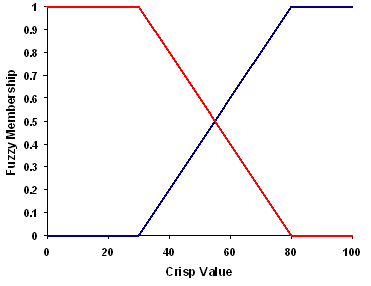
Syntaxe
FuzzyLinear(minimum, maximum)
| Nom | Explication | Type de données |
|---|---|---|
|
minimum |
The value that will have a membership of 0. If the The default value is minimum of the input. |
Double |
|
maximum |
The value that will have a membership of 1. If the The default value is maximum of the input. |
Double |
Propriétés
| Nom | Explication | Type de données |
|---|---|---|
|
minimum (Lecture et écriture) |
The value that will have a membership of 0. If the |
Double |
|
maximum (Lecture et écriture) |
The value that will have a membership of 1. If the |
Double |
Exemple de code
Demonstrates how to create a FuzzyLinear class and use it in the FuzzyMembership tool within the Python window.
import arcpy
from arcpy.sa import *
from arcpy import env
env.workspace = "c:/sapyexamples/data"
outFzyMember = FuzzyMembership("as_std", FuzzyLinear(12, 16))
outFzyMember.save("c:/sapyexamples/fzyline")
Performs a FuzzyMembership using the FuzzyLinear class.
# Name: FuzzyLinear_Ex_02.py
# Description: Scales input raster data into values ranging from zero to one
#     indicating the strength of a membership in a set.
# Requirements: Spatial Analyst extension

# Import system modules
import arcpy
from arcpy import env
from arcpy.sa import *

# Set environment settings
env.workspace = "C:/sapyexamples/data"

# Set local variables
inRaster = "as_std"

# Create the FuzzyLinear algorithm object
min = 19
max = 22
myFuzzyAlgorithm = FuzzyLinear(min, max)

# Run FuzzyMembership
outFuzzyMember = FuzzyMembership(inRaster, myFuzzyAlgorithm)

# Save the output
outFuzzyMember.save("c:/sapyexamples/fzyline2")