統計サマリー (解析ツール)
サマリー
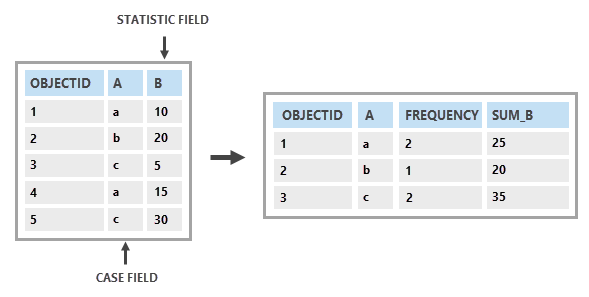
テーブル内のフィールドの統計サマリーを求めます。
図
使用法
出力は、統計演算の結果を含むフィールドで構成されます。
このツールで実行できる統計演算は、合計、平均、最小、最大、範囲、標準偏差、個数、最初、最後、中央値、分散、一意の値、連結、および最頻値です。
ケース フィールド パラメーターが指定されている場合、統計は一意のフィールド値別に計算されます。 そのため、出力テーブルには、フィールド値のセットごとに 1 レコードが含まれます。 ケース フィールド パラメーターが指定されていない場合、すべての入力レコードについて統計が計算されます。 そのため、出力テーブルには 1 レコードが含まれます。
出力の
Frequencyフィールドは、一意のフィールド値で表されるすべての入力レコードの個数です。 ケース フィールド パラメーターが指定されていない場合、すべての入力レコードの個数になります。統計タイプごとに、次の命名規則を使用してフィールドが作成されます:
SUM_<field>、MEAN_<field>、MIN_<field>、MAX_<field>、RANGE_<field>、STD_<field>、COUNT_<field>、FIRST_<field>、LAST_<field>、MEDIAN_<field>、VARIANCE_<field>、UNIQUE_<field>、CONCATENATE_<field>、DBMS_SUM_<field>、DBMS_MEAN_<field>、DBMS_MIN_<field>、DBMS_MAX_<field>、DBMS_STD_<field>、DBMS_COUNT_<field>、DBMS_MEDIAN_<field>、およびDBMS_VARIANCE_<field>(<field> は統計を計算する入力フィールドの名前)。 出力テーブルが dBASE である場合、フィールド名は 10 文字に切詰められます。DBMS 統計タイプを使用し、クライアント上ではなく、データベースまたはサービスで統計を直接処理します。 DBMS 統計タイプは、エンタープライズ ジオデータベース、フィーチャ サービス、クラウド データ ウェアハウス、GeoPackage、および SQLite ジオデータベースなどの入力ジオデータベース データ ソースに対してのみサポートされます。
DBMS 統計タイプは dBASE 出力をサポートしていません。
すべての統計計算から NULL 値が除外されます。 たとえば、6、4、および NULL 値の平均は 5 ((6+4)/2) です。
レイヤーを使用する場合、統計の計算には現在選択されているフィーチャだけが使用されます。
パラメーター
| ラベル | 説明 | データ タイプ |
|---|---|---|
|
入力テーブル |
統計の計算に使用するフィールドを含む入力テーブル。 |
Table View; Raster Layer |
|
出力テーブル |
計算された統計を格納する出力テーブル。 |
Table |
|
統計フィールド |
指定した統計を計算するために使用される属性値を含むフィールド (複数可) を指定します。 複数の統計とフィールドの組み合わせを指定できます。 NULL 値はすべての計算から除外されます。 数値属性フィールドは、任意の統計を使用して集計されます。 テキスト属性フィールドは、最小、最大、個数、最初、最後、一意の値、連結、およびモード統計を使用して集計されます。 Date、Date only、Timestamp offset 属性フィールドは、平均、最小、最大、個数、最初、最後、一意の値、連結の統計を使用して計算されます。 DBMS 統計タイプは、エンタープライズ ジオデータベース、フィーチャ サービス、クラウド データ ウェアハウス、SQLite ジオデータベースなどの入力ジオデータベース データ ソースに対してのみサポートされます。 値テーブル列:
|
Value Table |
|
ケース フィールド (オプション) |
一意の属性値 (または、複数フィールドが指定された場合には属性値の組み合わせ) ごとに、統計を個別に計算するために使用される、入力のフィールド (1 つまたは複数)。 |
Field |
|
連結区切り文字 (オプション) |
連結 オプションを 統計フィールド パラメーターに使用した場合に、値の連結に使用する文字。 デフォルトでは、ツールは区切り文字なしで値を連結します。 |
String |
環境
出力データのコンフィグレーション キーワード, 現在のワークスペース, スクラッチ ワークスペース, タイム ゾーン
特殊なケース
- タイム ゾーン
-
The mean statistic type on a Timestamp offset field will use the timezone offset from this environment.
ライセンス情報
- Basic: はい
- Standard: はい
- Advanced: はい