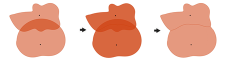
Center Line—Overlap will be removed by creating a border that evenly distributes the overlapping area between polygons. This is the simplest method. This is the default.
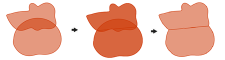
Thiessen—Overlap will be removed using straight lines to divide the area of intersection. This method uses a series of geometric functions to create nonoverlapping trade areas.
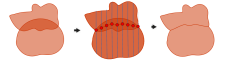
Grid—Overlap will be removed by creating a grid of parallel lines used to define a natural division between polygons.
String
結合する属性
(オプション)
入力レイヤーから出力に転送する属性を指定します。
All attributes—All attributes from the input features will be transferred to the output feature class. This is the default.
All attributes except feature IDs—All attributes from the input features, except the FID field, will be transferred to the output feature class.
Only feature IDs—Only the FID field from the input features will be transferred to the output feature class.
CENTER_LINE—Overlap will be removed by creating a border that evenly distributes the overlapping area between polygons. This is the simplest method. This is the default.
THIESSEN—Overlap will be removed using straight lines to divide the area of intersection. This method uses a series of geometric functions to create nonoverlapping trade areas.
GRID—Overlap will be removed by creating a grid of parallel lines used to define a natural division between polygons.
String
join_attributes
(オプション)
入力レイヤーから出力に転送する属性を指定します。
ALL—All attributes from the input features will be transferred to the output feature class. This is the default.
NO_FID—All attributes from the input features, except the FID field, will be transferred to the output feature class.
ONLY_FID—Only the FID field from the input features will be transferred to the output feature class.