フィールド統計 → テーブル (データ管理ツール)

サマリー

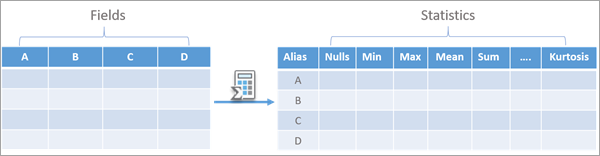
テーブルまたはフィーチャクラスにある 1 つ以上の入力フィールドの説明的な統計のテーブルを作成します。

使用法

  • このツールはフィーチャクラスまたはスタンドアロン テーブルを入力として受け付けます。

  • 入力フィールド パラメーターでは、統計を計算できる複数のフィールドを指定できます。 このパラメーターは数値 (Short、Long、Big Integer、Float、Double のいずれかのタイプ)、テキスト、日付 (Date、Date Only、Time Only、Timestamp Offset) の各タイプ フィールドを受け付けます。

  • 入力フィールド パラメーターで指定してフィールドの順番が出力テーブルの行の順番になります。

  • 指定したフィールドの各個別値について、入力フィールド統計を個別に計算するために フィールドでグループ化 パラメーターが使用されます。 各入力フィールドの統計が計算され、グループの個別値ごとにフィールド別に 1 回報告されます。

  • 出力テーブル パラメーターの フィールド タイプ 列には次の 4 つのオプションがあります。

    • すべて—フィールド タイプに関係なく、すべての入力フィールドと出力統計が 1 つの出力テーブルにエクスポートされます。

    • 数値—数値タイプ入力フィールド (Short、Long、Float、Big Integer、Double) だけがエクスポートされ、数値フィールド タイプに適用できる統計だけが出力テーブルにエクスポートされます。

    • テキスト—Text タイプ入力フィールドだけがエクスポートされ、Text フィールド タイプに適用できる統計だけが出力テーブルにエクスポートされます。

    • 日付—日付タイプ入力フィールド (Date、Date Only、Time Only、Timestamp Offset) だけがエクスポートされ、日付フィールド タイプに適用できる統計だけが出力テーブルにエクスポートされます。

    各出力テーブルでは、出力テーブル パラメーターの 出力名 列でテーブルの名前が指定され、出力場所 パラメーターで指定したワークスペースにテーブルが保存されます。

  • 出力統計とフィールド名は 出力統計 パラメーターを使用して構成できます。 このパラメーターに値を指定しなかった場合、適用可能なすべての出力統計が出力テーブルに含まれます。 以下のテーブルは、出力テーブル パラメーターの フィールド タイプ 列の各オプションで利用できる統計と対応する出力フィールド タイプをまとめたものです。

    出力統計

    すべて

    数値

    テキスト

    日付

    フィールド名

    Text

    Text

    Text

    Text

    エイリアス

    Text

    Text

    Text

    Text

    フィールド タイプ

    Text

    Text

    Text

    Text

    Null

    Long

    Long

    Long

    Long

    最小

    Text

    Double

    -

    Date

    最大

    Text

    Double

    -

    Date

    平均

    Text

    Double

    -

    Date

    標準偏差

    Double

    Double

    -

    -

    中央値

    Text

    Double

    -

    Date

    個数

    Long

    Long

    Long

    Long

    個別値の数

    Long

    Long

    Long

    Long

    最頻値

    Text

    Double

    Text

    Date

    最少頻値

    Text

    Double

    Text

    Date

    外れ値

    Long

    Long

    -

    -

    合計

    Double

    Double

    -

    -

    範囲

    Text

    Double

    -

    Text

    四分位範囲

    Double

    Double

    -

    -

    第一四分位

    Text

    Double

    -

    Date

    第三四分位

    Text

    Double

    -

    Date

    変動係数

    Double

    Double

    -

    -

    歪度

    Double

    Double

    -

    -

    尖度

    Double

    Double

    -

    -

  • 利用可能な統計は、データ エンジニアリング ビューで利用できるものと同じです。 各統計の計算方法の詳細については、統計の操作をご参照ください。

  • 出力テーブル パラメーターの フィールド タイプ 列で すべて を選択した場合、すべてのフィールド タイプが 1 つのテーブルにエクスポートされます。 すべての入力フィールドと統計を一度で可視化する場合にこれが便利です。 これによって一部の用途でメリットがもたらされます。たとえば、レイアウトやレポートで統計を使用する場合などが挙げられます。 ただし、1 つのテーブルとしてさまざまなフィールド タイプをエクスポートする際には注意点があります。 最頻値最少頻値最小最大 など、複数のフィールド タイプに共通する一部の統計オプションは、出力テーブルでテキスト フィールドとして保存されます。 これにより、統計列でのこれらの値の並べ替えやモデルでの出力統計の変更などで問題が発生する場合があります。 また、一部の統計はテキスト フィールドまたは日付フィールドに適用されないため、テーブルに空のセルが発生します。

  • 出力テーブル パラメーターの フィールド タイプ 列で 数値テキスト、または 日付 を選択した場合、各フィールド タイプがそれぞれ別のテーブルにエクスポートされ、出力テーブルにはそのフィールド タイプに適用可能な統計だけが含まれます。 複数のフィールド タイプに適用される一部の統計は、入力フィールド タイプと一致する形式で保存されます。 たとえば、数値テーブルでは 最小 フィールドのタイプが Double になり、日付テーブルではタイプが Date になります。 さまざまな出力テーブルを用意しておくことをおすすめします。 たとえば、入力フィールドと同じタイプとして統計を保存するには、出力テーブルで統計を並べ替えるか、モデルでこれらの値を使用します。

  • 同数の値が複数ある場合、出力統計 パラメーターの 統計 列の 最頻値最少頻値 オプションを入力フィールドの複数の値に関連付けることができます。 このような場合、数値、テキスト、日付の各出力テーブルでは複数の値が <Null> として報告されます。 すべて オプションの場合、出力セルにはテキスト「複数の値」が含まれます。

パラメーター

ラベル 説明 データ タイプ

入力テーブル

統計テーブルの作成に使用するフィールドを含む入力テーブル。

Table View

入力フィールド

統計の計算に使用する値を含むフィールド。

Field

出力場所

出力テーブルを作成する場所。 場所にはジオデータベース、フォルダー、またはフィーチャ データセットを指定できます。

Workspace

出力テーブル

統計を含む出力テーブル。 フィールド タイプ 列では各出力テーブルに含めるフィールド タイプを指定し、各出力テーブルの名前は 出力名 列で指定します。 たとえば、すべてのフィールド タイプのサマリーを含む 1 つのテーブルを作成したり、数値、テキスト、日付の各フィールド タイプごとにテーブルを作成したりできます。

値テーブル列:

  • Field TypesSpecifies the field types that will be included in each output table.

    • NumericA table summarizing numeric fields of the input (Short, Long, Float, and Double types) will be created.

    • TextA table summarizing text fields of the input (Text type) will be created.

    • DateA table summarizing date fields of the input (Date type) will be created.

    • AllA table summarizing all numeric, text, and date fields of the input will be created.

  • Output NameThe name of each output table.

Value Table

フィールドでグループ化

(オプション)

行をカテゴリーにグループ化するのに使用するフィールド。 フィールドでグループ化を指定した場合、フィールドでグループ化の個別地ごとに、入力の各フィールドが出力テーブルに行として 1 回表示されます。

Field

出力統計

(オプション)

サマリー処理される統計、および統計を含む出力フィールドの名前を指定します。 統計は 統計 列で指定し、出力フィールドの名前は 出力フィールド名 列で指定します。 値を指定しなかった場合、適用可能なすべての統計がすべての入力フィールドに対して計算されます。

入力フィールドに適用可能な統計だけが利用できます。

値テーブル列:

  • StatisticSpecifies the statistic type that will be used.

    • Field nameThe name of the field.

    • AliasThe alias of the field.

    • Field typeThe field type of the field (Short, Long, Double, Float, Text, or Date).

    • NullsThe number of records containing null values in the field.

    • MinimumThe smallest value in the field.

    • MaximumThe largest value in the field.

    • MeanThe mean (sum divided by total count) of all values in the field. To calculate the mean date for date fields, each date is converted to a number by calculating the difference between the date and a reference date (for example, 1900-01-01), calculated in milliseconds.

    • Standard deviationThe standard deviation of the values in the field. It is calculated as the square root of the variance, in which the variance is the average squared difference of each value from the mean of the field.

    • MedianThe median for all values in the field. The median is the middle value in the sorted list of values. If there is an even number of values, the median is the mean of the two middle values in the distribution.

    • CountThe number of nonnull values in the field.

    • Number of unique valuesThe number of unique values in the field.

    • ModeThe most frequently occurring value in the field.

    • Least commonThe least common value in the field.

    • OutliersThe number of records with outlier values in the field. Outliers are values that are more than 1.5 times the interquartile range above the third quartile or below the first quartile of the values of the field.

    • SumThe sum of all values in the field.

    • RangeThe difference between the largest and smallest values in the field.

    • Interquartile rangeThe range between the first quartile and the third quartile of the values in the field. This represents the range of the middle half of the data.

    • First quartileThe value of the first quartile of the field. Quartiles divide the sorted list of values into four groups containing equal numbers of values. The first quartile is the upper limit of the first group in ascending order.

    • Third quartileThe value of the third quartile of the field. Quartiles divide the sorted list of values into four groups containing equal numbers of values. The third quartile is the upper limit of the third group in ascending order.

    • Coefficient of variationThe coefficient of variation of the values in the field. The coefficient of variation is a measure of the relative spread of the values. It is calculated as the standard deviation divided by the mean of the field.

    • SkewnessThe skewness of the values in the field. Skewness measures the symmetry of the distribution. The skewness is calculated as the third moment (the average of the cubed data values) divided by the cubed standard deviation.

    • KurtosisThe kurtosis of the values in the field. Kurtosis describes the heaviness of the tails of a distribution compared to the normal distribution, helping identify the frequency of extreme values. The kurtosis is calculated as the fourth moment (the average of the data values taken to the fourth power) divided by the fourth power of the standard deviation.

  • Output Field NameThe name of the output field

Value Table

派生した出力

ラベル 説明 データ タイプ

数値フィールドの出力テーブル

数値データ タイプの出力テーブル。 出力場所 パラメーターで指定したワークスペースにテーブルが保存されます。

Table

テキスト フィールドの出力テーブル

テキスト データ タイプの出力テーブル。 出力場所 パラメーターで指定したワークスペースにテーブルが保存されます。

Table

日付フィールドの出力テーブル

日付データ タイプの出力テーブル。 出力場所 パラメーターで指定したワークスペースにテーブルが保存されます。

Table

すべてのフィールドの出力テーブル

すべてのデータ タイプの出力テーブル。 出力場所 パラメーターで指定したワークスペースにテーブルが保存されます。

Table

環境

このツールは、ジオプロセシング環境を一切使用しません。

ライセンス情報

  • Basic: はい
  • Standard: はい
  • Advanced: はい