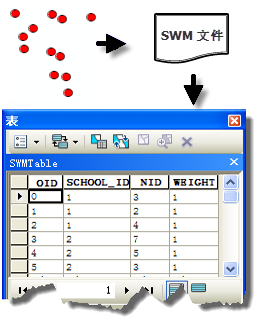
arcpy.stats.ConvertSpatialWeightsMatrixtoTable(Input_Spatial_Weights_Matrix_File, Output_Table)
|
名称
|
说明
|
数据类型
|
|
Input_Spatial_Weights_Matrix_File
|
要转换的空间权重矩阵文件 (.swm) 的完整路径名。
|
File
|
|
Output_Table
|
要创建的表的完整路径名。
|
Table
|
代码示例
ConvertSpatialWeightsMatrixtoTable 示例 1(Python 窗口)
以下 Python 窗口脚本演示了如何使用 ConvertSpatialWeightsMatrixtoTable 函数。
import arcpy
arcpy.env.workspace = "c:/data"
arcpy.stats.ConvertSpatialWeightsMatrixtoTable(
    "euclidean6Neighs.swm", "euclidean6Neighs.dbf")
ConvertSpatialWeightsMatrixtoTable 示例 2(独立脚本)
以下独立 Python 脚本演示了如何使用 ConvertSpatialWeightsMatrixtoTable 函数。
# Create a Spatial Weights Matrix based on Network Data.

# Import system modules.
import arcpy

# Set property to overwrite existing output.
arcpy.env.overwriteOutput = True

# Local variables...
workspace = r"C:\Data\USCounties\US"

# Set the current workspace (to avoid having to specify the full path to the
# feature classes each time).
arcpy.env.workspace = workspace

# Create Spatial Weights Matrix.
# Process: Generate Spatial Weights Matrix...
swm = arcpy.stats.GenerateSpatialWeightsMatrix(
    "USCounties.shp", "MYID", "euclidean6Neighs.swm", "K_NEAREST_NEIGHBORS",
    "#", "#", "#", 6)

# Dump Spatial Weights to Database Table.
# Process: Convert Spatial Weights Matrix to Table...
dbf = arcpy.stats.ConvertSpatialWeightsMatrixtoTable(
    "euclidean6Neighs.swm", "euclidean6Neighs.dbf")

# Now you can edit the spatial weights (add, subtract and alter
# neighbors and weights).

# Read weights from table back into Spatial Weights Matrix format.
# Process: Generate Spatial Weights Matrix...
swm = arcpy.stats.GenerateSpatialWeightsMatrix(
    "USCounties.shp", "MYID", "euclidean6Neighs.swm", "CONVERT_TABLE", "#",
    "#", "#", "#", "#", "#", "euclidean6Neighs.dbf")