Headings
Clear and descriptive headings provide organization and hierarchy when structuring content into sections.
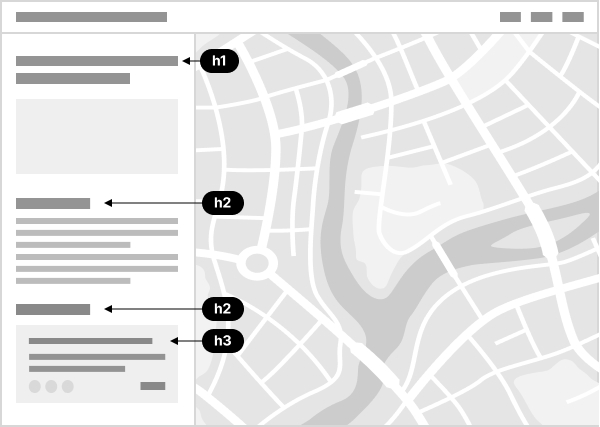
Headings make content easier to scan visually, and they also act as a table of contents for individuals navigating with screen readers. It is for this reason that headings should never be used decoratively to achieve a larger font size.
The standard heading levels understood by screen readers are 1–6.
There should be at least one <h1> heading on a page that introduces the topic. Generally, the page title should be an <h1> with subsequent headings using lower levels to represent nested content. In single page applications, the application name will often be the <h1>. But if the application has multiple pages, the <h1> should represent the page titles, not the application name. In modal dialogs, it is best to use an <h1> or <h2>, as this content acts like a new page, even if it is opened within the context of another page.
While it is a best practice to not skip heading levels, this is not always possible in dynamically generated applications, especially those with configurable layouts.
Related criteria
The Web Content Accessibility Guidelines tied to this topic are as follows: