HfInverseLinear
Summary
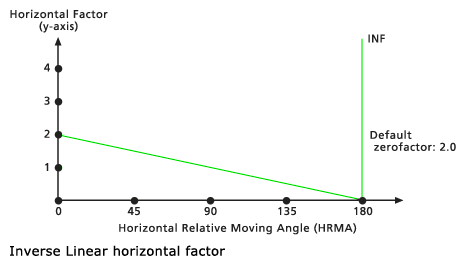
Defines the relationship between the horizontal cost factor and the horizontal relative moving angle through an inverse linear function. The function specifies that the horizontal factor is an inverse linear function of the horizontal relative moving angle.
Discussion
This object is used in the Distance Accumulation and Distance Allocation Spatial Analyst tools, as well as the Path Distance, Path Distance Allocation, and Path Distance Back Link Legacy Distance tools.
The horizontal factors (HF) are determined by the inverse values from a straight line in the horizontal relative moving angle (HRMA)-HF coordinate system. The line intercepts the y-axis, equitable to the HF factor, at the value associated with the zeroFactor. The slope of the line can be specified with the slope modifier. If no slope is identified, the default is -2/180 or -1/90 (specified as -0.01111).
Syntax
HfInverseLinear({zeroFactor}, {cutAngle}, {slope})
| Name | Explanation | Data type |
|---|---|---|
|
zeroFactor (Optional) |
The The default value is 2.0. |
Double |
|
cutAngle (Optional) |
The The default value is 180.0. |
Double |
|
slope (Optional) |
Identifies the slope of the straight line in the HRMA-HF coordinate system. Slope is specified as the rise over the run. For example, a 30-degree slope is 1/30, specified as 0.03333 (rise/run: 1 HF on the y axis / 30 degrees on the x axis). The default value is -0.011111. |
Double |
Properties
| Name | Explanation | Data type |
|---|---|---|
|
zeroFactor (Read and Write) |
The |
Double |
|
cutAngle (Read and Write) |
The |
Double |
|
slope (Read and Write) |
Identifies the slope of the straight line in the HRMA-HF coordinate system. Slope is specified as the rise over the run. For example, a 30-degree slope is 1/30, specified as 0.03333 (rise/run: 1 HF on the y axis / 30 degrees on the x axis). |
Double |
Code sample
Demonstrates how to create an HfInverseLinear class and use it in the DistanceAccumulation tool within the Python window.
import arcpy
from arcpy import env
from arcpy.sa import *
env.workspace = "C:/sapyexamples/data"
myHorizFactor = HfInverseLinear(2.0, 181.0, -0.01111)
outPathDist = PathDistance("source.shp", "costraster", "", "", myHorizFactor)
outPathDist.save("C:/sapyexamples/output/pathdisthfil")

import arcpy
from arcpy import env
from arcpy.sa import *
env.workspace = "C:/sapyexamples/data"
myHorizFactor = HfInverseLinear(2.0, 181.0, -0.01111)
outDistAccum = DistanceAccumulation("source.shp", "barrier.tif",
                                    "elev.tif", "", "", "",
                                    "horizontalRas.tif", myHorizFactor)
outDistAccum.save("C:/sapyexamples/output/distaccumhfil")
Performs a distance accumulationanalysis using theHfInverseLinear` class.
# Name: HfInverseLinear_Ex_02.py
# Description: Uses the HfInverseLinear object to run the
#              DistanceAccumulation tool.
# Requirements: Spatial Analyst extension

# Import system modules
import arcpy
from arcpy import env
from arcpy.sa import *

# Set environment settings
env.workspace = "C:/sapyexamples/data"

# Set local variables
inSourceData = "sourcepts.shp"
inSurfaceRaster = "elevation.tif"
inHorizontalRaster = "horizontalRas.tif"

# Create the HfInverseLinear Object
zeroFactor = 2.0
cutAngle = 181.0
slope = -0.01111
myHorizFactor = HfInverseLinear(zeroFactor, cutAngle, slope)

# Run PathDistance
outDistAccum = DistanceAccumulation(inSourceData,"", inSurfaceRaster,"","",
                                    "", inHorizontalRaster, myHorizFactor)

# Save the output
outDistAccum.save("C:/sapyexamples/output/distaccumhfil2")