ArcGIS Pro license types
ArcGIS Pro offers the following license types:
Named User (the default license type)
Single Use
Note:
As of December 1, 2025, it is no longer possible in My Esri to convert Named User licenses to Single Use or Concurrent Use licenses, or to convert those licenses to Named User licenses.
New Single Use licenses must be obtained for ArcGIS Pro 3.7 and later versions.
Concurrent Use licenses are not valid for ArcGIS Pro 3.7. This license type was deprecated on July 1, 2025. See the Concurrent Use License Type and ArcGIS License Manager deprecation notice for more information.
Named User license
With the Named User license type, an ArcGIS Online or ArcGIS Enterprise organization administrator gives a member access to ArcGIS Pro by setting the member's user type to one of the following:
Creator—This user type provides access to ArcGIS Pro Basic.
Professional—This user type provides access to ArcGIS Pro Standard.
Professional Plus—This user type provides access to ArcGIS Pro Advanced.
Extensions can be assigned to any one of these user types as add-on licenses.
Note:
The Professional Plus user type includes several ArcGIS Pro extensions. These cannot be reassigned to other user types.
An organization member with an ArcGIS Pro license uses their ArcGIS Online or ArcGIS Enterprise account credentials to sign in to ArcGIS Pro. The member can sign in to the application on any machine on which it is installed.
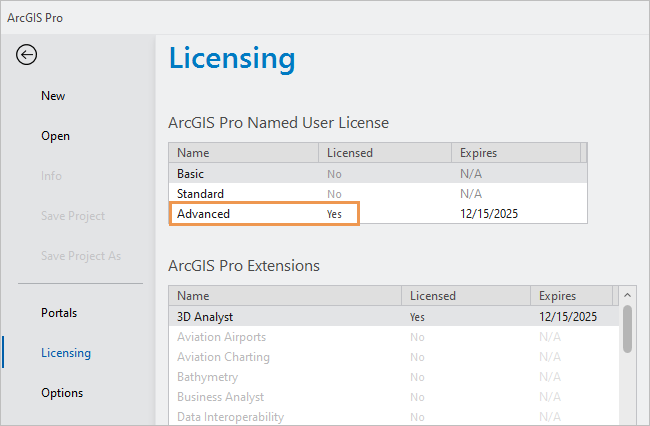
The application runs with the license level (Advanced, Standard, or Basic) associated with the member's user type. The license type, license level, and available extensions can be seen on the Licensing tab of the ArcGIS Pro settings page  .
.
Single Use license
A Single Use license authorizes one user to use ArcGIS Pro. That user can use the software on one computer at a time, while having it installed on a maximum of two computers.
A Single Use license can be transferred to a different computer by deauthorizing the license on the currently authorized machine and repeating the authorization process on the new machine.
It is not necessary to sign in to use ArcGIS Pro with a Single Use license.
Offline license use
Named User licenses can be authorized for offline use if this is allowed by your ArcGIS organization administrator or system administrator. When a license is taken offline, ArcGIS Pro is available on the computer used to check out the license. The computer does not need to connect to ArcGIS Online to run the software.
Learn more about taking a Named User license offline