Merge events
 Available with the Linear Referencing license.
ArcGIS Linear Referencing supports merging two or more adjoining linear events that are part of the same linear referencing system (LRS) event feature class to reduce fragmentation in the LRS.
Use the Merge Events tool  to combine multiple adjoining events into a target event. The tool retires all input events with the start date of the merged event.
Before using this tool to edit a feature service, you must share branch versioned linear referencing system (LRS) data as a web layer. If the feature service is not yet published, see Share as web layers.
By default, the merged event acquires its start measure from the first input event in the direction of digitization and its end measure from the last input event in the direction of digitization. You can edit the attributes of the merged event before committing to the merge.
Merge two or more events
To merge events using the Merge Events pane, complete the following steps:
Start ArcGIS Pro and open a project with LRS data in the map.
Zoom to the location where you want to merge events.
On the Linear Referencing tab, in the Event Editing group, click Merge
.The Merge Events pane appears.
Click the Event Layer drop-down list and choose the event layer that has the events you want to merge.
Select the events on the map by drawing a bounding box.
Tip:
You can select events on the map using any of the selection tools. You can also select rows in the event layer attribute table while the Merge Events pane is active to populate the Events To Merge table.
In either case, the events must belong to the same event layer specified in the Event Layer drop-down menu to populate the Events To Merge table.
The selected event's object ID is populated in the Events To Merge section in the order of route calibration.
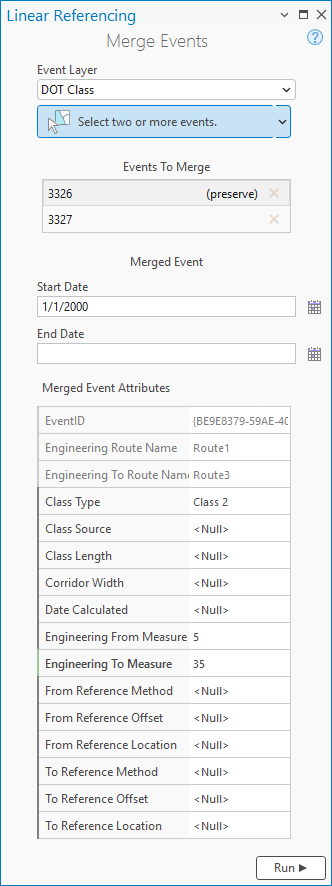
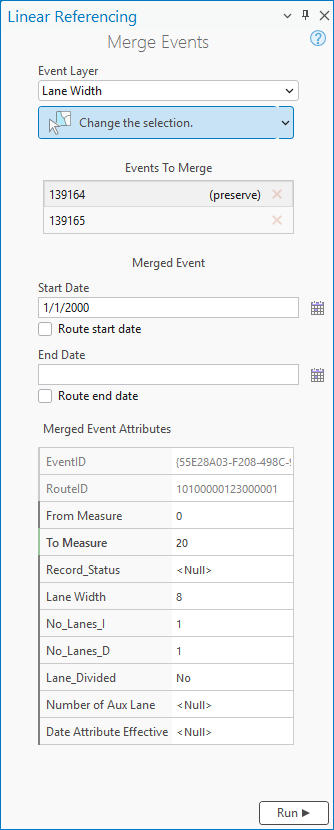
Optionally, change the start date of the merged event by doing one of the following:
Provide the start date in the Start Date text box.
Click Calendar
 and choose the start date.
Check the Route start date check box.
The default start date is the current date.
Optionally, specify the end date of the merged event by doing one of the following:
Provide the end date in the End Date text box.
Click Calendar
and choose the end date.Check the Route end date check box.
Double-click in the End Date text box to use the current date.
If you do not provide an end date, the event remains valid from the start date into the future.
Optionally, edit the attributes in the Merged Event Attributes parameter.
LRS fields such as event ID and route name are not editable.
LRS fields such as event ID and route ID are not editable.
Note:
The Merged Event Attributes section supports coded value domains, range domains, subtypes, contingent values, and attribute rules when configured for any field.
Click Run.
A confirmation message appears once the events are merged.
Event merging scenarios
The following examples demonstrate merging events into a single output event.
Events before merge
The diagram below shows three line events on a route before the merge:
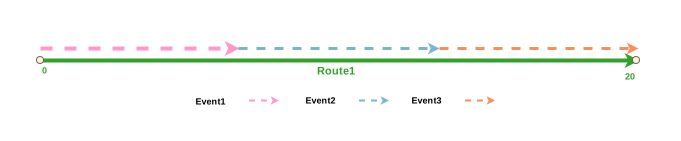
The following table details the events before the merge:
| Event ID | From Date | To Date | Route ID | From Measure | To Measure |
|---|---|---|---|---|---|
| Event1 | 1/1/2000 | <Null> | Route1 | 0 | 6 |
| Event2 | 1/1/2000 | <Null> | Route1 | 6 | 13 |
| Event3 | 1/1/2000 | <Null> | Route1 | 13 | 20 |
Events after merge
After merging, only the preserved event ID (Event1) remains. In this example, the measures of the merged event match the start measure value of Event 1 and the end measure value of Event 3. Different start and end measures can be specified for the merged event using the Merged Event Attributes section in the Merge Events pane.
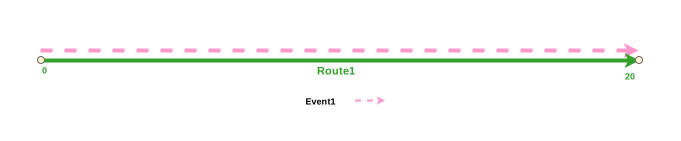
The following table details the merged event after the merge:
| Event ID | From Date | To Date | Route ID | From Measure | To Measure |
|---|---|---|---|---|---|
| Event1 | 1/1/2000 | <Null> | Route1 | 0 | 20 |
Referent offset values before event merge
If the selected events have referent offset values configured, those values are honored if the measure values are unchanged in the Merge Events pane. If the measure values are changed using the Merge Events pane, the referent offset values are disregarded and the specified measures are used.
The following diagram shows the routes before the edit:
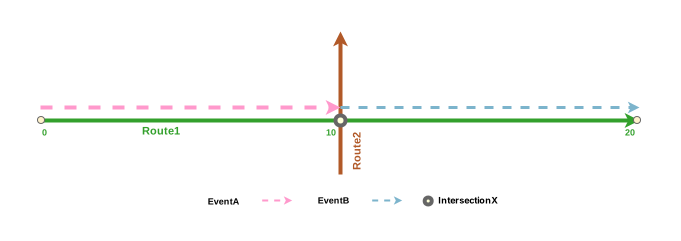
The following table details the events before the edit. In this case, the events have referent offset values configured using the Intersection offset method as the FromRefMethod and ToRefMethod values with IntersectionX set as the FromRefLocation and ToRefLocation values.
| Event ID | From Date | To Date | Route ID | From Measure | To Measure | FromRefMethod | FromRefLocation | FromRefOffset | ToRefMethod | ToRefLocation | ToRefOffset |
|---|---|---|---|---|---|---|---|---|---|---|---|
| EventA | 1/1/2000 | <Null> | Route1 | 0 | 10 | Intersection | IntersectionX | -10 | Intersection | IntersectionX | 0 |
| EventB | 1/1/2000 | <Null> | Route1 | 10 | 20 | Intersection | IntersectionX | 0 | Intersection | IntersectionX | 10 |
Referent offset values after event merge
After merging Event A and Event B, there are two possible outcomes that depend on whether the measures are changed in the Merge Events pane.
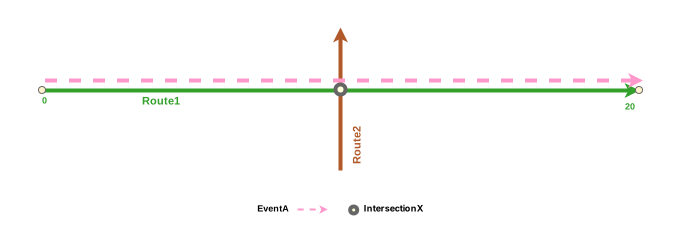
If the two events are merged using the existing measures, the output event (Event A) honors the referent offset values.
| Event ID | From Date | To Date | Route ID | From Measure | To Measure | FromRefMethod | FromRefLocation | FromRefOffset | ToRefMethod | ToRefLocation | ToRefOffset |
|---|---|---|---|---|---|---|---|---|---|---|---|
| EventA | 1/1/2000 | <Null> | Route1 | 0 | 20 | Intersection | IntersectionX | -10 | Intersection | IntersectionX | 10 |
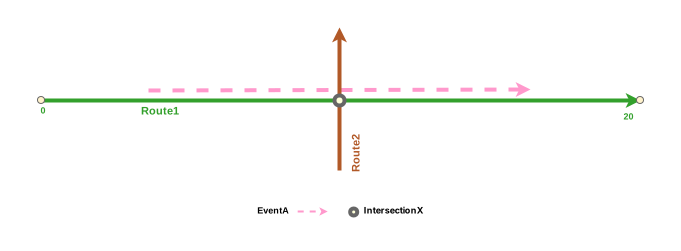
If the start measure is changed to 5 and the end measure is changed to 15 in the Merge Events pane, the specified measures are used to update the start measure and end measure of the output event.
Since Intersection X is no longer used as the referent location, the Event A measures are now based on the route measures, so the FromRefLocation and ToRefLocation values change to the LRS Network name, and the FromRefOffset and ToRefOffset values are replaced by the specified measures.
| Event ID | From Date | To Date | Route ID | From Measure | To Measure | FromRefMethod | FromRefLocation | FromRefOffset | ToRefMethod | ToRefLocation | ToRefOffset |
|---|---|---|---|---|---|---|---|---|---|---|---|
| EventA | 1/1/2000 | <Null> | Route1 | 5 | 15 | NetworkA | Route1 | 5 | NetworkA | Route1 | 15 |
Merging events with conflict prevention enabled
If conflict prevention is enabled, you can merge two or more adjoining events after acquiring locks under the following conditions:
No one has a lock on the event layer in any versions of the feature service for the route on which the events will be located.
You have an event lock on the event layer in which you're currently working.
You have a lock in the current version on the route on which the event lies.
You have a lock on the concurrent route of another network in the same version in which you're currently working.
You can merge events along the same route if other events on that route have locks acquired by different people in different versions.
You can't merge two or more adjoining events under the following conditions:
The event layer is locked by another person for the route on which the event is located.
The event layer is locked by you for the route on which the event is located but in a different version.
The route on which the event is located is locked by another person.
The route on which the event is located is locked by you but on a different version.
The concurrent route on another network is locked by you in another version or by a different person in a different version.