Time awareness in ArcGIS Linear Referencing
 Available with the Linear Referencing license.
You can view and analyze how routes, events, and intersections change over time with ArcGIS Linear Referencing. To support this functionality, all linear-referenced data includes time fields. ArcGIS Linear Referencing automatically manages and updates time fields in routes, events, and intersections feature classes as you edit routes and events.
Time in the LRS
The following example shows how features are affected when a route is edited.
Route 157A is created on 1/1/2000, so the start date is 1/1/2000 and the end date is null because it goes into the future.
The following table and diagram show the route before route realignment:
| Route Name | Route ID | From Date | To Date |
|---|---|---|---|
| Route 157A | {063E593B-0FCA-4B28-A93B-91BF1694F15A} | 1/1/2000 | <Null> |
| Route ID | From Date | To Date |
|---|---|---|
| Route 157A | 1/1/2000 | <Null> |

The route is realigned with an effective date of 5/10/2005. When route realignment is performed, two records are created: one for the original/historic route and another for the realigned/new route. This process is called time slicing.
During the realignment, the following changes occur:
The original route feature is updated with an end date of 5/10/2005.
A new route feature is created with a start date of 5/10/2005, using the same route name and route ID, with a different shape and calibration to reflect the realignment.
A new route feature is created with a start date of 5/10/2005, using the same route ID, with a different shape and calibration to reflect the realignment.
The following table provides details on the route after route realignment:
| Route Name | Route ID | From Date | To Date |
|---|---|---|---|
| Route 157A | {063E593B-0FCA-4B28-A93B-91BF1694F15A} | 1/1/2000 | 5/10/2005 |
| Route 157A | {063E593B-0FCA-4B28-A93B-91BF1694F15A} | 5/10/2005 | <Null> |
| Route ID | From Date | To Date |
|---|---|---|
| Route 157A | 1/1/2000 | 5/10/2005 |
| Route 157A | 5/10/2005 | <Null> |
The following diagram shows the route after route realignment, which has a start date of 5/10/2005:
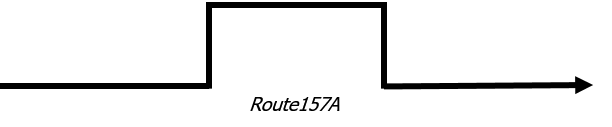
When you run the Apply Event Behaviors tool, any events on the route that are impacted by the edit would also have similar time changes applied.
Tip:
If you enable time on the layers in your project, you can use the time slider in ArcGIS Pro to view route, event, and intersection changes over time.
Time in other editing and loading scenarios
The following sections detail how time impacts editing and event loading.
Time boxed editing
There are a few other editing scenarios where time impacts the results of the edits.
If you edit a route in the past by choosing an effective date that is before the most recent end date on the route, the edit is boxed into the next end date.
In the Route 157A example above, the route realignment results in two records for Route 157A. The following table provides details on the route after route realignment:
| Route Name | Route ID | From Date | To Date |
|---|---|---|---|
| Route 157A | {063E593B-0FCA-4B28-A93B-91BF1694F15A} | 1/1/2000 | 5/10/2005 |
| Route 157A | {063E593B-0FCA-4B28-A93B-91BF1694F15A} | 5/10/2005 | <Null> |
| Route ID | From Date | To Date |
|---|---|---|
| Route 157A | 1/1/2000 | 5/10/2005 |
| Route 157A | 5/10/2005 | <Null> |
If you perform a retirement to the beginning of the route with an effective date of 3/6/2003, the route would have three time slices after the edit. The following table provides details on the route after route retirement:
| Route Name | Route ID | From Date | To Date |
|---|---|---|---|
| Route 157A | {063E593B-0FCA-4B28-A93B-91BF1694F15A} | 1/1/2000 | 3/6/2003 |
| Route 157A | {063E593B-0FCA-4B28-A93B-91BF1694F15A} | 3/6/2003 | 5/10/2005 |
| Route 157A | {063E593B-0FCA-4B28-A93B-91BF1694F15A} | 5/10/2005 | <Null> |
| Route ID | From Date | To Date |
|---|---|---|
| Route 157A | 1/1/2000 | 3/6/2003 |
| Route 157A | 3/6/2003 | 5/10/2005 |
| Route 157A | 5/10/2005 | <Null> |
The following diagram shows the original route that has a start date of 1/1/2000:
The following diagram shows the retired route that has a start date of 3/6/2003:

The following diagram shows the realigned route that has a start date of 5/10/2005:
The retirement effective on 3/6/2003 applies only until the end date (5/10/2005) of the affected record. These same time changes are applied to events and intersections on the route impacted by the edit. If you need to apply the edit to route records beyond 5/10/2005, you can perform the edit on the 5/10/2005 to <Null> record as well.
Multiple edits on the same date to the same route
Performing multiple edits with the same effective date on a route results in routes and events with the same start and end dates, which don’t have a time range where they are active. Since these records don’t exist in time, they are deleted from the geodatabase.
The following example shows how features are affected when you perform multiple route edits with same effective date on the same route.
The following diagram shows the route before route extension, which has a start date of 6/1/2010:

Route 8530B has a start date of 6/1/2010 and undergoes route extension on 9/15/2015.
The following diagram shows the route after route extension, which has a start date of 9/15/2015:

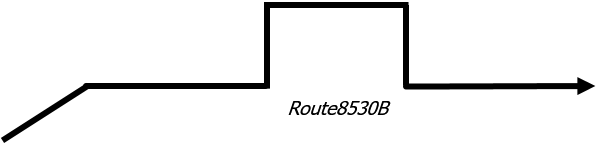
The route also undergoes route realignment on the same day (9/15/2015). After the route realignment, instead of maintaining a record for the route extension with a start date of 9/15/2015 and an end date of 9/15/2015, the record is deleted and a new record is created that reflects both the route extension and realignment.
The following table shows the route before and after the route extension and realignment:
| Route Name | Route ID | From Date | To Date |
|---|---|---|---|
| Route 8530B | {51E77E33-5CC2-4A52-A181-AA860D220323} | 6/1/2010 | 9/15/2015 |
| Route 8530B | {51E77E33-5CC2-4A52-A181-AA860D220323} | 9/15/2015 | <Null> |
| Route ID | From Date | To Date |
|---|---|---|
| Route 8530B | 6/1/2010 | 9/15/2015 |
| Route 8530B | 9/15/2015 | <Null> |
The following diagram shows the route after the route extension and realignment, which has a start date of 9/15/2015:
The effect of time when loading events
Event feature classes also have time fields. When you load event records into event feature classes, they might have different shapes compared to the underlying route’s time slices. The routes the events are located on are used to determine whether the event records need to be split by time.
The following table provides details on Route 550CH that has two different records across time:
| Route Name | Route ID | From Date | To Date |
|---|---|---|---|
| Route 550CH | {1D5C1AFA-915E-4095-9D33-71F657E17F70} | 4/15/2012 | 1/1/2016 |
| Route 550CH | {1D5C1AFA-915E-4095-9D33-71F657E17F70} | 1/1/2016 | <Null> |
| Route ID | From Date | To Date |
|---|---|---|
| Route 550CH | 4/15/2012 | 1/1/2016 |
| Route 550CH | 1/1/2016 | <Null> |
If an event on Route 550CH with a start date of 8/10/2014 and an end date of 12/31/2016 is loaded using the Append Events tool, the event gets split into two event records due to the event spanning both records for the route across time and possibly having a different shape.
The following table shows the records of the event feature class:
| Event ID | Route Name | Route ID | From Date | To Date |
|---|---|---|---|---|
| Event 1601 | Route 550CH | {1D5C1AFA-915E-4095-9D33-71F657E17F70} | 8/10/2014 | 1/1/2016 |
| Event 1601 | Route 550CH | {1D5C1AFA-915E-4095-9D33-71F657E17F70} | 1/1/2016 | 12/31/2016 |
| Event ID | Route ID | From Date | To Date |
|---|---|---|---|
| Event 1601 | Route 550CH | 8/10/2014 | 1/1/2016 |
| Event 1601 | Route 550CH | 1/1/2016 | 12/31/2016 |