Copy lines to the active record
Lines can be copied from existing line sources and added as new lines to an active parcel record. The active parcel records represents the legal document or transaction that defines the new parcels.
Lines can be copied from the parcel fabric, CAD lines, and simple feature classes. Lines are copied to the active record for the construction of new parcels.
For example, you can copy CAD lines to an active record and build parcels from closed loops.
Use the Copy Lines To tool  in the Construct group on the Parcel Record Workflows tab to copy existing lines to an active parcel record.
The Copy Lines To tool can be used multiple times to copy different selections of lines to the same active parcel record. For example, the boundary of a parcel can be copied from the parcel fabric, and the tool can be used again to copy CAD lines that split the parcel.
Note:
An active record must be set in the map to make the Copy Lines To tool available. If the record does not exist, create one.
Parcel seeds
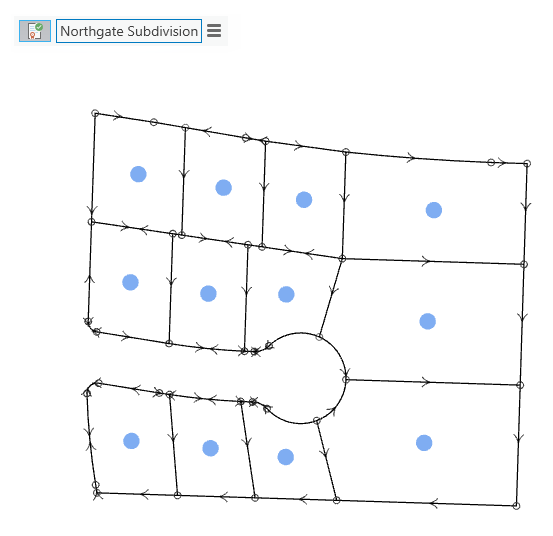
When you use the Copy Lines To tool to copy lines to the active record, parcel seeds are automatically created for closed loops.
A parcel seed is the initial state, or seed state, of a parcel. A parcel seed indicates to the build process that a parcel can be built from the lines enclosing the seed.
When copying lines from the parcel fabric, you can select a parcel to copy its boundary lines, or you can select individual parcel lines or connection lines. When you select a parcel to copy its lines, you have the option to preserve and transfer the attributes of the selected parcel to the seed that will be generated for the surrounding boundary lines.
After lines have been copied to the active record, you can add, delete, or edit the lines to construct new parcels. Parcel seeds can be copied and pasted to new closed loops, or they can be regenerated. To regenerate seeds, click Create Seeds  in the Construct group on the Parcel Record Workflows tab. Copy and paste a parcel seed if you want to preserve the attributes of the seed.
When copying lines from the parcel fabric, lines that are replaced or modified become historic.
Copy lines from selected parcels
Lines can be copied to an active parcel record from selected parcels. In this case, select the parcels and click Copy Lines To to copy the corresponding boundary lines to a parcel type and the active parcel record. Copy a parcel's corresponding lines when you want to use the parent parcel geometry to create subdivided parcels.
When you select a parcel to copy its boundary lines, you have the option to preserve and transfer the attributes of the selected parcel to the seed that will be generated for the surrounding boundary lines.
Copied boundary lines are added as new lines to the chosen parcel type and active parcel record. If lines are copied to the same parcel type, both the parcel and its corresponding lines are retired as historic when you click the Copy Lines To command. The Retired By Record field of the parcel polygon and parcel lines is populated with the GlobalID of the active record to which the lines have been copied. If any of the copied lines are not changed when new parcels are constructed and built, the Retired By Record field is cleared and the original lines are kept as current. This indicates that the original lines were not altered by the new parcel record, and they will remain current and keep their association with the parcel record that created them.
If lines are copied to a different parcel type, the original parcel and its lines remain current.
Note:
If copied lines are deleted, the lines are considered changed, and the original lines are retired as historic.
Copy individual parcel lines
Individual parcel lines in the parcel fabric can be selected and copied to an active record. Individual lines can be copied as parcel lines or as connection lines to the active parcel record.
When copying individual lines, the option to preserve parcel attributes and transfer them to parcel seeds is not available, since a parcel was not selected.
If lines are copied to the same parcel type, the selected lines are retired as historic when you click the Copy Lines To command. The Retired By Record field of the parcel lines is populated with the GlobalID of the active record to which the lines have been copied. If any of the copied lines are not changed when new parcels are constructed and built, the Retired By Record field is cleared and the original lines are kept as current. This indicates that the original lines were not altered by the new parcel record, and they will remain current and keep their association to the parcel record that created them.
If lines are copied to a different parcel type, the original lines remain current.
Note:
If copied lines are deleted, the lines are considered changed, and the original lines are retired as historic.
Copy lines to the active record
To copy lines from selected parcels or selected lines to the active record, follow these steps:
Set a parcel record as active in the map. If the record does not exist, create one.
The active record is displayed in the record's heads-up display (HUD) box in the map extent.
If you're selecting parcels to copy their boundary lines, use the Select tool
 to select the parcels. The parcels' corresponding boundary lines will be copied to the active record. If you're copying individual parcel lines, use the Select tool and selection chip
  to select parcel lines.
Click the Copy Lines To tool
in the Construct group on the Parcel Record Workflows tab.On the Copy Lines To dialog box, choose a parcel type to which to add the copied lines. If you want to copy individual lines as connection lines, choose Connection Lines.
Choose Show only active record to show only parcel features that are part of the active parcel record.
Turning off the display of parcel features that are not part of the active record is useful when editing and modifying lines to construct new parcels.
Note:
If parcels are already part of the active record, these parcels will be displayed in addition to the copied lines.
If you're selecting parcels to copy their boundary lines, choose Preserve attributes if you want to transfer the attributes of the selected parcels to the parcel seeds that will be generated for closed loops of parcel lines.
Note:
This option is only available if you selected parcels to copy their lines.
Click OK to copy the lines and add them as new lines to the active record.
Seeds will automatically be generated for closed loops of lines. If you chose to preserve attributes, parcel seeds will be populated with the selected parcels' attributes. To view the attributes of a parcel seed, select the seed and click Attributes in the Selection group on the Parcel Record Workflows tab to open the Attributes pane.
Add, delete, or edit lines to construct new parcels. Copy the existing parcel seed into new parcel loops, or click Create Seeds
in the Construct group on the Parcel Record Workflows tab to generate parcel seeds.After new parcels have been constructed and seeds have been added, click Build Active
 in the Construct group on the Parcel Record Workflows tab to build parcels in the active record.