Work with trace network properties
Properties of the trace network can be accessed from both the Contents and Catalog panes in ArcGIS Pro. When accessed from the Contents pane, the Layer Properties dialog box displays information about layer-specific properties as well as dataset properties of the trace network. Access from the Catalog pane displays the Trace Network Properties dialog box and displays only dataset properties.
Access trace network properties
The Layer Properties and Trace Network Properties dialog boxes provide access to the same dataset properties for the trace network; however, when Layer Properties is accessed from the Contents pane, additional tabs such as General, Metadata, and Source provide access to layer properties common to all map layers.
The Layer Properties dialog box is accessed from the trace network layer's context menu in the Contents pane.
Ensure the trace network is added to an active map. If the trace network layer is not present in a map, in the Catalog pane, right-click the trace network dataset
 and select Add to new map or Add to current map.
The trace network and related network classes are added to a new or existing map view.
In the Contents pane, right-click the trace network layer and select Properties.
The Layer Properties dialog box appears.
The following tabs are available on the Layer Properties dialog box:
General
Metadata
Source
Trace Network
Network Topology
Network Attributes
Network Diagrams
Note:
You can expand the dialog box by double-clicking the top menu bar.
The Trace Network Properties dialog box is accessed from the trace network dataset's context menu in the Catalog pane.
With ArcGIS Pro open, in the Catalog pane, open the geodatabase and feature dataset containing the trace network.
In the Catalog pane, right-click the trace network dataset and select Properties.
The Trace Network Properties dialog box appears.
The following tabs are available on the Layer Properties dialog box:
Trace Network
Network Topology
Network Attributes
Network Diagrams
See the next section to learn more about the information available in each of the dataset properties tabs.
Trace Network tab
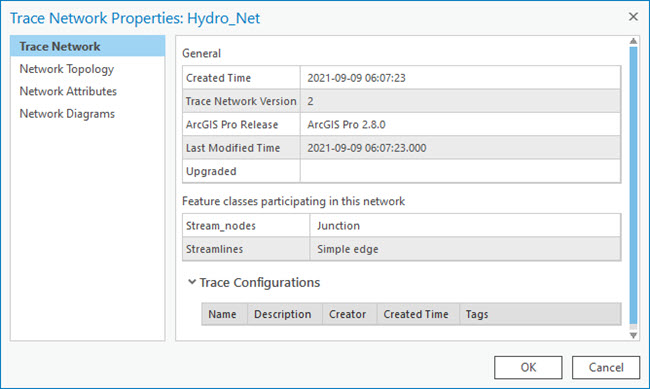
The Trace Network tab includes information about the creation time and last modified time as well as version and trace configuration information for the trace network:
Created Time
Trace Network Version
Created with ArcGIS Pro Release
Last Modified Time
Portal Trace Network Owner (see note below)
Upgraded (see note below)
Trace Configurations
- The Trace Configurations section includes the name, description, creator, created time, and tags for trace configurations created in the trace network. To learn more, see Trace configurations.
Note:
When working with an enterprise geodatabase, the portal trace network owner and upgraded properties are only available when accessed from a database connection as the database trace network owner. The portal trace network owner is helpful when performing configuration and publishing tasks.
This tab also lists the feature classes that participate in the trace network and their role.
Network Topology tab
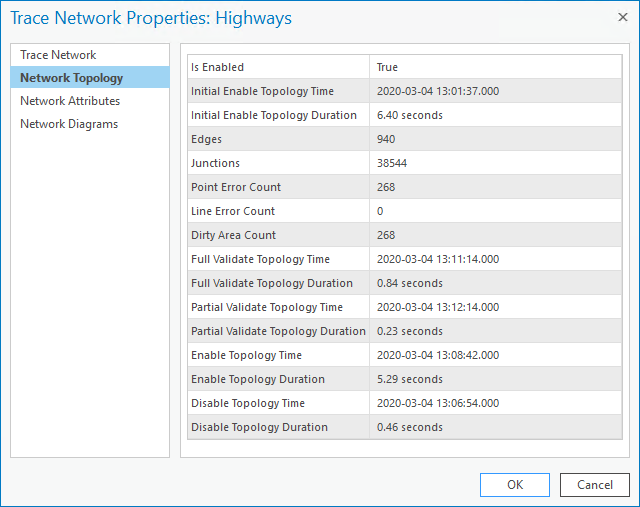
The Network Topology tab includes information about whether the network topology is enabled, the count of total edges and junctions in the network, the dirty area count, and the line and point error count. In addition, various other operations are recorded as they are completed against the trace network:
Is Enabled
Initial Enable Topology Time
Initial Enable Topology Duration
Edges
Junctions
Point Error Count
Line Error Count
Dirty Area Count
Full Validate Topology Time
Full Validate Topology Duration
Partial Validate Topology Time
Partial Validate Topology Duration
Enable Topology Time
Enable Topology Duration
Disable Topology Time
Disable Topology Duration
Network Attributes tab
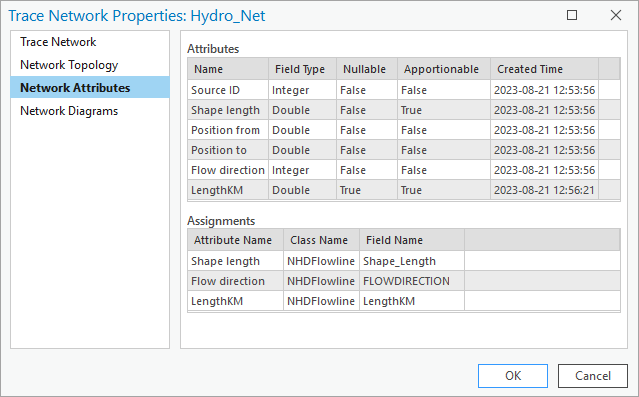
The Network Attributes tab includes the network attributes and their assignment in the trace network. As network attributes are added in the trace network, they are listed in the Attributes table:
Name
Field Type
Nullable
Apportionable
Created Time
When network attributes are assigned to a particular feature class, subtype, and field, they are populated in the Assignments table:
Attribute Name
Class Name
Field Name
Network Diagrams tab
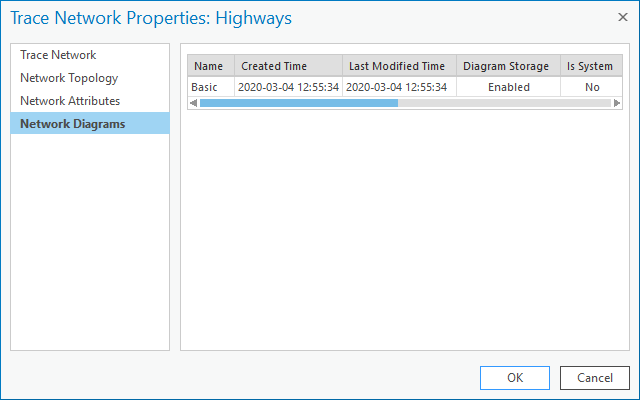
The Network Diagrams tab includes the names of existing diagram templates in the trace network. Information on the following properties for each diagram template is displayed:
Name
Created Time
Last Modified Time
Diagram Storage
Is System
Extend Diagram
Description