Control the order of operations in a SQL query
When running SQL queries, it is important to understand and manage the order in which clauses are evaluated so you can produce the results you expect.
In this scenario, imagine you are working with a global demographics database, and you want to find all the cities in China that either have at least 100,000 people or are provincial capitals.
Grouping and ungrouping clauses
In a query with multiple clauses, you can group and ungroup clauses to control the order of operations. To group two or more clauses, press the Shift key as you click the clauses to select them, and click Group Clauses  . To ungroup clauses, select a clause in a group and click Ungroup Clauses
  .
.
The two examples below are of the same query. The first example does not use clause grouping, and the returned results are not as expected. In the second example, clauses are grouped to force the correct order of operations to return the expected results.
Ungrouped clauses
When you run this ungrouped query, it first finds all cities in China, and then filters Chinese cities that have more than 100,000 people. Next, based on the Or operator, it evaluates the entire dataset to return provincial capitals. The final results are Chinese cities larger than 100,000 people and any global city that is a provincial capital, which is not the intended result. This is because the And operator has a higher precedence than the Or operator, so And is evaluated first.
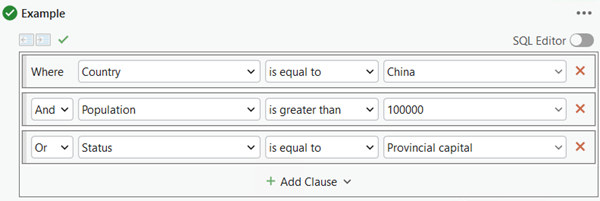
Grouped clauses
In this second example, to return the intended results, the Or operator must be evaluated first. You can group clauses to force the order of operations. The clauses in a group are evaluated before clauses outside of the group.
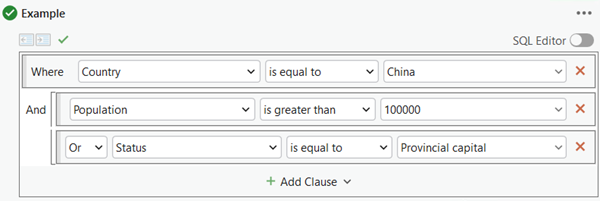
With grouping applied, the query first evaluates the clauses in the group: whether a city has at least 100,000 people or is a provincial capital. Next, it evaluates whether it is a city in China. The And operator then ensures that the query correctly returns the cities that meet both criteria: Chinese cities that have at least 100,000 people or are provincial capitals.
Grouping clauses is equivalent to enclosing them in parentheses. In SQL Editor mode, this query looks like the following:
CNTRY_NAME = 'China' And (POP > 100000 Or STATUS = 'Provincial capital')
Prioritize attribute clauses
When you are performing a query on an enterprise geodatabase feature class, the client (ArcGIS Pro) accesses the database using the SQL query, runs against the data source in the database, and returns a result. While working with the map view, you can choose whether to perform the spatial clause as part of the query run against the feature class in the database (the default) or to delay performing it in the client until after the query's attribute clauses are processed. In query edit mode, click the menu icon  and check the Prioritize attribute clauses option to apply the spatial clause in the client after the database filters the features. This can improve drawing performance.
Note:
The option is only present if the data source for the layer is an enterprise geodatabase feature class.