Coordinate system folder structure
When you work with coordinate systems in ArcGIS Pro, they are presented to you organized in a folder structure.
Favorites
The Favorites folder is where you can pin shortcuts to coordinate systems that you use often, to make them easier to access. You can also store custom coordinate systems here. Projected coordinate systems, geographic coordinate systems, and vertical coordinate systems can all be pinned here. They are stored as a simple list, with the most recently favorited coordinate system at the bottom of the list.
The Favorites folder on the Horizontal systems tab in the Available Coordinate Systems box lists favorited horizontal geographic and projected coordinate systems. When the Vertical systems tab is active, the Favorites folder shows favorited vertical coordinate systems.
Tip:
You can add a custom subfolder structure to the Favorites folder by creating those folders directly in the %LOCALAPPDATA%\ESRI\ArcGISPro\Favorites folder in a file browser.
Layers
The Layers folder lists any coordinate systems used in the map or scene. Expand a coordinate system to see the layers that are in that coordinate system. The Layers folder on the Horizontal systems tab shows horizontal coordinate systems used. The same folder on the Vertical systems tab shows any vertical coordinate systems used by layers in the map or scene.
Coordinate systems
All coordinate systems are presented in folders. The Horizontal systems tab in the Available Coordinate Systems shows folders for geographic and projected coordinate systems. The Vertical systems tab includes a folder for vertical coordinate systems. Vertical coordinate systems are organized into ellipsoidal-based and gravity-related vertical systems.
In general, all coordinate systems are further organized into geographic folders that apply to a continent or other region. Each geographic folder includes coordinate systems that apply to the entire region, as well as systems defined for the individual countries within that region. When a country or group of countries includes several coordinate systems (four or more), those systems are placed in a dedicated subfolder for that country within the appropriate geographic folder.
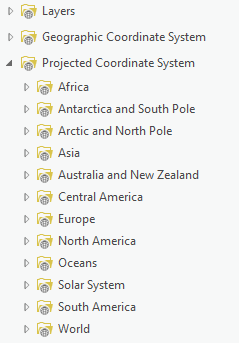
Special considerations
Zone series, such as Gauss–Krüger or UTM zones, which extend across multiple countries, are stored in a Zone Series subfolder within their geographic folder and further organized by zone series name and by their associated geographic coordinate systems.
State Plane coordinate systems and county-level systems for the United States make up a large portion of all projected coordinate systems available in ArcGIS Pro. As a result, the North America / United States folder contains additional subfolders for each state. When a state has separate county or state-specific systems, these are placed in subfolders within the state folder and organized by geographic coordinate system and linear unit.
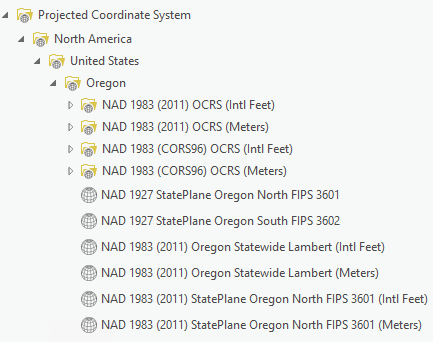
All coordinate systems specific to Hawaii and the U.S. Pacific territories are located in the Oceans / Pacific Ocean / Hawaii and US Territories folder. Coordinate systems for Puerto Rico and the U.S. Virgin Islands are located in Oceans / Caribbean Sea / Puerto Rico and US Virgin Islands folder.