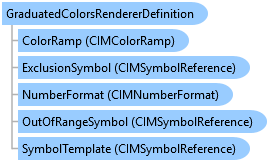
GraduatedColorsRendererDefinition Class
In This Topic
Represents graduated color renderer definition to show qualitative differences in feature values with a range of color.
Object Model
Syntax
Public Class GraduatedColorsRendererDefinition
   Inherits ClassBreaksRendererDefinition
public class GraduatedColorsRendererDefinition : ClassBreaksRendererDefinition
Remarks
GraduatedColorsRendererDefinition class allow you to define parameters to create renderers to draw features with graduated color based on the values of a quantitative attribute that is statistically grouped by a classification algorithm.
Once you define a graduated color renderer, you can call a FeatureLayer's CreateRenderer and SetRenderer methods to create and assign a renderer to a feature layer.
Once you define a graduated color renderer, you can call a FeatureLayer's CreateRenderer and SetRenderer methods to create and assign a renderer to a feature layer.
Example
Create a feature layer with class breaks renderer with defaults
{
    var featureLayerCreationParams = new FeatureLayerCreationParams(new Uri(@"c:\data\countydata.gdb\counties"))
    {
        Name = "Population Density (sq mi) Year 2010",
        RendererDefinition = new GraduatedColorsRendererDefinition("POP10_SQMI")
    };
    LayerFactory.Instance.CreateLayer<FeatureLayer>(
      featureLayerCreationParams,
      MapView.Active.Map
    );
}
Create a feature layer with class breaks renderer
{
    string colorBrewerSchemesName = "ColorBrewer Schemes (RGB)";
    StyleProjectItem colorBrewerStyle = Project.Current.GetItems<StyleProjectItem>().First(s => s.Name == colorBrewerSchemesName);
    string colorRampName = "Greens (Continuous)";
    //Note: Needs QueuedTask to run
    IList<ColorRampStyleItem> colorRampListFromTheStyle = colorBrewerStyle.SearchColorRamps(colorRampName);

    ColorRampStyleItem colorRampFound = colorRampList[0];
    GraduatedColorsRendererDefinition gcDef = new GraduatedColorsRendererDefinition()
    {
        ClassificationField = "CROP_ACR07",
        ClassificationMethod = ArcGIS.Core.CIM.ClassificationMethod.NaturalBreaks,
        BreakCount = 6,
        ColorRamp = colorRampFound.ColorRamp,
        SymbolTemplate = SymbolFactory.Instance.ConstructPolygonSymbol(
                              ColorFactory.Instance.GreenRGB, SimpleFillStyle.Solid, null).MakeSymbolReference(),
        ExclusionClause = "CROP_ACR07 = -99",
        ExclusionSymbol = SymbolFactory.Instance.ConstructPolygonSymbol(
                              ColorFactory.Instance.RedRGB, SimpleFillStyle.Solid, null).MakeSymbolReference(),
        ExclusionLabel = "No yield",
    };
    var featureLayerCreationParams = new FeatureLayerCreationParams((new Uri(@"c:\Data\CountyData.gdb\Counties")))
    {
        Name = "Crop",
        RendererDefinition = gcDef
    };
    //Note: Needs QueuedTask to run
    LayerFactory.Instance.CreateLayer<FeatureLayer>(featureLayerCreationParams, MapView.Active.Map);
}
Class Breaks renderer with graduated colors.
/// <summary> /// Renders a feature layer using graduated colors to draw quantities. ///  /// </summary> { //Check feature layer name //Code works with the USDemographics feature layer available with the ArcGIS Pro SDK Sample data var featureLayer = MapView.Active.Map.GetLayersAsFlattenedList().OfType<FeatureLayer>().FirstOrDefault(f => f.Name == "USDemographics"); if (featureLayer == null) { MessageBox.Show("This renderer works with the USDemographics feature layer available with the ArcGIS Pro SDK Sample data", "Data missing"); } GraduatedColorsRendererDefinition gcDef = new GraduatedColorsRendererDefinition() { ClassificationField = "NumericFieldInFeatureLayer", ClassificationMethod = ClassificationMethod.NaturalBreaks, BreakCount = 5, ColorRamp = colorRamp, }; //Note: Run within QueuedTask CIMClassBreaksRenderer renderer = (CIMClassBreaksRenderer)featureLayer.CreateRenderer(gcDef); featureLayer?.SetRenderer(renderer); }
Class Breaks renderer with graduated colors and outline
/// <summary> /// Renders a feature layer using graduated colors to draw quantities. The outline width is varied based on attributes. ///  /// </summary> { //Check feature layer name //Code works with the USDemographics feature layer available with the ArcGIS Pro SDK Sample data var featureLayer = MapView.Active.Map.GetLayersAsFlattenedList().OfType<FeatureLayer>().FirstOrDefault(f => f.Name == "USDemographics"); if (featureLayer == null) { MessageBox.Show("This renderer works with the USDemographics feature layer available with the ArcGIS Pro SDK Sample data", "Data missing"); } //Gets the first numeric field of the feature layer var firstNumericFieldOfFeatureLayer = "NumericFieldInFeatureLayer"; //Gets the min and max value of the field var minMax = GetFieldMinMax(featureLayer, firstNumericFieldOfFeatureLayer); GraduatedColorsRendererDefinition gcDef = new GraduatedColorsRendererDefinition() { ClassificationField = "NumericFieldInFeatureLayer", ClassificationMethod = ClassificationMethod.NaturalBreaks, BreakCount = 5, ColorRamp = colorRamp }; CIMClassBreaksRenderer renderer = (CIMClassBreaksRenderer)featureLayer.CreateRenderer(gcDef); //Create array of CIMVisualVariables to hold the outline information. var visualVariables = new CIMVisualVariable[] { new CIMSizeVisualVariable { ValueExpressionInfo = new CIMExpressionInfo { Title = "Custom", Expression = "$feature.AREA", ReturnType = ExpressionReturnType.Default }, AuthoringInfo = new CIMVisualVariableAuthoringInfo { MinSliderValue = Convert.ToDouble(minMax.Item1), MaxSliderValue = Convert.ToDouble(minMax.Item2), ShowLegend = false, Heading = firstNumericFieldOfFeatureLayer }, VariableType = SizeVisualVariableType.Graduated, Target = "outline", MinSize = 1, MaxSize = 13, MinValue = Convert.ToDouble(minMax.Item1), MaxValue = Convert.ToDouble(minMax.Item2) }, }; renderer.VisualVariables = visualVariables; //Note: Run within QueuedTask featureLayer?.SetRenderer(renderer); }
Inheritance Hierarchy
System.Object
ArcGIS.Desktop.Mapping.LayerDrawingDefinition
ArcGIS.Desktop.Mapping.RendererDefinition
ArcGIS.Desktop.Mapping.ClassBreaksRendererDefinition
ArcGIS.Desktop.Mapping.GraduatedColorsRendererDefinition
Requirements
Target Platforms: Windows 11 Home, Pro, Enterprise (64 bit)
ArcGIS Pro version: 3.0 or higher.
See Also