Public Overloads Function ConstructPointSymbol( _
   ByVal marker As CIMMarker _
) As CIMPointSymbol
public CIMPointSymbol ConstructPointSymbol(
   CIMMarker marker
)
Parameters
- marker
- ArcGIS.Core.CIM.CIMMarker
Public Overloads Function ConstructPointSymbol( _ ByVal marker As CIMMarker _ ) As CIMPointSymbol
public CIMPointSymbol ConstructPointSymbol( CIMMarker marker )
{
    CIMMarker marker = SymbolFactory.Instance.ConstructMarker(ColorFactory.Instance.GreenRGB, 8.0, SimpleMarkerStyle.Pushpin);
    CIMPointSymbol pointSymbolFromMarker = SymbolFactory.Instance.ConstructPointSymbol(marker);
}
{
    //The following file formats can be used to create the marker: DAE, 3DS, FLT, EMF, JPG, PNG, BMP, GIF
    //Note: Run within QueuedTask.Run
    CIMMarker markerFromFile = SymbolFactory.Instance.ConstructMarkerFromFile(@"C:\Temp\fileName.dae");

    CIMPointSymbol pointSymbolFromFile = SymbolFactory.Instance.ConstructPointSymbol(markerFromFile);
}
{
    //Create a stream for the image
    //At 3.0 you need https://www.nuget.org/packages/Microsoft.Windows.Compatibility
    //System.Drawing
    System.Drawing.Image newImage = System.Drawing.Image.FromFile(@"C:\PathToImage\Image.png");
    var stream = new System.IO.MemoryStream();
    newImage.Save(stream, System.Drawing.Imaging.ImageFormat.Png);
    stream.Position = 0;
    //Create marker using the stream
    CIMMarker markerFromStream = SymbolFactory.Instance.ConstructMarkerFromStream(stream);
    //Create the point symbol from the marker
    CIMPointSymbol pointSymbolFromStream = SymbolFactory.Instance.ConstructPointSymbol(markerFromStream);
}
{
    //create marker from the Font, char index,size,color
    //Note: Needs QueuedTask to run
    var cimMarker = SymbolFactory.Instance.ConstructMarker(125, "Wingdings 3", "Regular", 6, ColorFactory.Instance.BlueRGB) as CIMCharacterMarker;
    var polygonMarker = cimMarker.Symbol;
    //modifying the polygon's outline and fill
    //This is the outline
    polygonMarker.SymbolLayers[0] = SymbolFactory.Instance.ConstructStroke(ColorFactory.Instance.GreenRGB, 2, SimpleLineStyle.Solid);
    //This is the fill
    polygonMarker.SymbolLayers[1] = SymbolFactory.Instance.ConstructSolidFill(ColorFactory.Instance.BlueRGB);
    //create a symbol from the marker
    //Note this overload of ConstructPointSymbol does not need to be run within QueuedTask.Run.
    var pointSymbol = SymbolFactory.Instance.ConstructPointSymbol(cimMarker);
}
/// <summary> /// Create a point symbol from a character in a font file /// 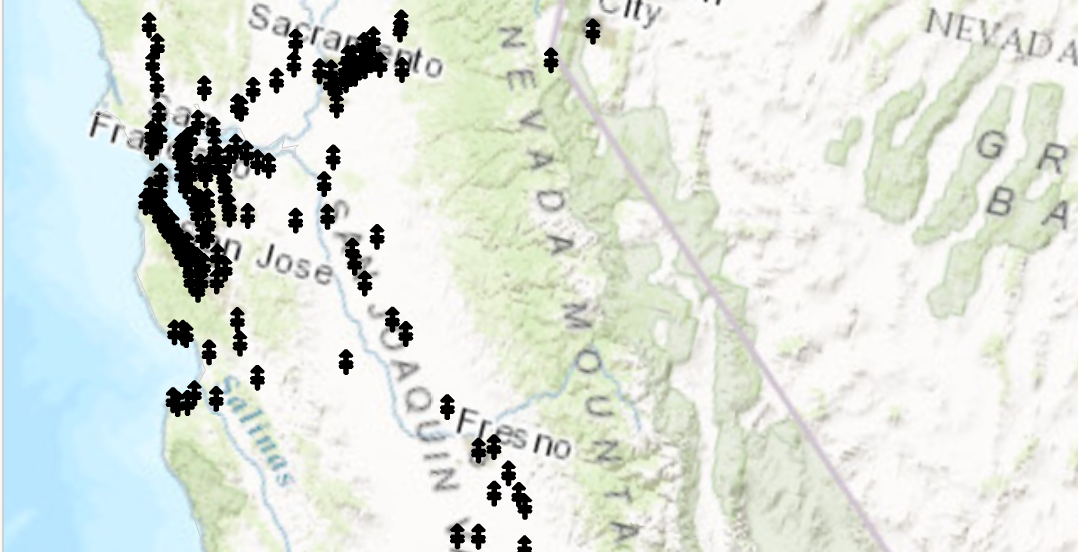 /// </summary> { //creating the marker from the Font selected //Note: Run withing QueuedTask var cimMarker = SymbolFactory.Instance.ConstructMarker(47, "Wingdings 3", "Regular", 12); CIMPointSymbol fontPointSymbol = SymbolFactory.Instance.ConstructPointSymbol(cimMarker); //To apply the symbol to a point feature layer //var renderer = pointLayer.GetRenderer() as CIMSimpleRenderer; //renderer.Symbol = fontPointSymbol.MakeSymbolReference(); //pointLayer.SetRenderer(renderer); }
Target Platforms: Windows 11 Home, Pro, Enterprise (64 bit)