Parameters
- color
- ArcGIS.Core.CIM.CIMColor
- size
- The size of the marker to construct.
| Exception | Description |
|---|---|
| ArcGIS.Core.CalledOnWrongThreadException | This method must be called within the lambda passed to QueuedTask.Run |
/// <summary> /// Renders a polygon feature layer with Dot Density symbols to represent quantities. /// 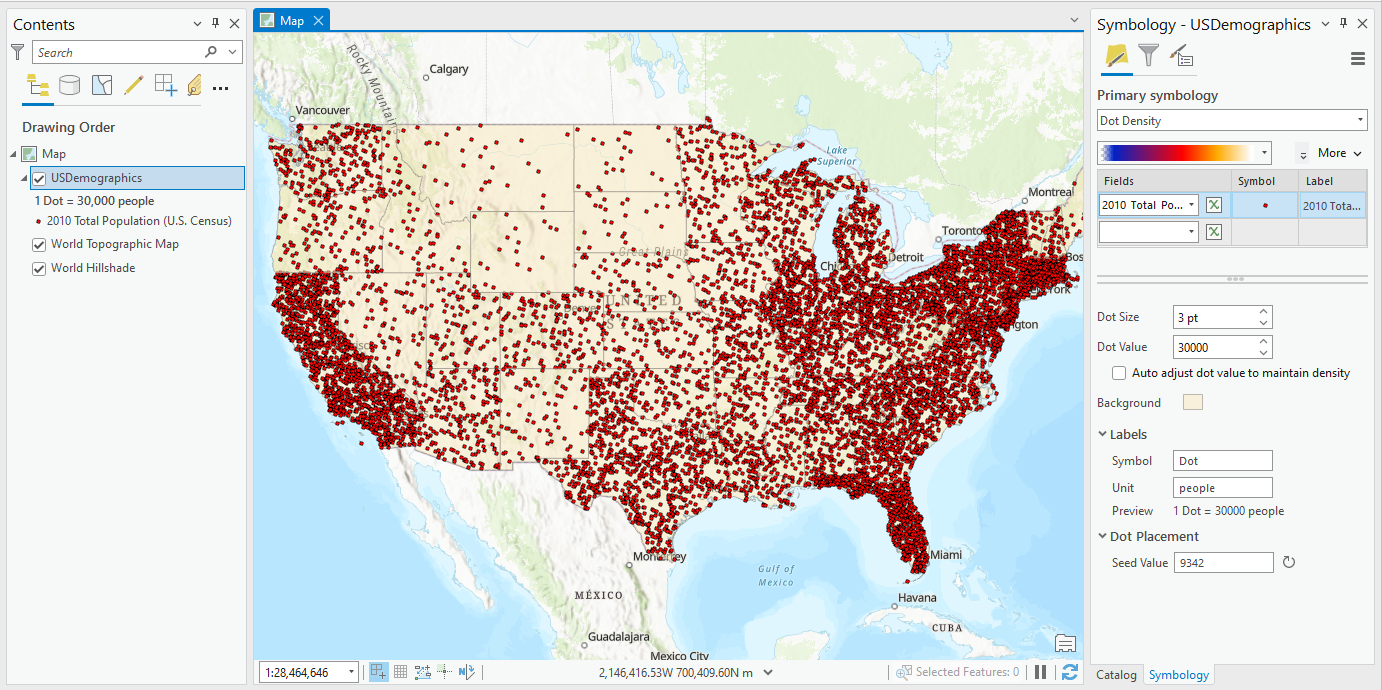 /// </summary> { //Check feature layer name //Code works with the USDemographics feature layer available with the ArcGIS Pro SDK Sample data var featureLayer = activeMap.GetLayersAsFlattenedList().OfType<FeatureLayer>().FirstOrDefault(f => f.Name == "USDemographics"); if (featureLayer == null) { MessageBox.Show("This renderer works with the USDemographics feature layer available with the ArcGIS Pro SDK Sample data", "Data missing"); } //Define size of the dot to use for the renderer int dotSize = 3; //Check if the TOTPOP10 field exists int idxField = -1; idxField = await QueuedTask.Run(() => { using var table = featureLayer.GetTable(); var def = table.GetDefinition(); return def.FindField("TOTPOP10"); }); // "TOTPOP10" field was not found if (idxField == -1) { return; } //array of fields to be represented in the renderer var valueFields = new List<string> { "TOTPOP10" }; await QueuedTask.Run(() => { //Create the DotDensityRendererDefinition object var dotDensityDef = new DotDensityRendererDefinition(valueFields, colorRamp, dotSize, 30000, "Dot", "people"); //Create the renderer using the DotDensityRendererDefinition CIMDotDensityRenderer dotDensityRndr = (CIMDotDensityRenderer)featureLayer.CreateRenderer(dotDensityDef); //if you want to customize the dot symbol for the renderer, create a "DotDensitySymbol" which is an //Amalgamation of 3 symbol layers: CIMVectorMarker, CIMSolidFill and CIMSolidStroke //Define CIMVectorMarker layer var cimMarker = SymbolFactory.Instance.ConstructMarker(ColorFactory.Instance.RedRGB, dotSize); var dotDensityMarker = cimMarker as CIMVectorMarker; //Define the placement CIMMarkerPlacementInsidePolygon markerPlacement = new CIMMarkerPlacementInsidePolygon { Randomness = 100, GridType = PlacementGridType.RandomFixedQuantity, Clipping = PlacementClip.RemoveIfCenterOutsideBoundary }; dotDensityMarker.MarkerPlacement = markerPlacement; //Define CIMSolidFill layer CIMSolidFill solidFill = new CIMSolidFill { Color = new CIMRGBColor { R = 249, G = 232, B = 189, Alpha = 50 } }; //Define CIMSolidStroke CIMSolidStroke solidStroke = new CIMSolidStroke { Color = ColorFactory.Instance.GreyRGB, Width = .5 }; //Create the amalgamated CIMPolygonSymbol that includes the 3 layers var dotDensitySymbol = new CIMPolygonSymbol { SymbolLayers = new CIMSymbolLayer[] { dotDensityMarker, solidFill, solidStroke } }; //Apply the dotDensitySymbol to the CIMDotDenstityRenderer's DotDensitySymbol property. dotDensityRndr.DotDensitySymbol = dotDensitySymbol.MakeSymbolReference(); //Apply the renderer to the polygon Feature Layer. featureLayer.SetRenderer(dotDensityRndr); }); }
Target Platforms: Windows 11 Home, Pro, Enterprise (64 bit)