ArcGIS Pro 3.8 API Reference Guide
ArcGIS.Desktop.Mapping Namespace / ISymbolFactory Interface / ConstructMarker Method / ConstructMarker(Int32,String,String,Int32) Method
The index of the character from the font.
The font family name of the character marker to construct.
The font style name (Regular, Bold, Italic, etc.) of the character marker to construct.
The size of the marker to construct.
Example

In This Topic
    ConstructMarker(Int32,String,String,Int32) Method
    In This Topic
    Constructs a character marker.
    Syntax
    Overloads Function ConstructMarker( _
       ByVal characterIndex As Integer, _
       ByVal fontFamily As String, _
       ByVal fontStyle As String, _
       ByVal size As Integer _
    ) As CIMMarker

    Parameters

    characterIndex
    The index of the character from the font.
    fontFamily
    The font family name of the character marker to construct.
    fontStyle
    The font style name (Regular, Bold, Italic, etc.) of the character marker to construct.
    size
    The size of the marker to construct.

    Return Value

    Example
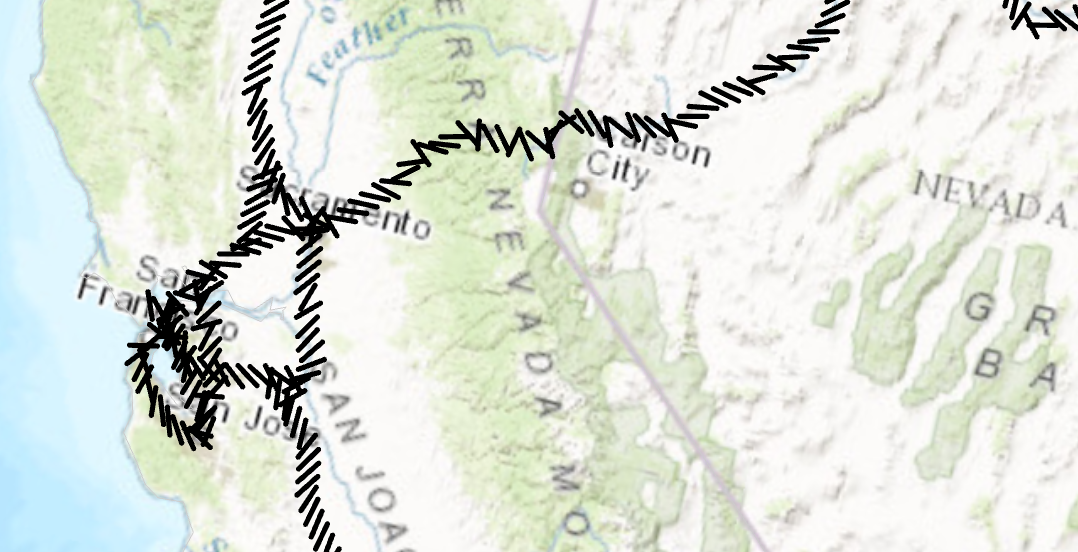
    Markers placed at a 45 degree angle
    /// <summary>
    /// Create a line symbol with the markers placed at a 45 degree angle. <br/>
    /// ![LineSymbolAngleMarker](https://ArcGIS.github.io/arcgis-pro-sdk/images/Symbology/line-marker-angle.png)
    /// </summary>
    {
      //Create a line symbol with the markers placed at a 45 degree angle.
      //Create a marker from the "|" character.  This is the marker that will be used to render the line layer.
      //Note: Run withing QueuedTask
      var lineMarker = SymbolFactory.Instance.ConstructMarker(124, "Agency FB", "Regular", 12);
    
      //Default line symbol which will be modified
      CIMLineSymbol lineSymbolWithMarkersAtAngle = SymbolFactory.Instance.ConstructLineSymbol(ColorFactory.Instance.BlackRGB, 2, SimpleLineStyle.Solid);
    
      //Modifying the marker to align with line
      //First define "markerplacement"
      CIMMarkerPlacementAlongLineSameSize markerPlacement = new CIMMarkerPlacementAlongLineSameSize()
      {
        AngleToLine = true,
        PlacementTemplate = new double[] { 5 }
      };
      //assign the markerplacement to the marker
      lineMarker.MarkerPlacement = markerPlacement;
      //angle the marker if needed
      lineMarker.Rotation = 45;
    
      //assign the marker as a layer to the line symbol
      lineSymbolWithMarkersAtAngle.SymbolLayers[0] = lineMarker;
    }
    Point Symbol from a font
    /// <summary>
    /// Create a point symbol from a character in a font file
    /// ![PointSymbolFont](https://ArcGIS.github.io/arcgis-pro-sdk/images/Symbology/point-marker.png)
    /// </summary>
    {
      //creating the marker from the Font selected
      //Note: Run withing QueuedTask
      var cimMarker = SymbolFactory.Instance.ConstructMarker(47, "Wingdings 3", "Regular", 12);
      CIMPointSymbol fontPointSymbol = SymbolFactory.Instance.ConstructPointSymbol(cimMarker);
      //To apply the symbol to a point feature layer
      //var renderer = pointLayer.GetRenderer() as CIMSimpleRenderer;
      //renderer.Symbol = fontPointSymbol.MakeSymbolReference();
      //pointLayer.SetRenderer(renderer);
    }
    Requirements

    Target Platforms: Windows 11 Home, Pro, Enterprise (64 bit)

    ArcGIS Pro version: 3.0 or higher.
    See Also