/// <summary>
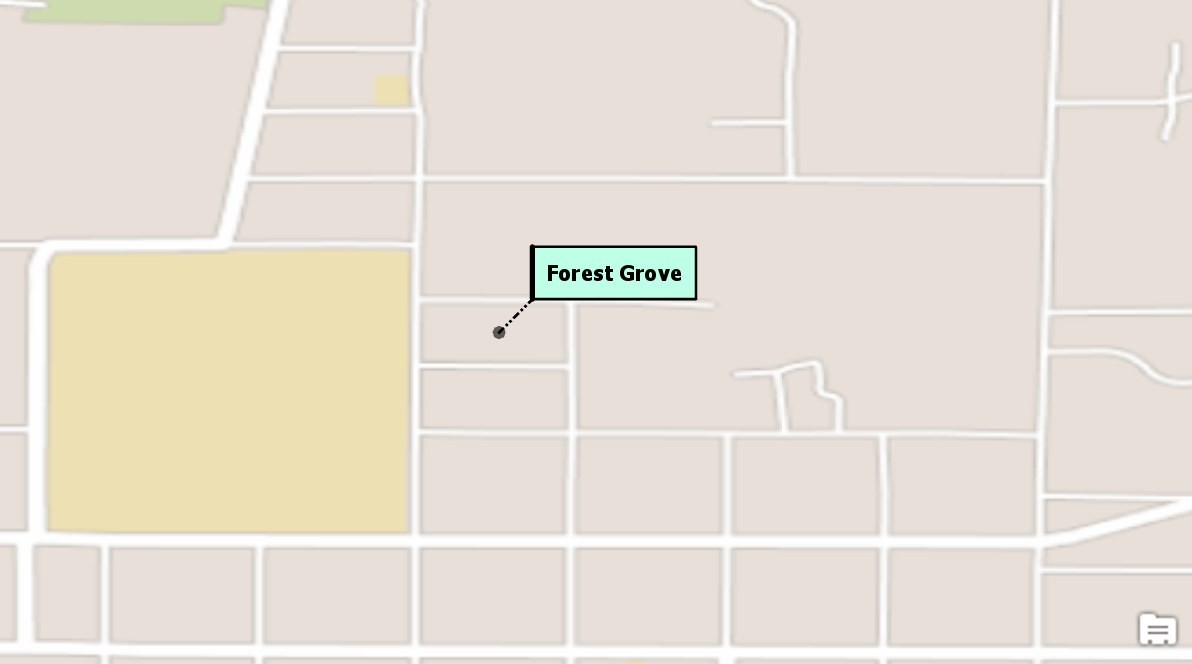
/// Creates a solid fill background text symbol with an Accent bar and leader line. The [CIMBackgroundCallout](https://doc.esri.com/en/arcgis-pro/latest/sdk/api-reference/#topic474.html) created has a solid fill aqua polygon, with a black dash-dot-dash leader line and a solid accent bar.
/// 
/// </summary>
{
await QueuedTask.Run(() =>
{
var textSymbolBackgroundCallout = SymbolFactory.Instance.ConstructTextSymbol(ColorFactory.Instance.BlackRGB, 8, "Tahoma", "Bold");
//Create a call out
var backgroundCalloutSymbol = new CIMBackgroundCallout();
//Leader line
//Get a line symbol
var lineSymbol = SymbolFactory.Instance.ConstructLineSymbol(ColorFactory.Instance.BlackRGB, 1, SimpleLineStyle.DashDotDot);
//Create a solid fill polygon symbol for the callout.
var aquaBackground = ColorFactory.Instance.CreateRGBColor(190, 255, 232, 100);
var polySymbol = SymbolFactory.Instance.ConstructPolygonSymbol(aquaBackground, SimpleFillStyle.Solid);
//assign the line to the callout
backgroundCalloutSymbol.LeaderLineSymbol = lineSymbol;
//Offset for the text
textSymbolBackgroundCallout.OffsetX = 10;
textSymbolBackgroundCallout.OffsetY = 10;
//Assign the polygon to the background callout
backgroundCalloutSymbol.BackgroundSymbol = polySymbol;
//Accent bar
var accentSymbol = SymbolFactory.Instance.ConstructLineSymbol(ColorFactory.Instance.BlackRGB, 2, SimpleLineStyle.Solid);
backgroundCalloutSymbol.AccentBarSymbol = accentSymbol;
//Set margins for the callout
backgroundCalloutSymbol.Margin = new CIMTextMargin
{
Left = 5,
Right = 5,
Top = 5,
Bottom = 5
};
//assign the callout to the textSymbol
textSymbolBackgroundCallout.Callout = backgroundCalloutSymbol;
});
//Refer to the snippet "How to apply a Text Symbol to labels of a layer" below to see how to apply this text symbol to a label class
}