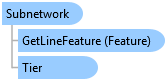
Subnetwork Class
In This Topic
Represents a subnetwork (circuit, zone) in a utility network
Object Model
Syntax
Example
Life cycle for a simple radial subnetwork with one controller
{
  // This routine demonstrates the life cycle of a simple radial subnetwork with one controller
  static void RadialNetworkLifecycle(SubnetworkManager subnetworkManager, Tier mediumVoltageTier, Element elementR1)
  {
    // Create a subnetwork named "Radial1" with a single controller
    // elementR1 represents the device that serves as the subnetwork controller (e.g., circuit breaker)
    Subnetwork subnetworkRadial1 = subnetworkManager.EnableControllerInEditOperation(mediumVoltageTier, elementR1,
      "Radial1", "R1", "my description", "my notes");

    // ...

    // Update the subnetwork and refresh the map
    subnetworkRadial1.Update();
    MapView.Active.Redraw(true);

    // ...

    // At some point, a subnetwork will need to be deleted.

    // First step is to disable the controller
    subnetworkManager.DisableControllerInEditOperation(elementR1);

    // At this point, the subnetwork is deleted, but all of the rows that have been labeled with the subnetwork ID need to be updated
    subnetworkRadial1.Update();
    MapView.Active.Redraw(true);

    // The final step is to notify external systems (if any) by exporting the subnetwork
    SubnetworkExportOptions subnetworkExportOptions = new SubnetworkExportOptions()
    {
      SetAcknowledged = true,
      IncludeDomainDescriptions = true,
      IncludeGeometry = true,
      ServiceSynchronizationType = ServiceSynchronizationType.Asynchronous,

      SubnetworkExportResultTypes = new List<SubnetworkExportResultType>()
      {
        SubnetworkExportResultType.Features
      }

      // Set networks attributes and attribute fields to export
      //ResultNetworkAttributes = new List<NetworkAttribute>(networkAttributes),

      //ResultFieldsByNetworkSourceID = new Dictionary<int, List<string>>()
      //  { { electricDevice.ID, new List<string>() { "AssetID" } } }

    };
    subnetworkRadial1.Export(new Uri($"{Path.GetTempPath()}SubnetworkExportResult.json"),
      subnetworkExportOptions);
  }
}
Life cycle for a mesh subnetwork with multiple controllers
{
  // This routine demonstrates the life cycle of a mesh subnetwork with multiple controllers
  static void MeshNetworkLifeCycle(SubnetworkManager subnetworkManager, Tier lowVoltageMeshTier,
  Element elementM1, Element elementM2, Element elementM3)
  {
    // Create a subnetwork named "Mesh1" from three controllers
    // elementM1, elementM2, and elementM3 represent the devices that serve as subnetwork controllers (e.g., network protectors)
    subnetworkManager.EnableController(lowVoltageMeshTier, elementM1, "Mesh1", "M1", "my description", "my notes");
    subnetworkManager.EnableController(lowVoltageMeshTier, elementM2, "Mesh1", "M2", "my description", "my notes");
    Subnetwork subnetworkMesh1 = subnetworkManager.EnableController(lowVoltageMeshTier, elementM3, "Mesh1", "M3",
      "my description", "my notes");
    subnetworkMesh1.Update();
    MapView.Active.Redraw(true);

    // ...

    // When deleting the subnetwork, each controller must be disabled before the subnetwork itself is deleted
    subnetworkManager.DisableControllerInEditOperation(elementM1);
    subnetworkManager.DisableControllerInEditOperation(elementM2);
    subnetworkManager.DisableControllerInEditOperation(elementM3);

    // After the subnetwork is deleted, all of the rows that have been labeled with the subnetwork ID need to be updated
    subnetworkMesh1.Update();
    MapView.Active.Redraw(true);

    // The final step is to notify external systems (if any) by exporting the subnetwork
    SubnetworkExportOptions subnetworkExportOptions = new SubnetworkExportOptions()
    {
      SetAcknowledged = true,
      IncludeDomainDescriptions = true,
      IncludeGeometry = true,
      ServiceSynchronizationType = ServiceSynchronizationType.Asynchronous,

      SubnetworkExportResultTypes = new List<SubnetworkExportResultType>()
      {
        SubnetworkExportResultType.Features
      }

      // Set networks attributes and attribute fields to export
      //ResultNetworkAttributes = new List<NetworkAttribute>(networkAttributes),

      //ResultFieldsByNetworkSourceID = new Dictionary<int, List<string>>()
      //  { { electricDevice.ID, new List<string>() { "AssetID" } } }

    };
    subnetworkMesh1.Export(new Uri($"{Path.GetTempPath()}SubnetworkExportResult.json"), subnetworkExportOptions);
  }
}
Life cycle for a multifeed radial subnetwork with two controllers
{
  // This routine demonstrates the life cycle of a multifeed radial subnetwork with two controllers
  static void MultifeedRadialLifeCycle(SubnetworkManager subnetworkManager, Tier mediumVoltageTier, Element elementR2, Element elementR3)
  {
    // Create a subnetwork named "R2, R3" from two controllers
    // elementR2 and elementR3 represent the devices that serve as subnetwork controllers (e.g., circuit breakers)
    subnetworkManager.EnableControllerInEditOperation(mediumVoltageTier, elementR2, "R2, R3", "R2",
      "my description", "my notes");
    subnetworkManager.EnableControllerInEditOperation(mediumVoltageTier, elementR3, "R2, R3", "R3",
      "my description", "my notes");

    // If the tie switch between them is opened, the original subnetwork controllers must be disabled and re-enabled with different names
    // This will create two new subnetworks, named "R2" and "R3"
    subnetworkManager.DisableControllerInEditOperation(elementR2);
    subnetworkManager.DisableControllerInEditOperation(elementR3);

    Subnetwork subnetworkR2 = subnetworkManager.EnableControllerInEditOperation(mediumVoltageTier, elementR2, "R2",
      "R2", "my description", "my notes");
    Subnetwork subnetworkR3 = subnetworkManager.EnableControllerInEditOperation(mediumVoltageTier, elementR3, "R3",
      "R3", "my description", "my notes");

    subnetworkR2.Update();
    subnetworkR3.Update();
    MapView.Active.Redraw(true);
  }
}
Inheritance Hierarchy
System.Object
ArcGIS.Core.Data.UtilityNetwork.Subnetwork
Requirements
Target Platforms: Windows 11 Home, Pro, Enterprise (64 bit)
ArcGIS Pro version: 3.0 or higher.
See Also