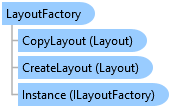
LayoutFactory Class
In This Topic
Provides methods to create new layout project items.
Object Model
Syntax
Public Class LayoutFactory
   Implements ILayoutFactory
public class LayoutFactory : ILayoutFactory
Remarks
Creating a new layout simply generates a new layout project item that appears in the Layouts folder in the Contents pane. The next logical steps are to create new layout elements. Refer to the ElementFactory to add new elements to layout.
A new layout project item is not automatically opened in a layout view pane. Use methods in the LayoutFrameworkExtender to open a layout project item in a pane.
Example
Create a new, basic layout and open it
{
  //Create a new, basic layout and open it.
  //Create layout with minimum set of parameters on the worker thread
  //Note: Needs QueuedTask to run
  var myNewLayout = LayoutFactory.Instance.CreateLayout(8.5, 11, LinearUnit.Inches);
  myNewLayout.SetName("New 8.5x11 Layout");

  //Open new layout on the GUI thread
  await ProApp.Panes.CreateLayoutPaneAsync(myNewLayout);
}
Inheritance Hierarchy
System.Object
ArcGIS.Desktop.Layouts.LayoutFactory
Requirements
Target Platforms: Windows 11 Home, Pro, Enterprise (64 bit)
ArcGIS Pro version: 3.0 or higher.
See Also