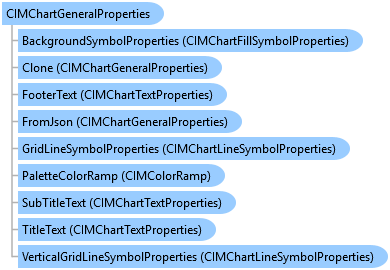
CIMChartGeneralProperties Class
In This Topic
Provides access to members that control general chart properties.
Object Model
Syntax
Public Class CIMChartGeneralProperties
   Inherits CIMObject
   Implements System.ComponentModel.INotifyPropertyChanged, System.Xml.Serialization.IXmlSerializable
public class CIMChartGeneralProperties : CIMObject, System.ComponentModel.INotifyPropertyChanged, System.Xml.Serialization.IXmlSerializable
Example
Create a simple scatter plot
{
  //Note: QueuedTask is required to access the feature layer
  {
    // For more information on the chart CIM specification:
    // https://github.com/Esri/cim-spec/blob/main/docs/v3/CIMCharts.md

    var lyrDefScatter = featureLayer.GetDefinition();

    // Define scatter plot CIM properties
    var scatterPlot = new CIMChart
    {
      Name = "scatterPlot",
      GeneralProperties = new CIMChartGeneralProperties
      {
        Title = $"{xField} vs. {yField}",
        UseAutomaticTitle = false
      },
      Series =
        [
          new CIMChartScatterSeries {
              UniqueName = "scatterPlotSeries",
              Name = "scatterPlotSeries",
              // Specify the X and Y field names
              Fields = new string[] { xField , yField },
              // Turn on trend line
              ShowTrendLine = true
          }
        ]
    };

    // Add new chart to layer's existing list of charts (if any exist)
    var newChartsScatter = new CIMChart[] { scatterPlot };
    var allChartsScatter = (lyrDefScatter == null) ? newChartsScatter : lyrDefScatter.Charts.Concat(newChartsScatter);
    // Add CIM chart to layer definition
    lyrDefScatter.Charts = allChartsScatter.ToArray();
    featureLayer.SetDefinition(lyrDefScatter);
  }
}
Create a line chart with custom time binning and style
{
  // For more information on the chart CIM specification:
  // https://github.com/Esri/cim-spec/blob/main/docs/v3/CIMCharts.md

  // Note: QueuedTask is required to access the feature layer
  {
    var lyrDefLine = featureLayer.GetDefinition();

    // Define line chart CIM properties
    var lineChart = new CIMChart
    {
      Name = "lineChart",
      GeneralProperties = new CIMChartGeneralProperties
      {
        Title = $"Line chart for {dateField} summarized by {numericField}",
        UseAutomaticTitle = false
      },
      Series =
        [
            new CIMChartLineSeries {
              UniqueName = "lineChartSeries",
              Name = $"Sum({numericField})",
              // Specify date field and numeric field
              Fields = new string[] { dateField, numericField },
              // Specify aggregation type
              FieldAggregation = new string[] { string.Empty, "SUM" },
              // Specify custom time bin of 6 months
              TimeAggregationType = ChartTimeAggregationType.EqualIntervalsFromStartTime,
              TimeIntervalSize = 6.0,
              TimeIntervalUnits = esriTimeUnits.esriTimeUnitsMonths,
              // NOTE: When setting custom time binning, be sure to set CalculateAutomaticTimeInterval = false
              CalculateAutomaticTimeInterval = false,
              // Define custom line color
              ColorType = ChartColorType.CustomColor,
              LineSymbolProperties = new CIMChartLineSymbolProperties {
                  Style = ChartLineDashStyle.DashDot,
                  Color = new CIMRGBColor { R = 0, G = 150, B = 20 },
              },
              MarkerSymbolProperties = new CIMChartMarkerSymbolProperties
              {
                  Color = new CIMRGBColor { R = 0, G = 150, B = 20 }
              }
          },
      ]
    };

    // Add new chart to layer's existing list of charts (if any exist)
    var newChartsLine = new CIMChart[] { lineChart };
    var allChartsLine = (lyrDefLine == null) ? newChartsLine : lyrDefLine.Charts.Concat(newChartsLine);
    // Add CIM chart to layer definition
    lyrDefLine.Charts = allChartsLine.ToArray();
    featureLayer.SetDefinition(lyrDefLine);
  }
}
Create a bar chart
{
  // Note: QueuedTask is required to access the feature layer
  {
    var layerDefinition = featureLayer.GetDefinition();
    string fieldXAxis = "textField";
    string fieldYAxis = "NumericField";

    var myBarChart = new CIMChart
    {
      Name = "Bar chart",
      GeneralProperties = new CIMChartGeneralProperties
      {
        Title = $"{fieldXAxis} vs. {fieldYAxis}",
        UseAutomaticTitle = false
      },
      Series =
      [
          new CIMChartBarSeries
      {
        Name = "Bar chart",
        UniqueName = "Bar chart",
        Fields = new string[] { fieldXAxis, fieldYAxis },
        //Create green fill symbols
        FillSymbolProperties = new CIMChartFillSymbolProperties
          {
            Color = CIMColor.CreateRGBColor(38, 115, 0, 70)
          }
      }
      ]
    };
    // Add new chart to layer's existing list of charts (if any exist)
    var newBarCharts = new CIMChart[] { myBarChart };
    var allChartsBar = (layerDefinition.Charts == null) ? newBarCharts : layerDefinition.Charts.Concat(newBarCharts);
    // Add CIM chart to layer definition
    layerDefinition.Charts = allChartsBar.ToArray();
    featureLayer.SetDefinition(layerDefinition);
  }

}
Create a histogram for every field of type Double
{
  // For more information on the chart CIM specification:
  // https://github.com/Esri/cim-spec/blob/main/docs/v3/CIMCharts.md

  var lyrDefHistogram = featureLayer.GetDefinition();

  // Get list names for fields of type Double
  var doubleFields = featureLayer.GetFieldDescriptions().Where(f => f.Type == FieldType.Double).Select(f => f.Name);

  // Create list that will contain all histograms
  var histograms = new List<CIMChart>();

  // Create histogram for each Double field
  foreach (var field in doubleFields)
  {
    // Define histogram CIM properties
    var histogram = new CIMChart
    {
      Name = $"histogram_{field}",
      GeneralProperties = new CIMChartGeneralProperties
      {
        Title = $"Histogram for {field}",
        UseAutomaticTitle = false
      },
      Series =
        [
              new CIMChartHistogramSeries {
                  UniqueName = "histogramSeries",
                  Name = $"histogram_{field}",
                  BinCount = 15,
                  // Specify the number field
                  Fields = new string[] { field },
              }
        ]
    };


    histograms.Add(histogram);
  }
  ;

  // Add new chart to layer's existing list of charts (if any exist)
  var allChartsHistogram = (lyrDefHistogram == null) ? histograms : lyrDefHistogram.Charts.Concat(histograms);
  // Add CIM chart to layer definition
  lyrDefHistogram.Charts = allChartsHistogram.ToArray();
  featureLayer.SetDefinition(lyrDefHistogram);
}
Create a multiseries bar chart
{
  // For more information on the chart CIM specification:
  // https://github.com/Esri/cim-spec/blob/main/docs/v3/CIMCharts.md

  var lyrDefBar = featureLayer.GetDefinition();

  // Get unique values for `splitByField`
  var values = new List<string>();
  using (RowCursor cursor = featureLayer.Search())
  {
    while (cursor.MoveNext())
    {
      var value = Convert.ToString(cursor.Current[splitByField]);
      values.Add(value);
    }
  }
  ;
  var uniqueValues = values.Distinct().ToList();

  // Define bar chart CIM properties
  var barChart = new CIMChart
  {
    Name = "barChart",
    GeneralProperties = new CIMChartGeneralProperties
    {
      Title = $"{categoryField} grouped by {splitByField}",
      UseAutomaticTitle = false
    },
  };

  // Create list to store the info for each chart series
  var allSeries = new List<CIMChartSeries>();

  // Create a series for each unique category
  foreach (var value in uniqueValues)
  {
    var series = new CIMChartBarSeries
    {
      UniqueName = value,
      Name = value,
      // Specify the category field
      Fields = new string[] { categoryField, string.Empty },
      // Specify the WhereClause to filter a series by unique value
      WhereClause = $"{splitByField} = '{value}'",
      GroupFields = new[] { categoryField },
      // Specify aggregation type
      FieldAggregation = new string[] { string.Empty, "COUNT" }
    };

    allSeries.Add(series);
  }

  barChart.Series = allSeries.ToArray();

  // Add new chart to layer's existing list of charts (if any exist)
  var newChartsBar = new CIMChart[] { barChart };
  var allBarCharts = (lyrDefBar == null) ? newChartsBar : lyrDefBar.Charts.Concat(newChartsBar);
  // Add CIM chart to layer definition
  lyrDefBar.Charts = allBarCharts.ToArray();
  featureLayer.SetDefinition(lyrDefBar);
}
Create a pie chart with custom legend formatting
{
  // For more information on the chart CIM specification:
  // https://github.com/Esri/cim-spec/blob/main/docs/v3/CIMCharts.md

  var lyrDef = featureLayer.GetDefinition();

  // Define pie chart CIM properties
  var pieChart = new CIMChart
  {
    Name = "pieChart",
    GeneralProperties = new CIMChartGeneralProperties
    {
      Title = "Pie chart with custom legend formatting",
      UseAutomaticTitle = true
    },
    Legend = new CIMChartLegend
    {
      LegendText = new CIMChartTextProperties
      {
        FontFillColor = new CIMRGBColor { R = 0, G = 250, B = 20 }, // Specify new font color
        FontSize = 6.0, // Specify new font size
      }
    },
    Series = [
            new CIMChartPieSeries
            {
               UniqueName = "pieSeries",
               Name = "pieSeries",
               Fields = new string[] { categoryField, string.Empty }
            }
         ]
  };

  // Add new chart to layer's existing list of charts (if any exist)
  var newCharts = new CIMChart[] { pieChart };
  var allCharts = (lyrDef?.Charts == null) ? newCharts : lyrDef.Charts.Concat(newCharts);
  // Add CIM chart to layer definition
  lyrDef.Charts = allCharts.ToArray();
  featureLayer.SetDefinition(lyrDef);
}
Inheritance Hierarchy
System.Object
ArcGIS.Core.CIM.CIMObject
ArcGIS.Core.CIM.CIMChartGeneralProperties
Requirements
Target Platforms: Windows 11 Home, Pro, Enterprise (64 bit)
ArcGIS Pro version: 3.0 or higher.
See Also