Classify LAS Building (3D Analyst Tools)
Summary
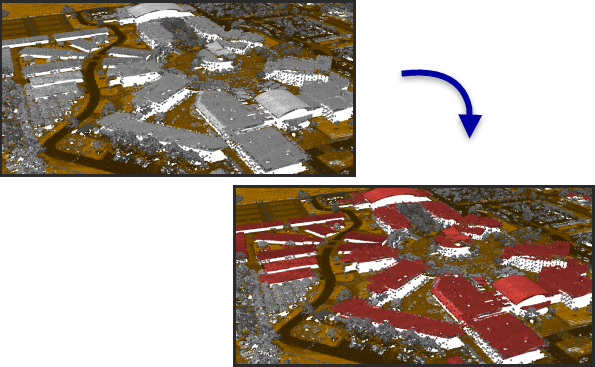
Classifies buildings in LAS format point cloud data.
Illustration
Usage
Points with class code values of 0, 1, and 6 will be evaluated to determine if they fit the characteristics of building rooftops. Existing building classified points that do not satisfy the detection criteria will be reassigned to 1 unless the option to reuse existing building classified points has been set.
This tool was designed with an emphasis on aerial lidar, which usually captures building rooftops. Points representing walls, vertical facades, and small rooftop features—such as dormers and chimneys—may not be included in the building classification. If such points are necessary, consider running the tool with the options for classifying points that are above and below the roof.
Classify ground points before running this tool. If ground points have not been classified, use the Classify LAS Ground tool. If ground points are classified but they use a class code value other than 2, use the Change LAS Class Codes tool to reassign them accordingly.
The Method parameter is not used when the Is photogrammetric data parameter is checked.
Points flagged as withheld or overlap will be ignored. Withheld points are originally defined as to not be used for classification. Overlap points are ignored from processing because their inclusion can create dramatic fluctuations in point density, and they may also introduce noise related calibration issues between flight lines.
Parameters
| Label | Explanation | Data type |
|---|---|---|
|
Input LAS Dataset |
The LAS dataset that will be classified. |
LAS Dataset Layer |
|
Minimum Rooftop Height (Optional) |
The height from the ground that defines the lowest point from which rooftop points will be identified. |
Linear Unit |
|
Minimum Area |
The smallest area of the building rooftop. |
Areal Unit |
|
Compute statistics (Optional) |
Specifies whether statistics will be computed for the
|
Boolean |
|
Processing Extent (Optional) |
The extent of the data that will be evaluated.
When coordinates are manually provided, the coordinates must be numeric values and in the active map's coordinate system. The map may use different display units than the provided coordinates. Use a negative value sign for south and west coordinates. |
Extent |
|
Processing Boundary |
The polygon feature or features that will define the area to be processed. |
Feature Layer |
|
Process entire LAS files that intersect extent (Optional) |
Specifies how the processing extent will be applied.
|
Boolean |
|
Average Point Spacing |
The average spacing of LAS points. This parameter is no longer used. |
Linear Unit |
|
Reuse existing building classified points (Optional) |
Specifies whether the existing building classified points will be reused or reevaluated.
|
Boolean |
|
Is photogrammetric data (Optional) |
Specifies whether the points in the
|
Boolean |
|
Classification Method (Optional) |
Specifies the classification method that will be used.
|
String |
|
Classify points above the roof (Optional) |
Specifies whether points above the planes detected for the roof will be classified.
|
Boolean |
|
Maximum Height Above Roof (Optional) |
The maximum height of the points above the building rooftop that will be classified using the Above Roof Class Code parameter value. |
Linear Unit |
|
Above Roof Class Code (Optional) |
The class code that will be assigned to points above the roof. |
Long |
|
Classify points below the roof (Optional) |
Specifies whether points between the roof and the ground will be classified.
|
Boolean |
|
Below Roof Class Code (Optional) |
The class code that will be assigned to points between the ground and the roof. |
Long |
|
Update pyramid (Optional) |
Specifies whether the LAS dataset pyramid will be updated after the class codes are modified.
|
Boolean |
 —The extent will be based on the active map or scene.
 —The extent will be based on a rectangle drawn on the map or scene.
 —The extent will be based on an active map layer. Choose an available layer or use the Extent of data in all layers option. Each map layer has the following options:
 —The extent of all features.
 —The extent of the selected features.
 —The extent of visible features.
 —The extent will be based on a dataset.
 —The extent will be the intersecting extent of all inputs.
 —The extent will be the combined extent of all inputs.
 —The extent can be copied to and from the clipboard.
 —Copies the extent and coordinate system to the clipboard.
 —The extent will be reset to the default value.
Derived output
| Label | Explanation | Data type |
|---|---|---|
|
Derived LAS Dataset |
The LAS dataset that is classified for building rooftops. |
LAS Dataset Layer |
Environments
Extent, Parallel Processing Factor
Licensing information
- Basic: Requires 3D Analyst
- Standard: Requires 3D Analyst
- Advanced: Requires 3D Analyst