Extract LAS (3D Analyst Tools)
Summary
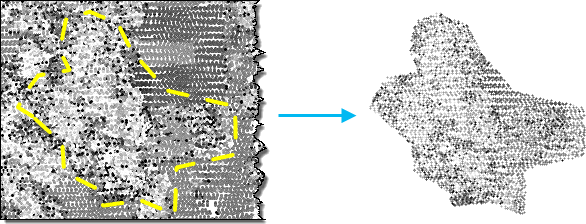
Creates LAS files from point cloud data in a LAS dataset or point cloud scene layer.
Illustration
Usage
This tool creates
.lasor.zlasfiles from a LAS dataset, point cloud.slpkfile, or I3S point cloud scene layer service. When the input is a LAS dataset, one output file will be created for each.lasor.zlasfile referenced by the LAS dataset. When the input is a point cloud scene layer, the number of output files will vary based on the number of points being extracted. Each output file is limited in size to approximately 16.8 million points. Some files may exceed this threshold or have a fewer number of points.The input point cloud can be filtered to limit the points that will be extracted using any combination of classification codes, classification flags, and return values. Point filters can be defined by loading the layer into a map or scene and specifying the filters on the Layer Properties dialog box. Point filters can also be applied to a LAS dataset using the Make LAS Dataset Layer tool. Additionally, you can extract a subset of the input point cloud by specifying a processing extent and an extraction boundary. When a processing extent is provided with an extraction boundary, the intersection of both will be used to create the output files. If neither the processing extent nor the extraction boundary is defined, the entire input point cloud will be processed.
In addition to filtering points by certain attributes, you can also filter LAS points by elevation using the Elevation Range control in the Filters group of the ribbon for a LAS dataset layer. This tool will honor the elevation range set on this control.
When the input is a LAS dataset, the resulting LAS file version and point record format of the outputs will match the source file. When the input is an I3S point cloud scene layer service or an
.slpkfile, the output will be created as LAS file version 1.4, but the point record format will depend on the attributes of the source point cloud as follows:Point format 6 will be used if the input does not contain RGB or near-infrared values.
Point format 7 will be used if the input contains RGB values but does not have near-infrared values.
Point format 8 will be used if the input contains RGB and near-infrared values.
To use a different LAS file version and point record format, generate them by processing the output files from by this tool using the Convert LAS tool.
The spatial reference of a
.lasfile is typically defined in the file. If this information is missing or incorrect, an auxiliary.prjfile can define the LAS file's spatial reference. The.prjfile must reside in the same location as the.lasfile and have the same name as the.lasfile. When present, the.prjfile will override the spatial reference information in the.lasfile. You can create.prjfiles for.lasfiles with a missing or incorrectly defined spatial reference using the Define Projection tool for an individual.lasor.zlasfile or the Create LAS Dataset tool through the Create PRJ For LAS Files parameter.You can reproject the horizontal coordinate system of the input point cloud into a different spatial reference by specifying the Output Coordinate System environment setting. Additionally, z-unit conversions can be achieved by ensuring that the vertical units are defined through a vertical coordinate system. However, a vertical datum transformation is not currently supported. Ensure that any horizontal coordinate system conversion can maintain the original vertical coordinate system.
It is not uncommon for LAS point records to be stored in the
.lasfile in a binary sequence that does not correspond with the spatial clustering of the points. When data of such distribution is queried, it can result in less efficient access to the binary records that represent the LAS points. Rearranging the points in the resulting.lasfile will optimize the data for visualization and other spatial operations. Statistics will automatically be calculated when the rearrange option is enabled. If you don't rearrange the LAS points, you can enable or disable the calculation of statistics. Calculating statistics will optimize spatial queries and provide a summary of the class codes and return values that are present in the.lasfile. However, it will also add time to the processing of this tool. If the resulting.lasfiles will not be used in ArcGIS, you can disable the calculation of statistics so that the tool can process faster.You can use the Extraction Boundary parameter to clip the input point cloud to an irregular shape. This parameter supports a polygon boundary that defines a contiguous study area, such as a single polygon feature covering a relatively large region. While multiple polygons representing neighboring areas of interest can be provided as input, the boundary feature does not support polygons that represent a large number of small features such as trees or buildings. Multiple polygons are merged to efficiently clip the input point cloud. Because of this, avoid specifying a boundary feature with many small polygons, which will result in slow performance.
Parameters
| Label | Explanation | Data type |
|---|---|---|
|
Input Point Cloud |
The LAS dataset, point cloud scene layer package ( |
LAS Dataset Layer; Scene Layer; File |
|
Target Folder |
The existing folder where the output LAS format files will be written. |
Folder |
|
Processing Extent (Optional) |
The extent of the data that will be evaluated.
When coordinates are manually provided, the coordinates must be numeric values and in the active map's coordinate system. The map may use different display units than the provided coordinates. Use a negative value sign for south and west coordinates. |
Extent |
|
Extraction Boundary (Optional) |
A polygon boundary that will be used to clip the input point cloud. This boundary should represent a primary study area that is typically defined by one contiguous polygon, but it can also be composed of more than one polygon when it represents a common study area with a relevant spatial gap. |
Feature Layer |
|
Process entire LAS files that intersect extent (Optional) |
Specifies how the processing extent will be applied.
|
Boolean |
|
Output File Name Suffix (Optional) |
The text that will be appended to the name of each output |
String |
|
Remove Variable Length Records (Optional) |
Specifies whether variable length records (VLRs) will be removed. Each
|
Boolean |
|
Rearrange points (Optional) |
Specifies whether points in the
|
Boolean |
|
Compute Statistics (Optional) |
Specifies whether statistics will be computed for the
|
Boolean |
|
Output LAS Dataset (Optional) |
The output LAS dataset referencing the newly created |
LAS Dataset |
|
Compression (Optional) |
Specifies whether the output
|
String |
 —The extent will be based on the active map or scene.
 —The extent will be based on a rectangle drawn on the map or scene.
 —The extent will be based on an active map layer. Choose an available layer or use the Extent of data in all layers option. Each map layer has the following options:
 —The extent of all features.
 —The extent of the selected features.
 —The extent of visible features.
 —The extent will be based on a dataset.
 —The extent will be the intersecting extent of all inputs.
 —The extent will be the combined extent of all inputs.
 —The extent can be copied to and from the clipboard.
 —Copies the extent and coordinate system to the clipboard.
 —The extent will be reset to the default value.
Derived output
| Label | Explanation | Data type |
|---|---|---|
|
Output Folder |
The folder where the |
Folder |
Environments
Current Workspace, Extent, Output Coordinate System, Geographic Transformations
Licensing information
- Basic: Requires 3D Analyst
- Standard: Requires 3D Analyst
- Advanced: Requires 3D Analyst