Create LAS Dataset (Data Management Tools)
Summary
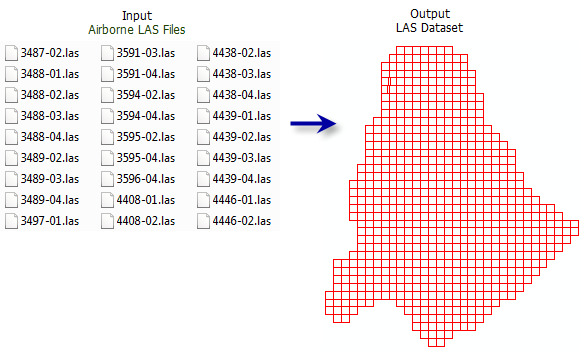
Creates a LAS dataset referencing one or more *.las, *.zlas, and *.laz files and surface constraint features.
Illustration
Usage
The LAS dataset provides a way to visualize, manage, and analyze collections of point cloud data stored in uncompressed LAS files (
*.las) and compressed variants (*.zlasand*.laz). The LAS dataset references the input files where they reside and supports working with a large collection of separate files through a single access point that can optimize the rendering experience. Compressed files typically use approximately 30 percent of the storage size of uncompressed files, making them a suitable alternative for managing large collections of data and archival storage. You can edit the class codes of uncompressed.lasfiles and.zlasfiles. When considering which file format to use, evaluate the formats by the applications in which they will be used.Learn more about the data types supported by the LAS dataset
ZLAS files can be created with any tool that creates
.lasfiles, including: Convert LAS, Extract LAS, Thin LAS, Tile LAS, and Project LAS. LAZ files can be created with the Convert LAS tool.Surface constraint features can be used to enforce feature-derived elevation values that represent surface characteristics in the LAS dataset.
Each LAS file (
*.las,*.zlas, or.laz) that will be added to the LAS dataset is examined to determine if its file structure meets the ASPRS LAS format specifications. Files that are improperly created or corrupted will fail to load. If this occurs, use the Esri CheckLAS application to evaluate the file.The ASPRS specifications for a
.lasfile require the file to have spatial reference information. If this information is missing or improperly defined, the file will have an unknown spatial reference, which will cause it to render in the coordinate system of the map. If the correct spatial reference is known, use the Define Projection tool or the Create LAS Dataset tool with the Create PRJ For LAS Files set to All LAS File or Files with Missing Spatial References.Learn more about how LAS coordinate system information is stored and modified
The class code labels provided in the LAS dataset's layer and catalog properties reflect the class designations outlined in the ASPRS LAS 1.4 specifications. This classification scheme is oriented for aerial lidar surveys and is comprised of the following:
Classes associated with predefined objects, for example, 2 represents ground
Classes whose values are not defined but reserved for later use by the ASPRS
Classes that can be allocated to any other object
The LAS dataset layer's point filters, interactive editing options, and default symbology labels reflect the LAS format specification's class code labels.
If the LAS standard is applicable for the data but the class codes do not conform, consider modifying the class designations to match the ASPRS LAS 1.4 standards to ensure that the data will be interpreted in a consistent manner. Since LAS format 1.0 files did not require any classification standard, data vendors may have applied classification codes to objects that did not match the standard that was introduced in the more recent LAS formats. If the class code values in the data are not consistent with the LAS standard, use the Change LAS Class Codes tool to align the value with the latest ASPRS classification scheme.
In the Geoprocessing pane, a folder can also be specified as an input by selecting the folder in File Explorer and dragging it onto the parameter's input box.
Parameters
| Label | Explanation | Data type |
|---|---|---|
|
Input LAS Files |
The LAS format files ( In the Geoprocessing pane, a folder can also be specified as an input by selecting the folder in File Explorer and dragging it onto the parameter's input box. |
LAS Dataset Layer; File; Folder |
|
Output LAS Dataset |
The LAS dataset that will be created. |
LAS Dataset |
|
Include subfolders (Optional) |
Specifies whether LAS format files (
|
Boolean |
|
Surface Constraints (Optional) |
The features that will contribute to the definition of the triangulated surface generated from the LAS dataset.
Value table columns:
|
Value Table |
|
Coordinate System (Optional) |
The spatial reference that will be assigned to the output LAS dataset. The default coordinate system will match the spatial reference of the first input file. When a coordinate system that differs from the input files is specified, it will result in the input files being reprojected to the LAS dataset's coordinate system when processed in subsequent operations. If the input files do not have a spatial reference, the coordinate system will default to unknown. When the coordinate system for files with no spatial reference is known, the correct coordinate system can be defined for the input files by selecting it in this parameter and setting the Define Projection for LAS Files parameter to Files with Unknown Spatial Reference. |
Coordinate System |
|
Compute Statistics (Optional) |
Specifies whether statistics and a spatial index will be computed for the input files. The presence of statistics allows the LAS dataset layer's filtering and symbology options to only show LAS attribute values that exist in the
|
Boolean |
|
Store Relative Paths (Optional) |
Specifies whether the source data referenced by the LAS dataset will use relative or absolute paths. Relative paths may be convenient when the LAS dataset and its associated data will be relocated in the file system using the same relative location.
|
Boolean |
|
Define Projection For LAS Files |
Specifies whether the input
|
String |
|
Processing Extent (Optional) |
The processing extent that will be used to filter the files being added to the LAS dataset. Any input file that is outside this extent will be excluded from the resulting LAS dataset. Files that partially overlap with the extent can be excluded if the Add only entirely contained files parameter is checked. |
Extent |
|
Processing Boundary (Optional) |
The polygon boundary feature that will be used to filter the files being added to the LAS dataset. Any input file that is outside this boundary will be excluded from the resulting LAS dataset. Files that partially overlap the boundary will be excluded if the Add only entirely contained files parameter is checked. |
Feature Layer |
|
Add only entirely contained files (Optional) |
Specifies whether the input files being added to the LAS dataset must be fully or partially contained by the processing extent and processing boundary.
|
Boolean |
Environments
Current Workspace, Output Coordinate System
Licensing information
- Basic: Requires 3D Analyst or Spatial Analyst
- Standard: Yes
- Advanced: Yes