Count Overlapping Features (Analysis Tools)
Summary
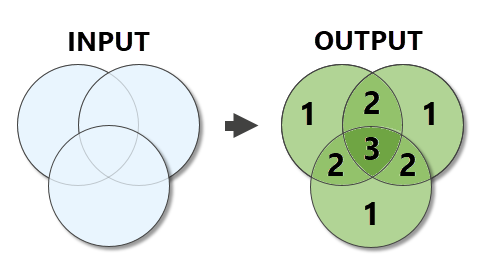
Generates planarized overlapping features from the input features. The count of overlapping features is written to the output features.
Illustration
Usage
The geometry type of the output is the same as the geometry type of the input, with the exception of point geometry. For point geometry, the output will be a multipoint feature class if there are multiple input feature classes or a point feature class if there is a single input point feature class.
The output is a planarized union of the inputs. Overlap between vertically offset features (geometry with various z-values) is evaluated as if all features are flattened onto the same plane.
For polygon geometry, any area that is occupied by two or more features is considered an overlap. For line geometry, only lines that overlap completely (a line segment is incident with another line segment) are considered overlapping. Lines that intersect at a point are not considered overlapping. For point geometry, any coincident points are considered overlapping.
The following fields will be included in the Output Feature Class:
COUNT_—The number of overlapping features in the inputCOUNT_FC—The number of individual feature classes that overlap the feature
All other fields from the Input Features are excluded from the Output Feature Class.
When an Output Overlap Table is generated, it includes one record for each overlap. For example, when three input features overlap the same location, the table contains three records for that location-one for each overlapping geometry. The following fields are included with the Output Overlap Table:
OVERLAP_OID—The ObjectID of the related Output Feature Class feature.ORIG_OID—The ObjectID of the related Input Features feature.ORIG_NAME—This field will be added if there are multiple inputs. The field contains the name of the input.
This table allows you to relate each overlap back to the input and output features.
Parameters
| Label | Explanation | Data type |
|---|---|---|
|
Input Features |
The input feature classes or layers. The input features can be point, multipoint, line, or polygon. If multiple inputs are provided, they must all be the same geometry type. |
Feature Layer |
|
Output Feature Class |
The output feature class containing the overlap count. |
Feature Class |
|
Minimum Overlap Count (Optional) |
Limits the output to only locations that meet or exceed the specified number of overlaps. The default value is 1. |
Long |
|
Output Overlap Table (Optional) |
The output table containing records for each individual overlapping geometry. |
Table |
Environments
Default Output Z Value, M Resolution, M Tolerance, Output M Domain, Output Coordinate System, Geographic Transformations, Scratch Workspace, Output has M values, Output has Z values, XY Resolution, XY Tolerance, Z Resolution, Z Tolerance, Current Workspace, Output CONFIG Keyword
Licensing information
- Basic: Yes
- Standard: Yes
- Advanced: Yes