Near (Analysis Tools)
Summary
Calculates distances and other proximity information between features in one or more feature classes or layers.
Learn more about how proximity is calculated by geoprocessing tools
Illustration
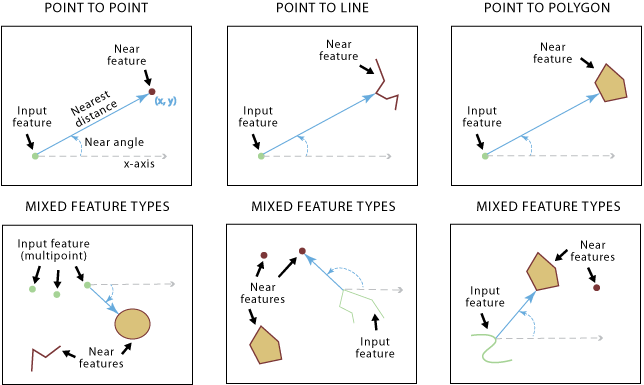
Usage
The fields below will be added to the input. If the fields already exist, the field values will be updated. These field names can be configured using the Field Names parameter.
NEAR_FID—The object ID of the nearest feature. If no near feature is found, the value will be -1.NEAR_DIST—The distance from the input feature to the near feature. The value is in the linear unit of the input feature's coordinate system, or meters when the Method parameter is set to Geodesic and the input is in a geographic coordinate system. If no near feature is found, the value will be -1.NEAR_FC—The path of the source feature class containing the nearest feature found. The layer name will be used if layers are used as input, and the catalog path to the feature class will be used if paths are used as input. This field is only added to the output table if multiple near features are specified. If no near feature is found, the value will be an empty string or null.
The fields below will be added to the input if the Location parameter is checked. The field values will be updated if the fields already exist. The field value units depend on the Method parameter value. If the Method parameter is set to Planar, the field value will be in the linear unit of the input feature's coordinate system. If it's set to Geodesic, the field value will be in the geographic coordinate system associated with the input feature's coordinate system.
NEAR_X—The x-coordinate of the location on the near feature that is closest to the input feature. If no near feature is found, the value will be -1.NEAR_Y—The y-coordinate of the location on the near feature that is closest to the input feature. If no near feature is found, the value will be -1.
The field below will be added to the input features if the Angle parameter is checked. The field value will be updated if the field already exists.
NEAR_ANGLE—The angle of the line at theFROM_XandFROM_Ylocation that connects the input features to the near feature. If no near feature is found or the near feature intersects the input feature, the value will be 0.
The values for
NEAR_FIDandNEAR_DISTwill be -1 if no feature is found within the search radius.Both input features and near features can be point, multipoint, line, or polygon.
The Near Features parameter value can include one or more feature classes of different shape types (point, multipoint, line, or polygon).
To calculate distance and additional proximity information within a single feature class or layer, the same feature class or layer can be used. In this case, the input feature being evaluated will be excluded from the near feature candidates to avoid all features being closest to themselves.
The input features can be a layer on which you have performed a selection. The selected features will be used and updated during tool operation. The remaining features will have the values of the newly created fields (such as
NEAR_FIDandNEAR_DIST) set to -1.When more than one near feature has the same shortest distance from an input feature, one of them is randomly chosen as the nearest feature.
When using the Planar option for the Method parameter, use a projection for the input features that is appropriate for distance measurement, such as an equidistant projection.
To visualize the
NEAR_XandNEAR_Ylocations, the output table can be used as input to the Make XY Event Layer or XY To Line tool.You can set a unit of measurement for the
NEAR_DISTfield—such as meters, kilometers, or miles—using the Distance Unit parameter.This tool supports finding the nearest feature for each input of the multiple Near Features parameter values.
Parameters
| Label | Explanation | Data type |
|---|---|---|
|
Input Features |
The input features, which can be point, polyline, polygon, or multipoint type. |
Feature Layer |
|
Near Features |
One or more feature layers or feature classes containing near feature candidates. The near features can be point, polyline, polygon, or multipoint. If multiple layers or feature classes are specified, the |
Feature Layer |
|
Search Radius (Optional) |
The radius that will be used to search for near features. If no value is specified, all near features will be considered. If a distance but no unit or unknown is specified, the units of the coordinate system of the input features will be used. If the Geodesic option is used for the Method parameter, use a linear unit such as kilometers or miles. |
Linear Unit |
|
Location (Optional) |
Specifies whether x- and y-coordinates of the closest location of the near feature will be written to the
|
Boolean |
|
Angle (Optional) |
Specifies whether the near angle will be calculated and written to the
|
Boolean |
|
Method (Optional) |
Specifies whether a shortest path on a spheroid (geodesic) or a flat earth (planar) distance method will be used. It is recommended that you use the Geodesic method for data stored in a coordinate system that is not appropriate for distance measurements (for example, Web Mercator or any geographic coordinate system) and for a dataset that spans a large geographic area.
|
String |
|
Field Names (Optional) |
The names of the attribute fields that will be added during processing. If this parameter is not used or any fields that will be added are excluded from this parameter, the default field names will be used. By default, the Optionally, when there are multiple Near Features parameter values, specify a Value table columns:
|
Value Table |
|
Distance Unit (Optional) |
Specifies the unit of measurement for the
|
String |
|
Match Fields (Optional) |
The pairs of fields from the input features and near features that will be used for attribute matching. Only the near features that share match field values with the input features will be used in the near calculation. Value table columns:
|
Value Table |
Derived output
| Label | Explanation | Data type |
|---|---|---|
|
Updated Input Features |
The updated input features. |
Feature Layer |
Environments
Licensing information
- Basic: Yes
- Standard: Yes
- Advanced: Yes