Tabulate Intersection (Analysis Tools)
Summary
Computes the intersection between two feature classes and cross tabulates the area, length, or count of the intersecting features.
Illustration
Usage
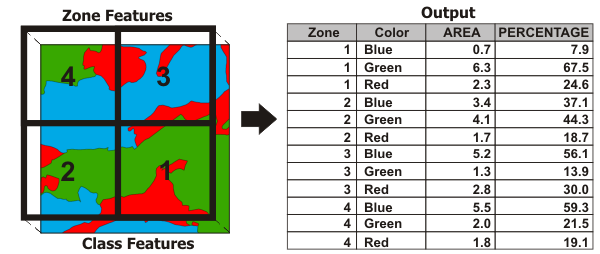
A zone is composed of all features in the Input Zone Features parameter that have the same values in the Zone Fields parameter. Similarly, a class is composed of all features in the Input Class Features parameter that have the same values in the Class Fields parameter. Features do not need to be contiguous to be in the same zone or class. This tool calculates how much of the zone is intersected by each class (area and percentage of zone area).
If no Class Fields value is specified, all features in the Input Class Features parameter will be considered a single class. The Output Table value will contain one record for each zone.
If a Class Fields value is specified, the Output Table value will contain n records for each zone in which n is the number of classes within that zone. For example, if a zone contains four classes, the Output Table value will contain four records for that zone.
Numeric attributes from the Input Class Features parameter can be summed by zone using the Sum Fields parameter. The sum values for a class represent a proportion of the sum values based on the percentage of the class intersecting the zone.
Caution:
Use fields with absolute values (not relative, normalized values such as percentages or densities) for Sum Fields, since the values may be split and apportioned to different zones.
Using a higher dimension Input Class Features value than the Input Zone Features value is not supported.
If the Input Zone Features values are points, the Input Class Features values cannot be polygons or lines.
If the Input Zone Features values are lines, the Input Class Features values cannot be polygons.
When the Input Zone Features and Input Class Features values are polygons, the output table statistics will be based on area calculations.
When the Input Class Features values are lines, the output table statistics will be based on linear calculations.
When the Input Class Features values are points, the output table statistics will be based on feature count.
When the Input Zone Features and the Input Class Features values are the same dimension (both polygon, both line, or both point), the output
PERCENTAGEfield records the percentage of the zone feature that is intersected by the class.If the Input Zone Features and the Input Class Features values are different dimensions (polygon zone with line class, polygon zone with point class, or line zone with point class), the output
PERCENTAGEfield records the percentage of the class intersecting the zone polygon.The
PERCENTAGEfield may record a percent value greater than 100 when there are overlapping features in the Input Zone Features or Input Class Features parameters.The
AREAfield is included in the output table only when the Input Zone Features and Input Class Features values are polygons. TheAREAfield contains the area of the Input Zone Features values that the Input Class Features values intersect.A
LENGTHfield is included in the output table when the Input Class Features values are lines. TheLENGTHfield contains the length of intersection between the Input Zone Features and the Input Class Features values.A
PNT_COUNTfield is included in the output table when the Input Class Features values are points. ThePNT_COUNTfield contains the number of Input Class Features points that intersect the Input Zone Features values.When using feature layers, if any features are selected, only the selected features are used in calculations.
Determining the intersection of zone and class features follows the same rules as the Intersect tool.
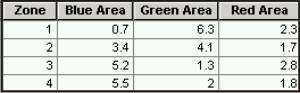
Use the Pivot Table tool to transform the Output Table value into a table that contains one record for each zone with class attributes as separate attribute fields. Fill in the parameters for the Pivot Table tool as follows:
Input Table—Tabulate Intersection Output Table
Input Fields—Tabulate Intersection Zone Fields
Pivot Field—Tabulate Intersection Class Fields
Value Field—Tabulate Intersection Sum Fields or
AREA,LENGTH,PERCENTAGE
Parameters
| Label | Explanation | Data type |
|---|---|---|
|
Input Zone Features |
The features used to identify zones. |
Feature Layer |
|
Zone Fields |
The attribute field or fields that will be used to define zones. |
Field |
|
Input Class Features |
The features used to identify classes. |
Feature Layer |
|
Output Table |
The table that will contain the cross tabulation of intersections between zones and classes. |
Table |
|
Class Fields (Optional) |
The attribute field or fields used to define classes. |
Field |
|
Sum Fields (Optional) |
The fields that will be summed from the Input Class Features parameter. |
Field |
|
XY Tolerance (Optional) |
The distance that determines the range in which features or their vertices are considered equal. By default, this is the x,y tolerance of the Input Zone Features parameter value. Caution:Changing this parameter's value may cause failure or unexpected results. It is recommended that you do not modify this parameter. It has been removed from view on the tool dialog box. By default, the input feature class's spatial reference x,y tolerance property is used. |
Linear Unit |
|
Output Units (Optional) |
Specifies the units that will be used to calculate area or length measurements. Setting output units when the input class features are points is not supported.
|
String |
Environments
Auto Commit, Output CONFIG Keyword, Output XY Domain, Output Coordinate System, Geographic Transformations, Extent, Maintain fully qualified field names, Scratch Workspace, XY Resolution, XY Tolerance
Licensing information
- Basic: No
- Standard: No
- Advanced: Yes