Append Data (GeoAnalytics Server Tools)
Summary
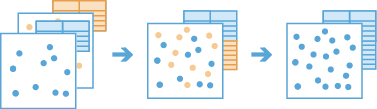
Appends features to an existing hosted feature layer.
Legacy:
The ArcGIS GeoAnalytics Server extension is being deprecated in ArcGIS Enterprise. The final release of GeoAnalytics Server was included with ArcGIS Enterprise 11.3. This geoprocessing tool is available through ArcGIS Enterprise 11.3 and earlier versions.
Illustration
Usage
This geoprocessing tool is available with ArcGIS Enterprise 10.6.1 or later.
The Input Layer parameter value must be an existing hosted point, line, polygon, or table layer. To append to a different layer, you must create a hosted layer of that dataset first. To do this, use the Copy To Data Store tool, or share a layer to your portal. To learn more about sharing layers, see Introduction to sharing web layers.
The Append Layer parameter value can be a point, line, polygon, or table big data file share dataset or feature layer.
The Append Layer value must have the same geometry type as the Input Layer value. For example, append table features to table features, and point features to point features. No features will be appended if the geometry types are not the same.
The Append Layer value must have the same time type as the Input Layer value. These types include instant, interval, or none.
The fields, geometry, and time of the Input Layer value will not be modified.
The following two methods can be used to append features:
Append matching fields only—Only fields with matching names and types will be appended. This is the default.
Append matching fields and resolve differences—Use the Append Fields or Append Expressions parameters to match fields with different names or to calculate values for specified fields.
Any Append Layer fields that are not matched in the Append Fields or Append Expressions parameters will be excluded from the appended results.
For example, human migration researchers want to append datasets with the input layer and append layer schemas seen below. Both layers have the
Countryfield of type text in common, and both have two additional fields with the same data type but unique names. The input layer hasPop_andPop_Densityfields, and the append layer hasPopulationandarea_km2fields. The researchers want to match theCountryfield to theCountryfield, append thePopulationfield to thePop_field, and calculate the population density for thePop_Densityfield using a mathematical calculation.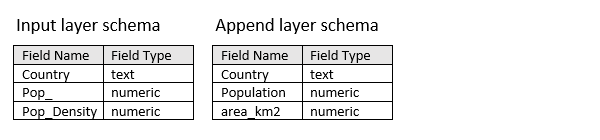
Input layer and append layer example schemas to be used in the Append Data tool By default, Append Data will match
Countryfields because they have the same field name and field type. By default, thePop_andPop_Densityfields have no match in the append layer and will be appended with null values.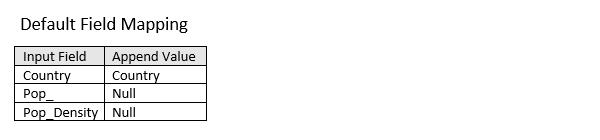
Default field mapping that will be applied when the Append matching fields only option is selected for the Append Method parameter. Select the Append matching fields and resolve differences option for the Append Method parameter to define custom field mapping specifications. Use the Append Fields parameter to append the Input Field
Pop_field with values from the Append FieldPopulationfield. Use the Append Expressions parameter to calculatePop_Densityvalues for the appending features using thePopulationandarea_km2append layer fields by building the following Arcade expression:$feature["Population"]/$feature["area_km2"].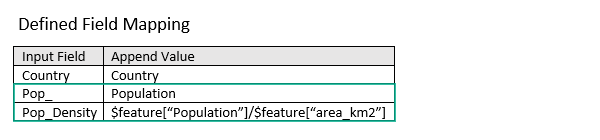
Defined field mapping as specified in the Append Fields and Append Expressions parameters. This geoprocessing tool is powered by ArcGIS GeoAnalytics Server. Analysis is completed on GeoAnalytics Server, and results are stored in your content in ArcGIS Enterprise.
When running GeoAnalytics Server tools, the analysis is completed on GeoAnalytics Server. For optimal performance, make data available to GeoAnalytics Server through feature layers hosted on your ArcGIS Enterprise portal or through big data file shares. Data that is not local to GeoAnalytics Server will be moved to GeoAnalytics Server before analysis begins. This means that it will take longer to run a tool and, in some cases, moving the data from ArcGIS Pro to GeoAnalytics Server may fail. The threshold for failure depends on your network speeds, as well as the size and complexity of the data. It is recommended that you always share your data or create a big data file share.
Learn more about sharing data to your portal
Learn more about creating a big data file share through Server Manager
Parameters
| Label | Explanation | Data type |
|---|---|---|
|
Input Layer |
The hosted feature layer to which features will be appended. |
Record Set |
|
Append Layer |
The layer containing features that will be appended to the input layer. |
Record Set |
|
Append Method (Optional) |
Specifies how fields from the input layer will be appended with values from the append layer.
|
String |
|
Append Fields (Optional) |
The append layer fields of the same type and different name as the input layer fields that will be appended. Select the input field to append to, and the append field containing the values to append. Value table columns:
|
Value Table |
|
Append Expressions (Optional) |
The Arcade expression that will be used to calculate field values for the input field. Expressions are written in Arcade and can include mathematical operators and multiple fields. Select the fields to append to, and provide an expression for each to calculate the values to append. If the layer is added to the map, the fields and helpers can be used to build an expression. Value table columns:
|
Value Table |
Derived output
| Label | Explanation | Data type |
|---|---|---|
|
Append Result |
The updated input to which features have been appended. |
Record Set |
Environments
Licensing information
- Basic: Requires ArcGIS GeoAnalytics Server
Available with ArcGIS Enterprise 10.6.1 - Standard: Requires ArcGIS GeoAnalytics Server
Available with ArcGIS Enterprise 10.6.1 - Advanced: Requires ArcGIS GeoAnalytics Server
Available with ArcGIS Enterprise 10.6.1