Set Control Point At Intersect (Cartography Tools)
Summary
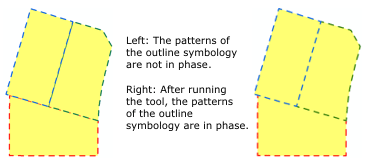
Creates a control point at vertices that are shared by one or more line or polygon features. This tool is commonly used to synchronize boundary symbology on adjacent polygons.
Illustration
Usage
Caution:
This tool modifies the input data. See Tools that modify or update the input data for more information and strategies to avoid undesired data changes.
Control points can be used to control the phasing of patterned symbology such as dashed lines. Use this tool to synchronize phased outline symbology on adjacent polygons.
The Input Features parameter value must be a line or polygon feature class. The Input Secondary Features parameter value can be a point, line, or polygon feature class. The secondary features provide geometry for comparison to the input features.
Only the Input Features parameter value will be modified. The Input Secondary Features parameter value will be used to determine the placement of control points on the Input Features parameter value.
To align dashes along two feature classes, you need to run the tool twice, once with each feature class as the Input Features and Input Secondary Features parameter values. This will place matching control points on each feature class, which are needed to align dashes.
Existing control points will not be removed.
When only one layer is input, control points will be created only where three segments form an intersection. When secondary features are input, control points will be added where segments intersect.
Both input layers can accept multipart geometry.
Control points cannot be added to shapefiles.
Processing large datasets may exceed memory limitations. In this case, consider processing input data by partition by identifying a relevant polygon feature class in the Cartographic Partitions environment. Portions of the data, defined by partition boundaries, will be processed sequentially. The result will be seamless and consistent at partition edges.
Parameters
| Label | Explanation | Data type |
|---|---|---|
|
Input Features |
The line or polygon feature layer. |
Feature Layer |
|
Input Secondary Features (Optional) |
The line or polygon feature layer with features coincident to the input features. |
Feature Layer |
Derived output
| Label | Explanation | Data type |
|---|---|---|
|
Updated Input Features |
The updated input features. |
Feature Layer |
Environments
Licensing information
- Basic: No
- Standard: No
- Advanced: Yes