Create Cartographic Partitions (Cartography Tools)
Summary
Creates a mesh of polygon features that cover the input feature class in which each output polygon encloses no more than a specified number of input features or input vertices. as determined by the density and distribution of the input features.
The resulting partition feature class is ideally suited for the Cartographic Partitions geoprocessing environment setting. The Cartographic Partitions environment setting causes certain geoprocessing tools to load and process input features by partition. These tools operate contextually, meaning that multiple features, possibly from multiple themes, must be loaded simultaneously. Memory limitations are encountered with large datasets. Partitioning allows large datasets to be processed by these tools in portions sequentially.
Illustration
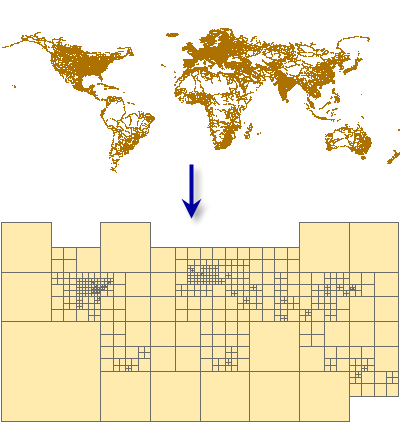
Usage
This tool creates a polygon feature class designed to be used in the Cartographic Partitions geoprocessing environment setting. Tools that honor this environment setting process input features in portions defined by the partition polygons to avoid exceeding memory limitations. The following tools honor the Cartographic Partitions environment setting:
The Aggregate Polygons tool
The Align Marker To Stroke Or Fill tool
The Collapse Hydro Polygon tool
The Collapse Road Detail tool
The Delineate Built-Up Areas tool
The Detect Graphic Conflict tool
The Intersecting Layers Masks tool
The Merge Divided Roads tool
The Resolve Building Conflicts tool
The Resolve Road Conflicts tool
The Set Control Point At Intersect tool
The Simplify Building tool
The Simplify Line tool
The Simplify Polygon tool
The Simplify Shared Edges tool
The Smooth Line tool
The Smooth Polygon tool
The Smooth Shared Edges tool
The Thin Road Network tool
Input features should correspond to the features that you intend to process together for multiscale display. For example, if you intend to use the Thin Road Network tool to process a feature class containing streets together with another containing highways, enter both of these as inputs to the Create Cartographic Partitions tool to create partitions that are relevant to the distribution and density of both datasets considered together.
Parameters
| Label | Explanation | Data type |
|---|---|---|
|
Input Features |
The input feature classes or layers with feature distribution and density, or vertex distribution and density, that determine the size and arrangement of output polygons. The input features are typically destined for subsequent processing with other geoprocessing tools. Typically, the input features, when considered simultaneously, would exceed memory limitations of other tools, so partitions are created to subdivide inputs for processing. |
Feature Layer |
|
Output Features |
The output polygon feature class of partitions each of which encloses a manageable number of input features or manageable number of input vertices not exceeding the number specified by the Feature Count parameter. |
Feature Class |
|
Feature Count |
The ideal number of features or vertices (depending on the Partition Method parameter value) to be enclosed by each polygon in the output feature class. The recommended count for features is 50,000, which is the default value. For vertices, 1 million vertices will consume approximately 0.5 GB of memory depending on the tool using the partitions. The feature count cannot be less than 500. |
Long |
|
Partition Method (Optional) |
Specifies whether the Feature Count parameter references the ideal number of features or the ideal number of vertices in each output polygon.
|
String |
Environments
Licensing information
- Basic: No
- Standard: No
- Advanced: Yes
Related topics
- An overview of the Generalization toolset
- Aggregate Polygons
- Align Marker To Stroke Or Fill
- Collapse Hydro Polygon
- Collapse Road Detail
- Delineate Built-Up Areas
- Intersecting Layers Masks
- Set Control Point At Intersect
- Thin Road Network
- Cartographic Partitions (Environment setting)
- Generalizing large datasets using partitions
- Find a geoprocessing tool