Smooth Line (Cartography Tools)
Summary
Smooths sharp angles in lines to improve aesthetic or cartographic quality.
Learn more about how the Smooth Line and Smooth Polygon tools work
Illustration
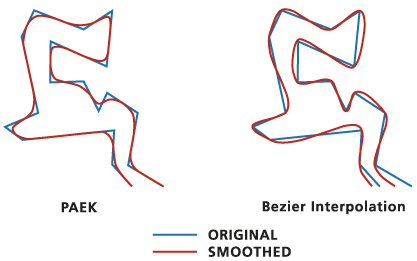
Usage
The Smoothing Algorithm parameter has the following options:
Polynomial Approximation with Exponential Kernel (PAEK)—Smooths lines based on a smoothing tolerance. Each smoothed line may have more vertices than its source line. The Smoothing Tolerance parameter controls the length of a moving path used in calculating the new vertices. The shorter the length, the more detail that will be preserved and the longer the processing time.
Bezier interpolation—Smooths lines without using a tolerance by creating approximated Bezier curves to match the input lines.
Use the Input Barrier Layers parameter to identify features that must not be crossed by smoothed lines. Barrier features can be points, lines, or polygons.
Processing large datasets may exceed memory limitations. In such cases, consider processing input data by partition by identifying a relevant polygon feature class in the Cartographic Partitions environment. Portions of the data, defined by partition boundaries, will be processed sequentially. The resulting feature class will be seamless and consistent at partition edges. See Generalizing large datasets using partitions for more information.
Caution:
The Cartographic Partitions environment is ignored when the Handling Topological Errors parameter is set to the Do not check for topological errors or Flag topological errors option .
Domains and subtypes are copied to the output even when the Transfer field domain, subtypes, and attributes rules environment is unchecked.
The output line feature class will be topologically correct. Any topological errors in the input data will be flagged in the output line feature class. The output feature class includes the following additional fields:,
InLine_FID—The input feature IDs.SmoLnFlag—Topological errors of the input. A value of 1 indicates that a topological error is present; a value of 0 indicates that no errors are present.
Legacy:
Prior to the ArcGIS Pro 2.2 version of this tool, the Preserve endpoint for rings parameter was used to specify whether the endpoint of a resulting isolated polygon ring would be preserved. This parameter is still included in the tool's syntax for compatibility in scripts and models but is now ignored and hidden on the tool's dialog box.
Parameters
| Label | Explanation | Data type |
|---|---|---|
|
Input Features |
The line features that will be smoothed. |
Feature Layer |
|
Output Feature Class |
The output feature class that will be created. |
Feature Class |
|
Smoothing Algorithm |
Specifies the smoothing algorithm that will be used.
|
String |
|
Smoothing Tolerance |
The smoothing tolerance that will be used by the Polynomial Approximation with Exponential Kernel (PAEK) option of the Smoothing Algorithm parameter. A tolerance must be specified, and it must be greater than zero. You can choose a preferred unit; the default is the feature unit. This parameter is unavailable when the Bezier interpolation option of the Smoothing Algorithm parameter is used. |
Linear Unit |
|
Preserve endpoint for closed lines (Optional) |
This is a legacy parameter that is no longer used. It was formerly used to specify whether endpoints of closed lines would be preserved. This parameter is still included in the tool's syntax for compatibility in scripts and models but is hidden from the tool's dialog box. Specifies whether the endpoints of closed lines will be preserved. This option works with the PAEK algorithm only.
|
Boolean |
|
Handling Topological Errors (Optional) |
Specifies how topological errors (possibly introduced in the process, such as line crossing or overlapping) will be handled.
|
String |
|
Input Barrier Layers (Optional) |
Inputs containing features that will act as barriers for smoothing. The resulting smoothed lines will not touch or cross barrier features. For example, when smoothing contour lines, spot height features input as barriers ensure that the smoothed contour lines will not be smooth across these points. The output will not violate the elevation as described by measured spot heights. |
Feature Layer |
Environments
Current Workspace, Default Output Z Value, Output M Domain, Output XY Domain, Output Coordinate System, Extent, Output has M values, Output has Z values, Scratch Workspace, XY Tolerance, Cartographic Partitions
Licensing information
- Basic: No
- Standard: Yes
- Advanced: Yes