Resolve Road Conflicts (Cartography Tools)
Summary
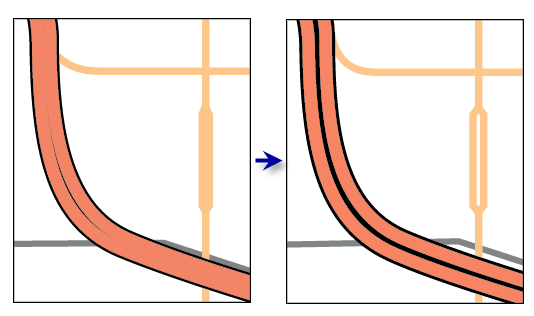
Resolves graphic conflicts among symbolized road features by adjusting portions of line segments.
Learn more about how Resolve Road Conflicts works
Caution:
This tool does not produce output layers. Instead, it alters the geometry of the source feature classes of the input layers. It is recommended that you make a copy of the input features before you run this tool.
Caution:
A warning is issued if the input features are not in a projected coordinate system. This tool relies on linear distance units, which will create unexpected results in an unprojected coordinate system. It is recommended that you run this tool on data in a projected coordinate system to ensure valid results. An error occurs and the tool will not process if the coordinate system is missing or unknown.
Illustration
Usage
This tool is typically used when producing relatively large-scale products when it is preferable to display divided roads with multiple lanes that are visually distinct. At smaller scales, you can use the Merge Divided Roads tool to display a single representative line for these features instead. If your workflow includes running both tools on the same collection of roads, it is recommended that you merge roads prior to resolving road conflicts.
The Hierarchy Field parameter is used to specify the hierarchical importance of each road class. Lower integers specify more significant roads, with a hierarchy value equal to 1 for the most important roads. Movement will be minimized for the most important roads; lower-hierarchy roads generally will be moved to accommodate higher-hierarchy roads. The
hierarchyfield must be present and named the same for all input feature classes. The data type must be short or long integer.This tool assesses graphic conflicts of symbolized features. The symbology extent and the reference scale are used in conjunction with one another. Run this tool only after you have finalized the appearance of the symbols, and ensure that the reference scale corresponds to the final intended output scale.
An error will occur if line and outline symbol widths equal zero. To eliminate certain features from display, use a definition query on the layer.
You can lock features from displacement by calculating the Hierarchy Field value equal to 0 (zero). This is useful when a road should not be moved because of its spatial relationship with other map features, especially with continuous data such as elevation.
Processing large road datasets or a number of datasets together may exceed memory limitations. In this case, consider processing input data by partition by identifying a relevant polygon feature class in the Cartographic Partitions environment setting. Portions of the data, defined by partition boundaries, will be processed sequentially. The resulting feature classes will be seamless and consistent at partition edges. See How Resolve Road Conflicts works for more information about running this tool with partitioning.
The optional Output Displacement Feature Class parameter creates a feature class of polygons that indicates the amount and direction of displacement that took place. You can use this feature class for visual inspection and spatial querying or as an input to the Propagate Displacement tool.
Parameters
| Label | Explanation | Data type |
|---|---|---|
|
Input Road Layers |
The input feature layers containing symbolized road features that may be in conflict. |
Layer |
|
Hierarchy Field |
The field that contains hierarchical ranking of feature importance in which 1 is very important and larger integers reflect decreasing importance. A value of 0 (zero) locks the feature to ensure that it is not moved. This field must be present and named the same for all input feature classes. The data type must be short or long integer. |
String |
|
Output Displacement Feature Class (Optional) |
The output polygon features containing the degree and direction of road displacement that will be used by the Propagate Displacement tool to preserve spatial relationships. |
Feature Class |
Derived output
| Label | Explanation | Data type |
|---|---|---|
|
Output Layers |
The updated input features. |
Layer |
Environments
Cartographic Coordinate System, Reference Scale, Cartographic Partitions
Licensing information
- Basic: No
- Standard: No
- Advanced: Yes
Related topics
- An overview of the Graphic Conflicts toolset
- Understanding conflict resolution and generalization
- Automating conflict resolution and generalization workflows with geoprocessing
- How Resolve Road Conflicts works
- Merge Divided Roads
- Propagate Displacement
- Generalizing large datasets using partitions
- Create Cartographic Partitions
- Cartographic Partitions (Environment setting)
- Find a geoprocessing tool