Simplify Polygon (Cartography Tools)
Summary
Simplifies polygons by removing relatively extraneous vertices while preserving essential shape.
Illustration
Usage
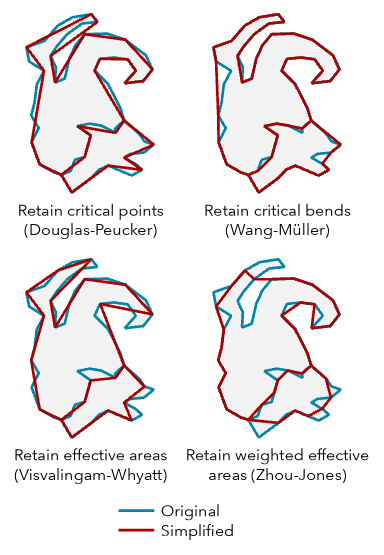
This tool uses different simplification algorithms for different purposes. To learn more about these algorithms, see How Simplify Line and Simplify Polygon work.
The options for the Simplification Algorithm parameter are listed below.
The Retain critical points (Douglas-Peucker) algorithm (
"POINT_REMOVE"in Python) identifies and removes relatively redundant vertices to simplify data for display at smaller scales. It is the fastest of the simplification algorithm options in this tool. This option is often used for data compression or for coarse simplification. The angularity of the resulting polygon outlines increase significantly as the tolerance increases.The Retain critical bends (Wang-Müller) algorithm (
"BEND_SIMPLIFY"in Python") identifies and eliminates relatively insignificant bends to simplify data for display at smaller scales. It is typically more accurate regarding the input geometry than the Retain critical points (Douglas-Peucker) option but can take more time to process.The Retain weighted effective areas (Zhou-Jones) algorithm (
"WEIGHTED_AREA"in Python) identifies triangles of effective area for each vertex. The triangles are then weighted by a set of metrics to compare the flatness, skewness, and convexity of each area. The weighted areas guide the removal of their corresponding vertices to simplify the polygon outline while retaining as much character as possible.The Retain effective areas (Visvalingam-Whyatt) algorithm (
"EFFECTIVE_AREA"in Python) identifies triangles of effective area for each vertex to guide the removal of vertices to simplify the polygon outline while retaining as much character as possible.
The Simplification Tolerance parameter value determines the degree of simplification. The larger the tolerance, the more coarse the resulting geometry. Smaller tolerances generate geometry that more accurately represents the input. The
MinSimpTolandMaxSimpTolfields will be added to the output to store the tolerance that was used.For the Retain critical points (Douglas-Peucker) algorithm, the tolerance is the maximum allowable perpendicular distance between each vertex and the newly created line.
For the Retain critical bends (Wang-Müller) algorithm, the tolerance is the diameter of a circle that approximates a significant bend.
For the Retain weighted effective areas (Zhou-Jones) algorithm, the square of the tolerance is the area of a significant triangle defined by three adjacent vertices. The further a triangle deviates from equilateral, the higher weight it is given, and the less likely it is to be removed.
For the Retain effective areas (Visvalingam-Whyatt) algorithm, the square of the tolerance is the area of a significant triangle defined by three adjacent vertices.
Polygons that are smaller than the Minimum Area parameter value will be removed from the output feature class. For a group of adjacent polygons that share common edges, the minimum area applies to the total area of the group. Use the Keep collapsed points parameter to retain a record of removed polygons as point features.
Multipart polygons are simplified as individual parts.
Use the Keep collapsed points parameter to create an output point feature class to store points that represent any polygons that are removed because they are smaller than the minimum area. The point output is derived; it will use the same name and location as the Output Feature Class parameter value but with a _Pnt suffix. The output polygon feature class contains all the fields from the input feature class. The output point feature class will not contain these fields.
Topological errors such as self-intersections and overlaps between features may be created when simplifying geometry. The Handling Topological Errors parameter has three options for determining what happens in these cases:
Do not check for topological errors—Topological errors will not be identified. Processing will be faster. Use this option when you have confidence in the topological accuracy of the data.
Flag topological errors—Topological errors will be identified and flagged. The output feature class will include the
InPoly_FIDandSimPgnFlagfields. TheInPoly_FIDfield will contain the input feature IDs. TheSimPgnFlagfield will contain a value of 1 if a topological error is present or a value of 0 (zero) if no error is present.Resolve topological errors—Topological errors will not be created in the output, and errors that exist in the input will have vertices inserted at the points of intersection. Existing topological relationships between features such as shared edges will be retained. Processing time will be longer. The output feature class will include the
InPoly_FIDandSimPgnFlagfields. TheInPoly_FIDfield will contain the input feature ID. TheSimPgnFlagfield values are as follows:0 = No topological errors are present.
1 = A topological error is present in the input.
2 = The feature has been split by a partition and the parts are now smaller than the minimum area after simplification. The flag may appear on only one part of the split feature. These features will be retained in the output feature class. This only occurs when the Cartographic Partitions environment setting is used.
Legacy:
In the course of topology resolution, previous versions of the tool modified tolerance on a per-feature basis and stored those values in the
MinSimpTolandMaxSimpTolfields. In the current implementation, the values in these fields will be the same and equal to the value specified for the Simplification Tolerance parameter. Be sure to modify existing models or scripts that rely on these fields.Use the Input Barrier Layers parameter to identify features that must not be crossed by simplified polygons. Barrier features can be points, lines, or polygons.
Domains and subtypes will be copied to the output even if the Transfer Geodatabase Field Properties environment is not checked.
Processing large datasets may exceed memory limitations. In this case, consider processing input data by partition by identifying a relevant polygon feature class in the Cartographic Partitions environment setting. Portions of the data defined by partition boundaries will be processed sequentially. The resulting output feature class will be seamless and consistent at partition edges. See Generalizing large datasets using partitions for more information.
Caution:
The Cartographic Partitions environment setting is ignored when the Handling Topological Errors parameter is set to Do not check for topological errors or Flag topological errors.
Parameters
| Label | Explanation | Data type |
|---|---|---|
|
Input Features |
The input polygon features that will be simplified. |
Feature Layer |
|
Output Feature Class |
The simplified output polygon feature class. It will contain all the fields from the input feature class. The output polygon feature class is topologically correct. The tool does not introduce topology errors, but topological errors in the input data will be flagged in the output polygon feature class. The output feature class will include the The
|
Feature Class |
|
Simplification Algorithm |
Specifies the polygon simplification algorithm that will be used.
|
String |
|
Simplification Tolerance |
The degree of simplification that will be used. You can choose a preferred unit; otherwise, the units of the input will be used. The
|
Linear Unit |
|
Minimum Area (Optional) |
The minimum area for a polygon to be retained. The default value is zero, that is, to keep all polygons. You can choose a preferred unit for the specified value; otherwise, the units of the input will be used. |
Areal Unit |
|
Handling Topological Errors (Optional) |
Specifies how topological errors will be handled. Topological errors may be introduced in the simplification process and can include lines crossing or overlapping lines.
|
String |
|
Keep collapsed points (Optional) |
Specifies whether an output point feature class will be created to store the centers of polygons that are removed because they are smaller than the
|
Boolean |
|
Input Barrier Layers (Optional) |
The inputs containing features to act as barriers for simplification. Resulting simplified polygons will not touch or cross barrier features. For example, when simplifying forested areas, the resulting simplified forest polygons will not cross road features defined as barriers. |
Feature Layer |
Derived output
| Label | Explanation | Data type |
|---|---|---|
|
Polygons Collapsed To Zero Area |
When the Keep collapsed points parameter is checked, an output point feature class is created to store points that represent polygons that are removed because they are smaller than the minimum area. |
Feature Class |
Environments
Cartographic Partitions, Current Workspace, Default Output Z Value, Output M Domain, Output XY Domain, Output Coordinate System, Extent, Output has M values, Output has Z values, Scratch Workspace, XY Tolerance
Licensing information
- Basic: No
- Standard: Yes
- Advanced: Yes