Simplify Building (Cartography Tools)
Summary
Simplifies the boundary or footprint of building polygons while maintaining their essential shape and size.
Illustration
Usage
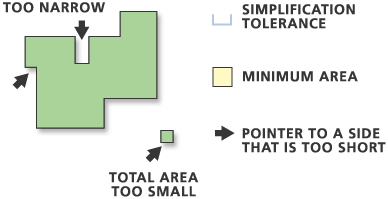
The Minimum Area parameter applies to simplified buildings only. Any buildings that are smaller than the minimum area after the simplification process is completed will be removed from the output feature class.
Use the Input barrier layers parameter to identify features that must not be crossed by simplified buildings. Barrier features can be points, lines, or polygons.
Use the Keep collapsed points parameter (
collapsed_point_optionin Python) to create an output point feature class to store points that represent buildings that are removed because they are smaller than the minimum area. The point output is derived; it will use the same name and location as the Output Feature Class parameter (out_feature_classin Python) but with a _Pnt suffix. The output polygon feature class contains all the fields present in the input feature class. The output point feature class does not contain any of these fields.The output feature class will include a
BLD_STATUSfield to indicate simplification status as follows:1—A single building has been simplified
2—A single building has been simplified to its minimum bounding rectangle
3—A building smaller than the tolerance squared has been simplified to its minimum bounding rectangle
5—A building that has not been simplified
Legacy:
Prior to ArcGIS version 10,
BLD_STATUS= 4 indicated simplified or partially simplified buildings connected with straight lines.BLD_STATUS= 4 is no longer used.Caution:
If a
BLD_STATUSfield exists in the input feature class, it will be present in the output feature class populated with new values. Existing values will be overwritten. To preserve the existing values, create a field in the input feature class, and copy the existing values from theBLD_STATUSfield to this new field.If the Check for spatial conflicts parameter is used, the tool will detect spatial conflicts and add a
SimBldFlagfield to the output to store conflict flags. A value of 0 means no conflict; a value of 1 means conflict.Caution:
If a
SimBldFlagfield exists in the input feature class, it will be present in the output feature class populated with new values. Existing values will be overwritten even if this parameter is unchecked (conflict_option = "NO_CHECK"in Python). When spatial conflicts are not being checked, this existing field will be overwritten with NULL values. To preserve the existing values, create a field in the input feature class, and copy the existing values from theSimBldFlagfield to this new field.This tool cannot be executed in an edit session.
Input z-values can be preserved if they're specified in the Environment settings. When output vertices are coincident to input feature vertices, z-values will be transferred to output vertices. Otherwise, z-values will be derived either from existing z-values or through interpolation.
Invalid (self-intersecting) geometry may be created during the simplification process and will be repaired but not improved. For example, if a polygon crosses itself, the polygon will become a multipart polygon but will still appear self-crossing.
Domains and subtypes are copied to the output even if the Transfer Geodatabase Field Properties environment is unchecked.
Processing large datasets may exceed memory limitations. In such cases, consider processing input data by partition by identifying a relevant polygon feature class in the Cartographic Partitions environment setting. Portions of the data, defined by partition boundaries, will be processed sequentially. The resulting feature class will be seamless and consistent at partition edges. See Generalizing large datasets using partitions for more information.
Parameters
| Label | Explanation | Data type |
|---|---|---|
|
Input Features |
The building polygons to be simplified. |
Feature Layer |
|
Output Feature Class |
The output feature class to be created. |
Feature Class |
|
Simplification Tolerance |
The tolerance for building simplification. A tolerance must be specified, and it must be greater than zero. You can choose a preferred unit; the default is the feature unit. |
Linear Unit |
|
Minimum Area (Optional) |
The minimum area for a simplified building to be retained in feature units. The default value is zero, that is, to keep all buildings. You can specify a preferred unit; the default is the feature unit. |
Areal Unit |
|
Check for spatial conflicts (Optional) |
Specifies whether spatial conflicts—that is, overlapping or touching among buildings—will be identified. A
|
Boolean |
|
Input barrier layers (Optional) |
The input layers containing features to act as barriers for simplification. Resulting simplified buildings will not touch or cross barrier features. For example, when simplifying buildings, the resulting simplified building areas do not cross road features defined as barriers. |
Feature Layer |
|
Keep collapsed points (Optional) |
Specifies whether an output point feature class will be created to store the centers of any buildings that are removed because they are smaller than the
|
Boolean |
Derived output
| Label | Explanation | Data type |
|---|---|---|
|
Polygons Collapsed To Zero Area |
The output point feature class that will store points that represent buildings that are removed because they are smaller than the Minimum Area parameter value ( |
Feature Class |
Environments
Cartographic Partitions, Current Workspace, Default Output Z Value, Output M Domain, Output XY Domain, Output Coordinate System, Extent, Output has M values, Output has Z values, Scratch Workspace, XY Tolerance
Licensing information
- Basic: No
- Standard: No
- Advanced: Yes