Test (Image Analyst Tools)
Summary
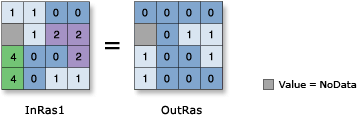
Performs a Boolean evaluation of the input raster using a logical expression.
When the expression evaluates to true, the output cell value is 1. If the expression is false, the output cell value is 0.
Illustration
Usage
The test is specified by an SQL expression in the Where clause.
The Where clause uses an SQL query. See the following topics for more details on creating queries:
In order to use a {where_clause} in Python, it should be enclosed in quotes. For example, "Value > 5000".
You can consult the help for more information on specifying a query in Python.
If the input is a multiband raster, the output will be a multiband raster. The tool will perform the operation on each band in the input.
If the input is multidimensional raster data, all slices from all variables will be processed. The output will be a multidimensional raster in CRF format.
Parameters
| Label | Explanation | Data type |
|---|---|---|
|
Input raster |
The input raster on which the Boolean evaluation is performed, based on a logical expression. |
Raster Layer |
|
Where clause |
The logical expression that will determine which input cells will return a value of true (1) and which will be false (0). The Where clause follows the general form of an SQL expression. It can be entered directly, for example, VALUE > 100, if you click the Edit SQL mode button |
SQL Expression |
 . If in the Edit Clause Mode
  , you can begin constructing the expression by clicking on the Add Clause Mode button.
Return value
| Label | Explanation | Data type |
|---|---|---|
|
Output raster |
The output raster. The output cell values will be either 0 or 1. |
Raster |
Environments
Auto Commit, Cell Size, Cell Size Projection Method, Compression, Current Workspace, Extent, Geographic Transformations, Mask, Output CONFIG Keyword, Output Coordinate System, Scratch Workspace, Snap Raster, Tile Size
Licensing information
- Basic: Requires Image Analyst or Spatial Analyst
- Standard: Requires Image Analyst or Spatial Analyst
- Advanced: Requires Image Analyst or Spatial Analyst