Import Indoor Images (Indoors Tools)
Summary
Imports 360-degree and panoramic images from an .e57 file to an oriented imagery dataset. The output of this tool can be added to floor-aware maps and scenes in ArcGIS Pro.
Usage
Use this tool to load 360-degree and panoramic images into an oriented imagery dataset. You can include floor-aware oriented imagery layers in floor-aware maps.
This tool supports 360-degree and panoramic JPEG images contained in
.e57files. The images must use an equirectangular (spherical) representation.Use this tool with input Levels features with a selection or definition query to only import images for specific floors.
The Target Oriented Imagery Layer parameter value must be a z-enabled oriented imagery layer. Create oriented imagery using the Create Oriented Imagery Dataset tool.
The oriented imagery layer can be from a local oriented imagery dataset or a hosted feature service. When importing photos to a hosted feature service, the feature service must support feature attachments.
Use the Input Coordinate System parameter to specify the horizontal and vertical coordinate systems of the input data.
If no coordinate system is specified or defined in the input
.e57file, the input data is assumed to be in the same coordinate system as the input Levels features.If the input data and input Levels features have different coordinate systems, the tool will reproject the imported image locations.
To support floor awareness, this tool adds a
LEVEL_IDfield to the target oriented imagery dataset if it is not present.The tool assigns Level IDs to images based on a comparison of the z-values of the images and Levels features as follows:
An image is assigned the Level ID of the Levels feature that is vertically positioned at or immediately below the image.
When an image has a z-value that places it below the lowest level or more than 15 meters above the highest level, the image is assigned a Level ID value of Null.
Images that fall outside any Levels feature (based on x,y-coordinates) are assigned a Level ID value of Null.
If the input data and input Levels layer features have different z-origins, use the Elevation Adjustment parameter to compensate for the difference. Elevation adjustment is applied after any needed reprojection of image locations.
For example, if the input data has z-values relative to sea level, and the input Levels features have z-values relative to ground level, use a negative Elevation Adjustment parameter value to compensate for the difference. The following diagram is an example:
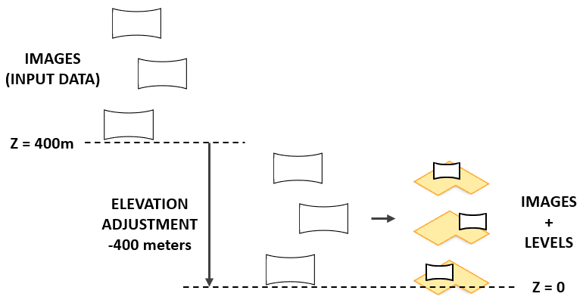
A negative elevation adjustment of -400m is applied to vertically align images with Levels features. The tool populates oriented imagery feature attributes as follows:
Shape—x-, y-, and z-coordinate values are based on the input data file's location information for the image.Name—The name of the image from the input data file's metadata. If no metadata is available, the input data file name is used with incrementing numeral values appended.Note:
This value may differ from the image file name in the
ImagePathfield.LEVEL_ID—The level ID of the associated levels feature. If no associated level is determined, a value of Null is assigned.ImagePath—The path of the image file that is associated with the feature.AcquisitionDate—The acquisition date and time from the input file's metadata. If no metadata is available, the input data file's last modified date and time value is used.CameraHeading—The camera heading based on the input data file's rotation information for the image. Values are in degrees.Heading values are measured in a positive clockwise direction in which north is defined as 0 degrees.
This tool does not populate the oriented imagery's
CameraPitchorCameraRollattributes.Note:
Camera heading information may be stored differently depending on the software used. Review the tool output to verify that the
CameraHeadingvalues are correct, and use the Calculate Field tool to adjust theCameraHeadingvalues if needed.
HorizontalFieldOfView—The camera's scope in the horizontal direction, in degrees.Valid values range from 0 to 360.
By default, this tool assigns a value of 360. Adjust this value using the Horizontal Field of View parameter.
VerticalFieldOfView—The camera's scope in the vertical direction, in degrees.Valid values range from 0 to 180.
By default, this tool assigns a value of 180. Adjust this value using the Vertical Field of View parameter.
OrientedImageryType—The type of oriented imagery. This tool assigns a value of 360, which indicates the images provide spherical or panoramic surrounding views.
The oriented imagery output by this tool can be configured as floor aware for use with the floor filter in floor-aware maps.
Imported images are stored as local files in the folder specified for the Target Image Folder parameter.
If the Target Oriented Imagery parameter value is a local oriented imagery dataset, use the Generate Service From Oriented Imagery Dataset tool to publish a hosted feature service with the imported imagery.
If the Target Oriented Imagery parameter value is a hosted feature service, the imported images are added as attachments to the features in the oriented imagery layer.
Existing features in the target oriented imagery dataset are preserved during import.
Parameters
| Label | Explanation | Data type |
|---|---|---|
|
Input Data |
The |
File |
|
Input Level Features |
The associated Levels layer from the ArcGIS Indoors Information Model that resides in the same workspace as the target images layer. |
Feature Layer |
|
Target Image Folder |
The existing folder where the imagery files will be written. |
Folder |
|
Target Oriented Imagery |
The target oriented imagery layer to which features will be added. |
Oriented Imagery Layer |
|
Input Coordinate System (Optional) |
The spatial reference of the input image file. A coordinate system can be selected if none are specified in the input data file. |
Spatial Reference |
|
Elevation Adjustment (Optional) |
The value by which the z-values of imported images will be adjusted. If the imported images are reprojected, the adjustment will be applied after projection. The default value is 0 meters.
|
Linear Unit |
|
Horizontal Field of View (Optional) |
The effective width of the field of view of imported images, in degrees. Valid values range from 0 to 360. The default value is 360. |
Double |
|
Vertical Field of View (Optional) |
The effective height of the field of view of imported images, in degrees. Valid values range from 0 to 180. The default value is 180. |
Double |
Derived output
| Label | Explanation | Data type |
|---|---|---|
|
Updated Target Oriented Imagery |
The updated oriented imagery dataset in the Indoors workspace. Existing oriented imagery data is retained during the import. A new point feature is appended for each image in the input data, with the associated image added as an attachment. Attributes are set on newly added point features based on attributes of the input image file. |
Oriented imagery Layer |
Environments
This tool does not use any geoprocessing environments.
Licensing information
- Basic: No
- Standard: Requires ArcGIS Indoors Pro or ArcGIS Indoors Maps
- Advanced: Requires ArcGIS Indoors Pro or ArcGIS Indoors Maps