Iterate Time (Model Tools)
Summary
Iterates over time in a date field.
Usage
This tool is only available from ModelBuilder for use in models. The tool is not available from the Geoprocessing pane or from Python.
The tool accepts features and tables with a date field.
The tool iterates and filters rows that are in different time intervals and time extents. For example, iterate over hourly data for the full temporal extent of the data or a subset of it. The tool creates different temporal slices that can used as input to other tools.
Use the Time Definition parameter to filter rows for specific months or weekdays. For example, if iterating data by week with a Time Step Interval value of 1 week, when Time Definition is set to Saturday and Sunday, each temporal slice only returns the data from Saturday and Sunday.
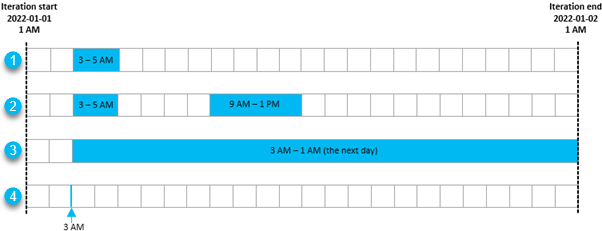
Use the Subset parameter to create one or more subsets of each temporal slice. The table below shows examples of different Subset Delay and Subset Duration values with the assumption that the temporal slice is from January 1, 2022, 1 AM (2022-01-01 01:00:00) to January 2, 2022, 1 AM (2022-01-02 01:00:00). The numbers in the Case column correspond to the numbers in the image below the table.
Case
Subset value
Result

Subset Delay: 2 Hours
Subset Duration: 2 Hours
Data from 3 AM (2022-01-01 00:03:00) to 5 AM (2022-01-01 00:05:00) will be returned.

Subset Delay: 2 Hours
Subset Duration: 2 Hours
Subset Delay: 8 Hours
Subset Duration: 4 Hours
Data from 3 AM (2022-01-01 00:03:00) to 5 AM (2022-01-01 00:05:00), and from 9AM (2022-01-01 00:09:00) to 1 PM (2022-01-01 00:13:00) will be returned

Subset Delay: 2 Hours
Subset Duration: None
Data from 3 AM (2022-01-01 00:03:00) to the next day 1 AM (2022-01-02 00:01:00) will be returned.

Subset Delay: 2 Hours
Subset Duration: 0 Hours
Data from 3 AM (2022-01-01 00:03:00) will be returned.
Use the Iteration Start Time and Iteration End Time parameters to create temporal slices from a temporal subset of the data.
Use the Snap Iteration Start Datetime To Data and Snap Iteration End Datetime To Data parameters with the Iteration Start Time and Iteration End Time parameters to align the start and end of iteration to the closest date and time value in the data.
The start and end of temporal slices are calculated based on the combination of the parameter values. The table below shows the expected outcomes based on different parameter combinations with the Skip Empty Slices parameter unchecked. For example, the data extent is from 2022-01-03 to 2022-01-31. With a one-day interval, if the Iteration Start Time and Iteration End Time parameter values are not specified, the first temporal slice will start from 2022-01-03 based on the start of the data, and will end on 2022-02-01.
Iteration Start Time
Snap Iteration Start Datetime To Data
Iteration End Time
Snap Iteration End Datetime To Data
Start of first temporal slice
End of last temporal slice
2022-01-03
2022-02-01
2022-01-01
Unchecked
2022-01-01
2022-02-01
2022-01-01
Checked
2022-01-03
2022-02-01
2022-02-01
Unchecked
2022-01-03
2022-02-01
2022-02-01
Checked
2022-01-03
2022-01-31
2022-01-01
Unchecked
2022-02-01
Unchecked
2022-01-01
2022-02-01
2022-01-01
Checked
2022-02-01
Unchecked
2022-01-03
2022-02-01
2022-01-01
Unchecked
2022-02-01
Checked
2022-01-01
2022-01-31
2022-01-01
Checked
2022-02-01
Checked
2022-01-03
2022-01-31
The Include Start parameter is always honored for the first temporal slice, and the Include End parameter is always honored for the last temporal slice regardless of the Include Start and Include End parameter values. For each temporal slice in between, the inclusion or exclusion of data is based on the parameter values. For example, if the data has values from 2022-01-01 to 2022-01-03, the table below shows the expected count outcome with a 1-day interval for the iterations from 2022-01-01 to 2022-01-03.
Time slice
Count with both parameters unchecked
Count with only Include Start checked
Count with only Include End checked
Count with both parameters checked
2022-01-01 to 2022-01-02
1
1
2 (Include Start is always honored for the first temporal slice)
2
2022-01-02 to 2022-01-03
0
1
1
2
2022-01-03 to 2022-01-04
0
1
0
1
The Subset parameter honors the inclusion settings in the Include Start and Include End parameters.
When the same field is used for the Iteration Start Time and Iteration End Time parameters, rows with null values will be skipped because they do not fall within any time extent.
When different fields are used for the Iteration Start Time and Iteration End Time parameters, rows with null values will be skipped by default. Uncheck the Skip Null Values parameter to include them in the iteration. The tables below show whether a row will be included for the output time slices from 2022-01-01 to 2022-01-03 with a one-day interval and the Include Start parameter checked.
For example, in the following table, a row has a null start time field value and the end time field value is 2022-01-02:
Time slice
Expected outcome
2022-01-01 to 2022-01-02
Included (because a null row value is in the start field)
2022-01-02 to 2022-01-03
Included (because the Include Start parameter is checked)
2022-01-03 to 2022-01-04
Not included
For example, in the following table, a row has 2022-01-02 as a start time field and the end time field value is null:
Time slice
Expected outcome
2022-01-01 to 2022-01-02
Not included
2022-01-02 to 2022-01-03
Included (because a null row value is in the end field)
2022-01-03 to 2022-01-04
Included (because a null row value is in the end field)
If a row has null values in both start and end time fields, the row will be included in every output time slice.
Uncheck the Skip Empty Slices parameter to show all temporal slices in the output, including those with a row count of zero. By default, the empty slices will be hidden.
For each iteration, the tool returns the following outputs:
Output Layer—The layer with selected rows that match the temporal slicing criteria
Start Time—The start time for each temporal slice
End Time—The end time for each temporal slice
Count—The count of rows in each temporal slice
The two output parameters, Start Time and End Time, are in 24-hour format. If no time is specified in the data or in any parameter values, the default cutoff time is 00:00:00.
The Start Time and End Time parameter values can be used as inline variable substitution to define the output names in other tools. To do so, check the Format Output Time String parameter to return a date and time string without special characters as in the example below.
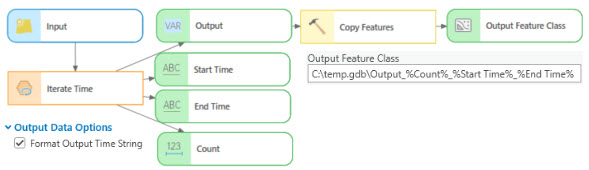
The time is always appended to the start and end time strings. To remove time from that string, use the Calculate Value tool and set the expression to
"%Start Time%"[:11] + "_to_" + "%End Time%"[:11]. The output of the Calculate Value tool can then be used as inline variable substitution in the output of the Copy Features tool.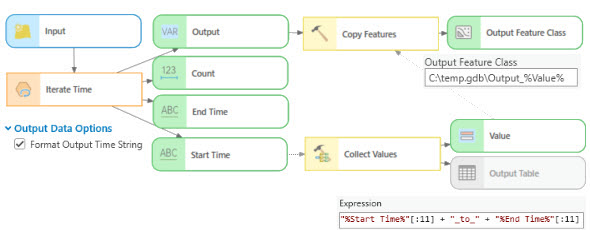
Parameters
| Label | Explanation | Data type |
|---|---|---|
|
Input Table |
The input table that will be iterated. |
Table View; Feature Layer |
|
Time Definition (Optional) |
Specifies the filter that will be applied to the data.
|
String |
|
Months (Optional) |
Specifies the month that will be used to filter the data. This parameter is active if the Time Definition parameter value is Months.
|
String |
|
Days (Optional) |
Specifies the weekday that will be used to filter the data. This parameter is active if the Time Definition parameter value is Days.
|
String |
|
Time Step Interval |
The time interval that will be used to create temporal slices. Only whole numbers are valid inputs. |
Time Unit |
|
Subset (Optional) |
One or more temporal subsets of each iteration. Each subset is defined by a pair of Subset Delay and Subset Duration values. The start of each temporal slice is offset by the Subset Delay value, and the temporal range of the slice is defined by the Subset Duration value. For example, a temporal slice is between January 1, 2022, 1 AM (2022-01-01 01:00:00) and January 2, 2022, 1 AM (2022-01-02 01:00:00), with a Subset Delay value of 2 hours.
Value table columns:
|
Value Table |
|
Start Time Field |
A field that will be used to define the temporal extent (or the start of the temporal extent) and query to create temporal slices. This field can be of type Date or Date Only, or Time Only based on the time unit used for iterating through the dataset. The temporal extent can be altered by specifying a different date and time value for the Iteration Start Time parameter. |
Field |
|
End Time Field (Optional) |
A field that will be used to define the end of the temporal extent and query to create temporal slices. The field type of this field must match the field type of the Start Time Field parameter value. This field can be added if the data has separate date fields for start and end time. If the data has a single field for start and end time, leave this parameter blank or set it to the same field as the Start Time Field value. |
Field |
|
Iteration Start Time (Optional) |
A start time that creates a subset of the data starting on and after the specified time, date, or date and time. The value should match the field type set in the Start Time Field parameter. |
Date |
|
Snap Iteration Start Datetime To Data (Optional) |
Specifies whether the start of the iteration will be aligned with the closest date in the data.
|
Boolean |
|
Iteration End Time (Optional) |
The end time that creates a subset of the data ending on and before the specified time, date, or date and time. The value should match the field type set in the End Time Field parameter. |
Date |
|
Snap Iteration End Datetime To Data (Optional) |
Specifies whether the end of iteration will be aligned with the closest date in the data.
|
Boolean |
|
Include Start (Optional) |
Specifies whether the start time will be included in each time slice.
|
Boolean |
|
Include End (Optional) |
Specifies whether the end time will be included in each time slice. Checking both Include Start and Include End will result in counting the same event twice. If an event occurred at the ending of the previous slice, it will also be counted in the following slice (include start). This may be useful in continuous events. For example, a fire has been burning for three days and you want to know the total number of new and existing fire records
|
Boolean |
|
Skip Null Values (Optional) |
Specifies whether rows with null date and time values will be included. This parameter is available when the Start Time Field and End Time Field parameters have different date fields.
Uncheck this parameter in the following cases:
|
Boolean |
|
Format Output Time String (Optional) |
Specifies whether reserved characters will be removed from the output Start Time and End Time parameter values. Only alphanumeric and underscore characters will be retained.
|
Boolean |
|
Skip Empty Slices (Optional) |
Specifies whether empty time slices will be removed. An empty time slice contains no rows.
|
Boolean |
Derived output
| Label | Explanation | Data type |
|---|---|---|
|
Output Time Layer |
The layer with selected rows that match the time slicing criteria. |
Any Value |
|
Start Time |
The start time for each slice. |
String |
|
End Time |
The end time for each slice. |
String |
|
Count |
The count of rows in each slice. |
Long |
Environments
This tool does not use any geoprocessing environments.
Licensing information
- Basic: Yes
- Standard: Yes
- Advanced: Yes