Parse Path (Model Tools)
Summary
Parses the input into its file, path, name, or extension. The output can be used as inline variable in the output name of other tools.
Legacy:
This is a deprecated tool. This functionality has been replaced by the new Parse Path tool.
Usage
This tool is only available from ModelBuilder for use in models. The tool is not available from the Geoprocessing pane or from Python.
Parsing results are controlled by the Parse Type parameter. Example: If the input to the Parse Path tool is
C:\ToolData\InputFC.shp, thenParse Type
Result
File name and extension
InputFC.shpFile path
C:\ToolDataFile name
InputFCFile extension
shpThe same functionality can be accessed in scripting with the Python
osmodule. For example if you pass an input variable:Input = "C:\ToolData\InputFC.shp", thenTo get the file
InputFC.shpimport os os.path.basename(Input)To get the file path
C:\ToolDataimport os os.path.dirname(Input)To get the file name
InputFCimport os os.path.basename(Input).rstrip(os.path.splitext(Input)[1])To get the file extension
shpimport os os.path.splitext(Input)[1].lstrip(".")
The output of Parse Path is a string and cannot be connected directly as an input to the tools such as Create Feature Class in parameters like Feature Class Location which requires a workspace data type as input. Use
%Value%inline variable substitution in such cases as shown below: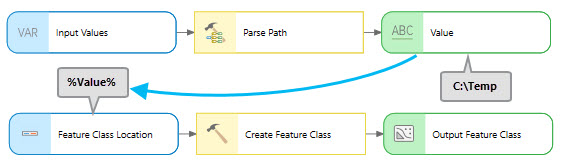
Parameters
| Label | Explanation | Data type |
|---|---|---|
|
Input Values |
The input values that you want to parse. |
Any Value |
|
Parse type (Optional) |
Specifies the parse type. Given an input value of
|
String |
Derived output
| Label | Explanation | Data type |
|---|---|---|
|
Value |
A string that contains the parsed input. |
String |
Environments
This tool does not use any geoprocessing environments.
Licensing information
- Basic: Yes
- Standard: Yes
- Advanced: Yes