Parse Path (Model Tools)
Summary
Parses an input into its file name, extension, path, and the last workspace name. The output can be used as an inline variable in the output name of other tools.
Usage
This tool is only available from ModelBuilder for use in models. The tool is not available from the Geoprocessing pane or from Python.
More than one variable name can be added to create unique names for the output, for example,
C:\Temp\Out_%Name%_%Workspace Name%.If the input to this tool is
C:\1Tool Data\City Roads.shp, for example, it will be parsed into the following outputs:Parse
Result
Path
C:\1Tool DataName
City RoadsExtension
shpWorkspace Name
1Tool DataIf the Format The name, extension and workspace parameter is checked, the path above will be parsed into the following outputs:
Parse
Result
Path
C:\1Tool DataName
City_RoadsExtension
shpWorkspace Name
_1Tool_DataThe same functionality can be accessed in scripting with the Python
osmodule. For example, if you pass the following input variable:inData = r"C:\1Tool Data\City Roads.shp", thenTo get the name
City Roadsimport os name = os.path.basename(inData)To get the path
C:\1Tool Dataimport os path = os.path.dirname(inData)To get the file extension
shpimport os ext = os.path.splitext(inData)[1][1:]To get the workspace name
1Tool Dataimport os folder = os.path.basename(os.path.dirname(inData))
To parse paths in a similar way to when the Format Name, Extension and Workspace parameter is checked, do the following:
To get the name
City_Roadsimport os import re name = os.path.basename(inData) name = re.sub('[^0-9a-zA-Z]+', '_', name) if name[0].isdigit(): name = "_" + nameTo get the path
C:\1Tool Dataimport os path = os.path.dirname(inData)To get the file extension
shpimport os ext = os.path.splitext(inData)[1][1:]To get the workspace name
_1Tool_Dataimport os import re folder = os.path.basename(os.path.dirname(inData)) folder = re.sub('[^0-9a-zA-Z]+', '_', folder) if folder[0].isdigit(): folder = "_" + folder
The Path output of this tool has a workspace data type and can be connected directly as an input to the Create Feature Class tool's Feature Class Location parameter, which accepts a workspace data type as input. For tools such as Copy that do not have a workspace data type parameter, the Path value can be passed to the tool using inline variable substitution such as
%Path%\Out_%Name%.%Extension%.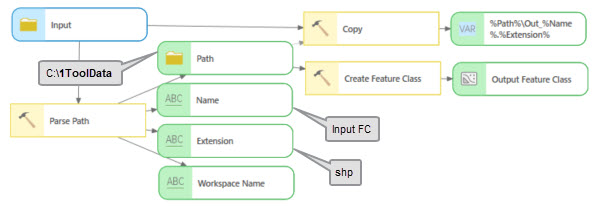
Parameters
| Label | Explanation | Data type |
|---|---|---|
|
Input Values |
The input values that will be parsed. |
Any Value |
|
Format the name, extension and workspace (Optional) |
Specifies whether all reserved characters will be removed.
|
Boolean |
Derived output
| Label | Explanation | Data type |
|---|---|---|
|
Path |
The workspace of the input. |
Workspace |
|
Name |
The file name, excluding the extension. |
String |
|
Extension |
The file extension. |
String |
|
Workspace Name |
The name of the workspace. |
String |
Environments
This tool does not use any geoprocessing environments.
Licensing information
- Basic: Yes
- Standard: Yes
- Advanced: Yes