Connect Public Transit Data Model To Streets (Public Transit Tools)
Summary
Connects transit stops to street features for use in a transit-enabled network dataset. This tool creates the StopsOnStreets and StopConnectors feature classes defined by the Network Analyst public transit data model and is intended to be run as part of a larger workflow for creating a transit-network dataset described in Create and use a network dataset with public transit data.
To realistically model travel by public transit in a network dataset, the network should allow pedestrians to walk to the transit stops, ride the transit, and walk to their destinations. The network should include both public transit data and street data, and the transit stops and lines should be connected to the streets in a controlled manner. Pedestrians should only be able to enter or exit the transit lines at stops, and the stops must be connected to the streets. This tool ensures such a connection.
The tool will create a copy of the Stops feature class, which must be present in the target feature dataset, and snap the copied Stops features to the input streets features, subject to the specified search distance and expression. The tool will then create StopConnectors features by generating a straight line between each stop and its snapped copy, creating a connection between the stop's location and the location where it snapped to a street feature. Vertices will be added to the input streets features at the locations of the snapped stops to ensure good network dataset connectivity.
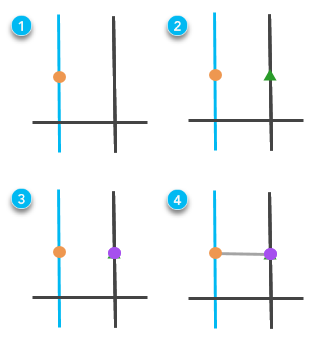
Usage
The target feature dataset used in this tool must already exist and contain a point feature class called
Stopswith the schema described by the Network Analyst public transit data model. A validStopsfeature class can be created using the GTFS To Public Transit Data Model tool.The tool will snap public transit stops in the target feature dataset to the streets features. As with any edit operation, it is best to have all the features in the same spatial reference to avoid potential errors. It is recommended that you ensure that the target feature dataset and the input streets features have the same spatial reference.
The input streets features will be altered after running the tool. Vertices will be added at the locations where
StopsOnStreetsfeatures intersect the streets. If you do not want the street data altered, make a copy of it before running this tool.If the input
Stopsfeature class contains parent stations (features with aGStopTypevalue of 1), the parent stations will be connected to the streets, and child stops will be connected to the parent station. Stops with parent stations will not be directly connected to the streets.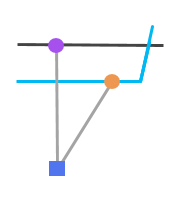
This is a stop with a parent station. The stop (orange circle) connects to the parent station (blue square) using a connector line (gray line) with ConnectorType1. The parent station connects to the street using a connector line withConnectorType0.If the input
Stopsfeature class contains station entrances (features with aGStopTypevalue of 2), the station entrances will be snapped to the streets, and parent stations will be connected to the station entrances. In this situation, the station entrances will be coincident with the streets,StopConnectorslines with aConnectorTypevalue of 2 will connect the parent station to its entrances, andStopConnectorslines with aConnectorTypevalue of 1 will connect stops to the parent station.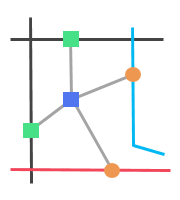
This is a parent station with explicitly defined station entrances. The stops (orange circles) connect to the parent station (blue square) using connector lines (gray lines) with ConnectorType1. The parent station connects to the streets at the station entrance locations (green squares) using connector lines withConnectorType2.The
Stopsfeature class may be altered after running the tool. Stop features with aGStopTypevalue of 2, representing station entrances, may be deleted. These stop features will instead be included in the outputStopsOnStreetsfeature class to model correct connections from the streets, through the station entrances, and to the stops. Parent stations that are spatially coincident with stops may also be deleted.When running this tool in stand-alone Python, if the input
Stopsfeature class contains parent stations or station entrances, warning message 001059 may be written to the console. This warning message is expected and does not indicate a problem.
Parameters
| Label | Explanation | Data type |
|---|---|---|
|
Target Feature Dataset |
The feature dataset where the transit-enabled network dataset will be created. This feature dataset must already exist and contain a point feature class called Note:The |
Feature Dataset |
|
Input Streets Features |
A polyline feature class of streets to which transit stops and lines will connect. This streets feature class should be the same feature class you intend to use in the transit-enabled network dataset for modeling pedestrians walking along streets. The feature class does not need to be in the target feature dataset to run this tool; however, the feature class must be in the target feature dataset at the time you create the network dataset. Note:The input streets features will be altered after running the tool. Vertices will be added at the locations where |
Feature Layer |
|
Search Distance |
The search distance for snapping transit stops to the input street features. Stops that are outside the search distance will not be snapped and will not be connected to the streets. A small search distance will ensure that stops do not snap to streets that are far away, but it increases the likelihood of stops failing to snap when they should. A large search distance increases the number of stops likely to snap but may lead to errors that should instead be corrected by editing the street data. If no street features are found within the search distance of a particular stop, the output The default is 100 meters. |
Linear Unit |
|
Expression |
An SQL expression used to select a subset of input street feature records. Transit stops will be snapped only to street features matching this expression. For example, the expression can be used to prevent stops from snapping to streets where pedestrian travel is prohibited. |
SQL Expression |
Derived output
| Label | Explanation | Data type |
|---|---|---|
|
Updated Target Feature Dataset |
The feature dataset to which the new feature classes have been added and existing ones may have been updated. |
Feature Dataset |
|
Updated Input Streets Features |
The input street feature class, which may have been modified by the tool. |
Feature Class |
|
Updated Input Stops |
The |
Feature Class |
|
Output Stops On Streets |
The |
Feature Class |
|
Output Stop Connectors |
The |
Feature Class |
Environments
This tool does not use any geoprocessing environments.
Licensing information
- Basic: No
- Standard: Yes
- Advanced: Yes