Network Analyst public transit data model
 Available with Network Analyst license.
To model schedule-based public transit service in a network dataset, the network must include a specific set of tables and feature classes, with a particular schema, that define the transit stops and lines as well as the dates and times when transit service is available. These tables and feature classes comprise the Network Analyst public transit data model and are described below.
These tables and feature classes can be used in the network dataset by time-based cost attributes configured to use the Public Transit evaluator, which calculates the travel time along transit lines at a specific time of day based on the public transit schedules defined in the data model.
Note:
A set of valid public transit data model tables and feature classes can be created automatically from General Transit Feed Specification (GTFS) public transit data by running the GTFS To Public Transit Data Model and Connect Public Transit Data Model To Streets geoprocessing tools. The complete workflow for creating such a network dataset is described in Create and use a network dataset with public transit data.
The Network Analyst public transit data model consists of five feature classes that must be located in the feature dataset where the network dataset will be created and seven tables that must be located in that feature dataset's parent geodatabase. The data must be contained in a file geodatabase or an enterprise geodatabase; mobile geodatabase network datasets do not support public transit. Additionally, because the data model requires feature classes and tables with specific names, it's not possible to include more than one set of public transit data model feature classes and tables in the same geodatabase. You can include data from more than one public transit agency in the same set of feature classes and tables, but you cannot have more than one separate set of feature classes and tables in the geodatabase.
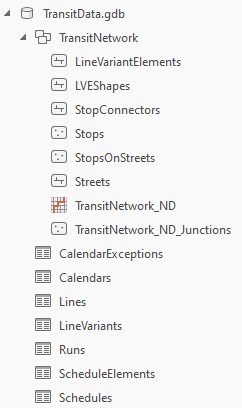
The following table summarizes the data model feature classes and tables and the relationships between them:
Public transit data model feature classes and tables
|
Name |
Description |
Type |
Required |
|---|---|---|---|
|
Defines the location and characteristics of public transit stops. The |
Feature class |
Y |
|
|
Defines the locations where passengers would access transit stops from the streets or sidewalks. The primary purpose of this feature class is to ensure proper network connectivity between the streets and transit lines. The |
Feature class |
N |
|
|
Creates a connection between a stop and its street location as defined by its associated The |
Feature class |
N |
|
|
Polyline features defining the public transit lines. Each In the network dataset, the |
Feature class |
Y |
|
|
Polyline features defining the cartographic paths taken by transit vehicles, intended to be used for visualization in the map. This optional feature class is not used by the network dataset for routing but can be used for improved output visualization in the Calculate Transit Service Frequency tool. |
Feature class |
N |
|
|
Defines the general characteristics of public transit lines or routes. |
Table |
Y |
|
|
Defines variations on lines. For example, a transit line may have two different end stations, with some trips going to one end station and the other trips going to the other end station. Each of these would be a separate line variant. Each line variant is composed of line variant elements. |
Table |
Y |
|
|
Defines unique patterns of travel times associated with line variants. For example, suppose that during rush hour, it takes five minutes for the bus to drive between each stop along the transit line, but during off-peak hours, it takes only three minutes to drive between each stop. The |
Table |
Y |
|
|
Defines the travel times for a schedule along each line variant element that is part of the line variant with which the schedule is associated. A sequence of schedule elements defines the travel times for a corresponding sequence of line variant elements for a particular schedule. |
Table |
Y |
|
|
Defines specific start times when a transit trip begins service using the travel time pattern defined by a particular schedule. |
Table |
Y |
|
|
Defines the days of the week and date ranges when public transit service runs. The |
Table |
Y |
|
|
Defines exceptions to the regular service, such as specific dates when public transit service is added or removed. The |
Table |
Y |
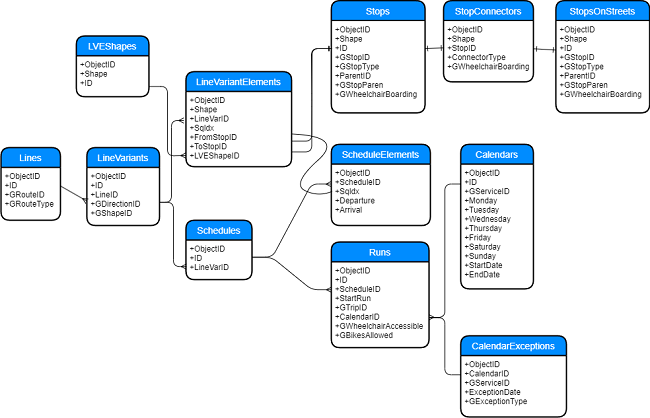
See a larger version of the data model.
Feature classes
Most of the feature classes in the data model can be used as source feature classes in the network dataset. The Stops and StopsOnStreets feature classes will be junction sources, and the LineVariantElements and StopConnectors feature classes will be edge sources. In the network dataset, the LineVariantElements edge source, representing the transit line segments, should use the Public Transit evaluator in time-based cost attributes to model public transit travel time according to the scheduled service. Connectivity groups can be used to control travel between the streets and transit lines by way of stops and connector features.
The LVEShapes feature class is not used by the network dataset and is intended only for visualization. It is primarily used by the Calculate Transit Service Frequency tool.
Stops
The Stops feature class defines the location and characteristics of public transit stops. It's required by the data model to adequately model a public transit system; however, it's not directly used by the Public Transit evaluator.
The Stops feature class is equivalent to the GTFS stops.txt file.
The following table describes the schema of the Stops feature class:
Stops
|
Field name |
Description |
Type |
Required |
Nullable |
|---|---|---|---|---|
|
|
The ObjectID of the table row. |
ObjectID |
Y |
N |
|
|
The point shape defining the location of the stop. |
Shape |
Y |
N |
|
|
The unique ID of the transit stop. |
Long |
Y |
N |
|
|
The GTFS |
Text |
N |
Y |
|
|
Indicates whether this stop represents a regular public transit stop, a parent station containing one or more regular stops, or a station entrance. The possible values are as follows:
If a stop is housed inside a station, the If a feature represents a station entrance ( If the The |
Short |
N |
Y |
|
|
The |
Long |
N |
Y |
|
|
The GTFS |
Text |
N |
Y |
|
|
Indicates whether the stop, station, or station entrance is wheelchair accessible. The possible values are as follows:
If the feature represents a stop ( The |
Short |
N |
Y |
StopsOnStreets
The StopsOnStreets feature class defines the locations where passengers can access transit stops from streets or sidewalks. The StopsOnStreets features can represent the locations of station entrances, or they can represent the closest point intersecting a street or sidewalk to the stop's location to ensure network connectivity.
The StopsOnStreets feature class is not required by the data model, but it's helpful in establishing proper network dataset connectivity, since stops are unlikely to fall directly on top of streets. If you intend to model travelers walking along the streets and using the public transit system, you need some way to connect the transit lines with the streets in a controlled manner, so use of this feature class is recommended.
The StopsOnStreets feature class doesn't have a required schema. If you create this feature class using the Connect Public Transit Data Model To Streets tool, it will have the same schema as the Stops feature class. However, since this feature class is not used by the Public Transit evaluator, you can use whatever fields are best suited for what you're modeling.
StopConnectors
The StopConnectors feature class defines polyline features to connect stops with streets by way of corresponding StopsOnStreets features. The primary purpose of this feature class is to ensure proper network connectivity between the streets and transit lines. This allows a traveler to walk along the streets, access a transit stop, use the scheduled transit service along a transit line (a LineVariantElements feature), exit the transit line at another stop, and return to the streets to continue walking to the destination.
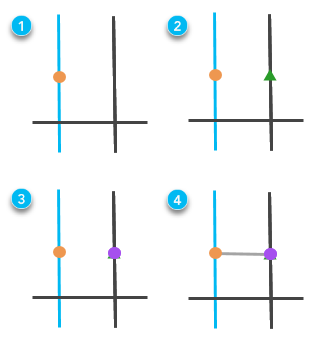
The StopConnectors feature class is not required by the data model and isn't used by the Public Transit evaluator. However, since stops are unlikely to fall directly on top of streets, a connector is recommended to ensure connectivity between the transit lines and streets.
The following table describes the schema of the StopConnectors feature class:
StopConnectors
|
Field name |
Description |
Type |
Required |
Nullable |
|---|---|---|---|---|
|
|
The ObjectID of the table row. |
ObjectID |
Y |
N |
|
|
The polyline shape of the feature. The direction of digitization of the stop connector features should be from the stops toward the streets. |
Shape |
Y |
N |
|
|
The |
Long |
N |
Y |
|
|
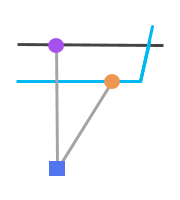
Indicates the type of connection this feature makes between the stop and the streets. The
ConnectorType 1. The parent station connects to the street using a connector line with ConnectorType 0.
ConnectorType 1. The parent station connects to the streets at the station entrance locations (green squares) using connector lines with ConnectorType 2.This field is not required, but it can be helpful for setting up evaluators on cost or restriction attributes. For example, your cost attribute could add different amounts of walk time depending on the |
Short |
N |
Y |
|
|
Indicates whether the path between the stop and the street represented by this connector line is wheelchair accessible. The possible values are as follows:
This field is helpful for creating restriction attributes in the network dataset to model passengers traveling with wheelchairs. |
Short |
N |
Y |

LineVariantElements
The LineVariantElements feature class defines polylines representing the public transit lines. Each line variant element represents travel along a transit line between two adjacent transit stops.
In the network dataset, the LineVariantElements edge source should use the Public Transit evaluator in cost attributes to model public transit travel time according to the scheduled service. The Public Transit evaluator calculates the travel time along a line variant element at a specific time of day based on the public transit schedules by querying the various public transit data model tables. The length and shape of line variant elements aren't used by the Public Transit evaluator, so the actual geometry doesn't matter; however, each feature must connect to its adjacent stops on each end to maintain proper network dataset connectivity.
The following table describes the schema of the LineVariantElements feature class:
LineVariantElements
|
Field name |
Description |
Type |
Required |
Nullable |
|---|---|---|---|---|
|
|
The ObjectID of the table row. |
ObjectID |
Y |
N |
|
|
The polyline shape of the transit line segment. The length and shape of the line feature aren't used by the Public Transit evaluator to calculate the travel time. Rather, the travel time is derived from the public transit schedules stored in the data model tables. Consequently, although the line variant elements must have shapes to model connectivity in the network dataset, the specific shapes are irrelevant for the travel time calculation. If you create your data model tables from GTFS data using the GTFS To Public Transit Data Model tool, the line variant elements will be simple straight lines connecting adjacent transit stops and will not represent the geographic paths traveled by vehicles in the transit system. |
Shape |
Y |
N |
|
|
The |
Long |
Y |
N |
|
|
A line variant consists of an ordered sequence of line variant elements that connect a specific sequence of transit stops along a transit line. The For example, if a line variant consists of 10 line variant elements, the The |
Short |
Y |
N |
|
|
A line variant element represents travel along a transit line between two adjacent transit stops. The |
Long |
N |
Y |
|
|
A line variant element feature represents travel along a transit line between two adjacent transit stops. The |
Long |
N |
Y |
|
|
The Multiple |
Long |
N |
Y |
LVEShapes
The LVEShapes feature class defines cartographic polylines representing the public transit lines that can be used for visualization in the map. Each feature represents the geographic path traveled by a transit vehicle along a transit line between two adjacent transit stops.
This optional feature class is not used by the network dataset for routing but can be used for improved output visualization in the Calculate Transit Service Frequency tool.
The following table describes the schema of the LVEShapes feature class:
LVEShapes
|
Field name |
Description |
Type |
Required |
Nullable |
|---|---|---|---|---|
|
|
The ObjectID of the table row. |
ObjectID |
Y |
N |
|
|
The cartographic polyline shape of the transit line segment representing the path traveled by a transit vehicle between two adjacent stops. |
Shape |
Y |
N |
|
|
The unique ID of the shape feature. |
Long |
Y |
N |
Tables
The tables in the data model define the public transit schedules. These tables are used by the Public Transit evaluator to determine the travel time along a LineVariantElements feature at a specific time of day based on the scheduled transit service.
Lines
The Lines table defines transit lines or routes and their characteristics. A line is equivalent to a GTFS route.
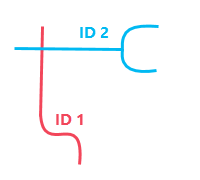
ID value.The following table describes the schema of the Lines table:
Lines
|
Field name |
Description |
Type |
Required |
Nullable |
|---|---|---|---|---|
|
|
The ObjectID of the table row. |
ObjectID |
Y |
N |
|
|
The unique ID of the transit line. |
Long |
Y |
N |
|
|
The GTFS |
Text |
N |
Y |
|
|
The mode of public transit that this line represents. The possible values are as follows:
The |
Short |
N |
Y |
LineVariants
The LineVariants table defines variations on lines. For example, a transit line may have two different end stations, with some trips going to one end station and the other trips going to the other end station. A line variant consists of an ordered sequence of line variant elements that connect a specific sequence of transit stops along a transit line.
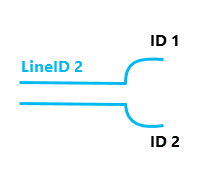
LineID value, but they are separate line variants, each with their own ID value, because they go to different end stations.The following table describes the schema of the LineVariants table:
LineVariants
|
Field name |
Description |
Type |
Required |
Nullable |
|---|---|---|---|---|
|
|
The ObjectID of the table row. |
ObjectID |
Y |
N |
|
|
The unique ID of the line variant. |
Long |
Y |
N |
|
|
The |
Long |
Y |
N |
|
|
A numerical code indicating the direction of travel along the line this line variant represents, such as inbound or outbound. This field is purely descriptive and does not impact routing. It corresponds to the GTFS The possible values are as follows:
|
Short |
N |
Y |
|
|
The GTFS |
Text |
N |
Y |
Schedules
The Schedules table defines unique patterns of travel times associated with line variants. For example, perhaps during rush hour, it takes five minutes for the bus to drive between each stop along the transit line, but during off-peak hours, it takes only three minutes to drive between each stop. The Schedules table would contain an entry for the five-minute times and another entry for the three-minute times. The individual components of the schedule are defined in the ScheduleElements table. Schedules are specific to line variants.
The following table describes the schema of the Schedules table:
Schedules
|
Field name |
Description |
Type |
Required |
Nullable |
|---|---|---|---|---|
|
|
The ObjectID of the table row. |
ObjectID |
Y |
N |
|
|
The unique ID of the schedule. |
Long |
Y |
N |
|
|
The |
Long |
Y |
N |
ScheduleElements
The ScheduleElements table defines the travel times along each line variant element for a particular schedule. An ordered sequence of schedule elements defines the travel times for a corresponding sequence of line variant elements for a particular schedule. The ScheduleElements table must contain a sequence of rows for each row in the Schedules table.
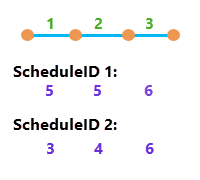
The following table describes the schema of the ScheduleElements table:
ScheduleElements
|
Field name |
Description |
Type |
Required |
Nullable |
|---|---|---|---|---|
|
|
The ObjectID of the table row. |
ObjectID |
Y |
N |
|
|
The |
Long |
Y |
N |
|
|
A schedule consists of an ordered sequence of schedule elements, each of which matches a corresponding line variant element for the line variant referenced by both the For example, if a line variant consists of 10 line variant elements, the The corresponding If the aforementioned line variant has an additional schedule associated with it, the |
Short |
Y |
N |
|
|
The number of minutes since 0 that the transit vehicle departs the originating stop of the line variant element with the same The |
Double |
Y |
N |
|
|
The number of minutes since 0 that the transit vehicle arrives at the terminating stop of the line variant element with the same |
Double |
Y |
N |
Runs
The Runs table defines specific start times when a transit trip begins service along a sequence of line variant elements using travel times defined by a particular schedule. A run is equivalent to a GTFS trip. The Runs table also defines whether wheelchairs and bicycles can be accommodated on the particular transit vehicle servicing the route at this time of day.
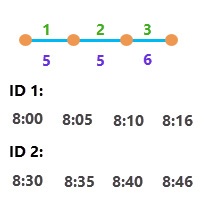
The following table describes the schema of the Runs table:
Runs
|
Field name |
Description |
Type |
Required |
Nullable |
|---|---|---|---|---|
|
|
The ObjectID of the table row. |
ObjectID |
Y |
N |
|
|
The unique ID of the run. |
Long |
Y |
N |
|
|
The |
Long |
Y |
N |
|
|
The number of minutes since midnight that the transit vehicle departs from the first stop. For example, if the run begins at 8:00 a.m., the |
Double |
Y |
N |
|
|
The GTFS |
Text |
N |
Y |
|
|
The |
Long |
Y |
N |
|
|
Indicates whether the run is wheelchair accessible. The possible values are as follows:
This field is optional. If the field is not present, the Public Transit evaluator treats all runs as usable by travelers with wheelchairs. The |
Short |
N |
Y |
|
|
Indicates whether bicycles are allowed on this run. The possible values are as follows:
This field is optional. If the field is not present, the Public Transit evaluator treats all runs as usable by travelers with bicycles. The |
Short |
N |
Y |
Calendars
The Calendars table defines the days of the week and date ranges when public transit service runs.
When solving network analyses with specific dates, the Public Transit evaluator considers the date range defined by the StartDate and EndDate fields in the Calendars table. When solving network analyses with a generic weekday, the StartDate and EndDate fields are ignored, and only the weekday fields, such as Monday, are used to define the transit service operating on the day of the analysis.
This table is required by the data model, but it does not have to have any rows if you do not want to define regular transit service. However, either Calendars or CalendarExceptions must be populated with rows. If both Calendars and CalendarExceptions are populated, CalendarExceptions modifies the regular service defined in Calendars.
The following table describes the schema of the Calendars table:
Calendars
|
Field name |
Description |
Type |
Required |
Nullable |
|---|---|---|---|---|
|
|
The ObjectID of the table row. |
ObjectID |
Y |
N |
|
|
The unique ID of the calendar. |
Long |
Y |
N |
|
|
The GTFS |
Text |
N |
Y |
|
|
Indicates whether runs with this
|
Short |
Y |
N |
|
|
Indicates whether runs with this
|
Short |
Y |
N |
|
|
Indicates whether runs with this
|
Short |
Y |
N |
|
|
Indicates whether runs with this
|
Short |
Y |
N |
|
|
Indicates whether runs with this
|
Short |
Y |
N |
|
|
Indicates whether runs with this
|
Short |
Y |
N |
|
|
Indicates whether runs with this
|
Short |
Y |
N |
|
|
The beginning of the date range when public transit service described by this dataset operates. When solving network analyses with specific dates, the Public Transit evaluator only uses runs with this |
Date |
N |
N |
|
|
The end of the date range when public transit service described by this dataset operates. The date described by When solving network analyses with specific dates, the Public Transit evaluator only uses runs with this |
Date |
N |
N |
CalendarExceptions
The CalendarExceptions table defines exceptions to the regular public transit service, such as specific dates when public transit service is added or removed. The Public Transit evaluator only uses the exception dates in this table if the network analysis is configured to use specific dates instead of generic weekdays.
This table is required by the data model, but it does not have to have any rows if you do not want to define any exceptions to the regular public transit service. However, either Calendars or CalendarExceptions must be populated with rows. If both Calendars and CalendarExceptions are populated, CalendarExceptions modifies the regular service defined in Calendars. If the Calendars table is empty, all public transit service is defined in CalendarExceptions by explicitly adding service on specific dates. In this situation, a specific date must be used in network analysis instead of a generic weekday.
The following table describes the schema of the CalendarExceptions table:
CalendarExceptions
|
Field name |
Description |
Type |
Required |
Nullable |
|---|---|---|---|---|
|
|
The ObjectID of the table row. |
ObjectID |
Y |
N |
|
|
The ID of the exception that may or may not correspond to a value in the The values in this field don't have to be unique, but each unique combination of |
Long |
Y |
N |
|
|
The GTFS |
Text |
N |
Y |
|
|
The date the transit service described by this exception is added or removed. |
Date |
Y |
N |
|
|
Indicates whether transit service is added or removed on the date described by the
The |
Short |
Y |
N |