This raster analysis portal tool is available when you are signed in to an ArcGIS Enterprise portal that has ArcGIS Image Server configured for Raster Analysis. When the tool is run, ArcGIS Pro serves as a client and the processing occurs in the servers federated with ArcGIS Enterprise. The portal tool accepts layers from your portal as input and creates output in your portal.
The input raster layer supports a layer from the portal, a URI or URL to an image service, or the output from the Make Image Server Layer tool. The input feature layer can be a layer from the portal or a URI or URL to a feature service. This tool does not support local raster data or layers. While you can use local feature data and layers as input to this portal tool, best practice is to use layers from your portal as input.
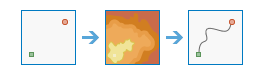
The Determine Travel Cost Path As Polyline tool produces an output feature of least-cost paths from sources to destinations.
When the source or the destination input is an image service, cells that are not sources or destinations must have the value NoData. Any cells in either of these inputs that have a value, including zero, will be used as valid sources or destinations.
The input cost surface cannot have any zero values or negative values.
An image service or feature service that identifies the cells from which the least-cost path is determined to the destinations.
If the input is an image service, the input consists of cells that have valid values (zero is a valid value), and the remaining cells must be assigned NoData.
The name of a cost raster image service to be used to determine the least-cost path from the sources to the destinations.
The value at each cell location represents the cost-per-unit distance for moving through the cell. Each cell location value is multiplied by the cell resolution while also compensating for diagonal movement to obtain the total cost of passing through the cell.
The values of the cost raster can be integer or floating point, but they cannot be negative or zero (you cannot have a negative or zero cost).
Raster Layer; Image Service; String
Input Destination Raster or Features
An image service or feature service that identifies the cells to which the least-cost path is calculated.
The polyline feature service of the optimum (least-cost) paths connecting sources and destinations.
Each path (or line) is uniquely numbered, and has an additional field in the attribute table called DestID, which connects it back to the unique identifier on the destination raster.
Since each path is represented by a unique line, there can be multiple lines in locations where paths travel the same route.
String
Path Type
(Optional)
Specifies the manner in which the values and zones on the input destination data will be interpreted in the cost path calculations.
To each cell—For each cell or location with valid values on the input destination data, a least-cost path is determined and saved on the output. With this option, each cell or location of the input destination data is treated separately, and a least-cost path is determined for each from cell.
To each zone—For each zone on the input destination data, a least-cost path is determined and saved to the output. With this option, the least-cost path for each zone begins at the location with the lowest cost distance weighting in the zone.
Best single—For all locations on the input destination data, the least-cost path is derived from the location with the minimum of the least-cost paths to source locations. This is the default.
String
Destination Field
(Optional)
The field used to obtain values for the destination locations.
Input feature data must contain at least one valid integer field.
An image service or feature service that identifies the cells from which the least-cost path is determined to the destinations.
If the input is an image service, the input consists of cells that have valid values (zero is a valid value), and the remaining cells must be assigned NoData.
The name of a cost raster image service to be used to determine the least-cost path from the sources to the destinations.
The value at each cell location represents the cost-per-unit distance for moving through the cell. Each cell location value is multiplied by the cell resolution while also compensating for diagonal movement to obtain the total cost of passing through the cell.
The values of the cost raster can be integer or floating point, but they cannot be negative or zero (you cannot have a negative or zero cost).
Raster Layer; Image Service; String
inputDestinationRasterOrFeatures
An image service or feature service that identifies the cells to which the least-cost path is calculated.
The polyline feature service of the optimum (least-cost) paths connecting sources and destinations.
Each path (or line) is uniquely numbered, and has an additional field in the attribute table called DestID, which connects it back to the unique identifier on the destination raster.
Since each path is represented by a unique line, there can be multiple lines in locations where paths travel the same route.
String
pathType
(Optional)
Specifies the manner in which the values and zones on the input destination data will be interpreted in the cost path calculations.
EACH_CELL—For each cell or location with valid values on the input destination data, a least-cost path is determined and saved on the output. With this option, each cell or location of the input destination data is treated separately, and a least-cost path is determined for each from cell.
EACH_ZONE—For each zone on the input destination data, a least-cost path is determined and saved to the output. With this option, the least-cost path for each zone begins at the location with the lowest cost distance weighting in the zone.
BEST_SINGLE—For all locations on the input destination data, the least-cost path is derived from the location with the minimum of the least-cost paths to source locations. This is the default.
String
destinationField
(Optional)
The field used to obtain values for the destination locations.
Input feature data must contain at least one valid integer field.
Field
Derived output
Name
Explanation
Data type
outputPolylineFeatures
The output polyline features.
Feature Class
Code sample
DetermineTravelCostPathAsPolyline example 1 (Python window)
This example calculates the travel cost to destinations.