Boundary Clean (Spatial Analyst Tools)
Summary
Smooths the boundary between zones in a raster.
Illustration
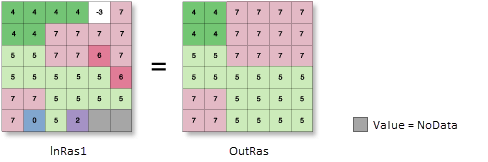
OutRas = BoundaryClean(InRas1)Usage
The Boundary Clean tool generalizes, or simplifies, rasters by smoothing the boundaries between zones. The tool provides options for controlling how the cells of the zones in the input influence the smoothing and the amount of smoothing that will be applied.
The tool applies the mathematical morphology techniques of expansion (dilation) and shrinking (erosion) when smoothing the boundaries (Serra, 1982). Each input cell is evaluated using its immediate orthogonal and diagonal neighbors.
The smoothing process first sorts the neighbor cells by a particular priority. The priority determines which zone from the neighboring cells can replace the value of the processing cell in the output.
The priority can be based on either the value of the zones or the size of the zones. The Sort type parameter (
sort_typein Python) determines the sorting type to use.The default method, Do not sort (
NO_SORTin Python), assesses the priority based on the value of the zones. Cells from zones with larger values will have a higher priority to expand into zones with smaller values. The size of the zones is not considered.The size, or total area, of the zones can be used to sort the priority. The size is determined by the count of cells that compose each zone. With the Descending setting (
DESCENDin Python), the zones are sorted by size in descending order. The zones with larger total areas will have the priority to expand into zones with smaller areas. With the Ascending setting (ASCENDin Python), the opposite is true: zones with smaller total areas will have the priority to expand into zones with larger total areas.The amount of smoothing is controlled by the Run expansion and shrinking twice parameter (
number_of_runsin Python), which determines the number of times the expand and shrinking process will be performed.With the unchecked setting (
ONE_WAYin Python), the expand and shrink process is performed once. With the checked setting (TWO_WAYin Python), the expand and shrink process is performed twice, resulting in an additional degree of smoothing of the zone boundaries.For additional details about the algorithm, see the Boundary Clean section of Smoothing zone edges with Boundary Clean and Majority Filter.
If the values of all eight neighbor cells are the same as the processing cell, the output cell will retain the value of the input cell.
See Analysis environments and Spatial Analyst for additional details on the geoprocessing environments that apply to this tool.
Reference:
Serra, J. Image Analysis and Mathematical Morphology, Academic Press, London 1982.
Parameters
| Label | Explanation | Data type |
|---|---|---|
|
Input raster |
The input raster for which the boundary between zones will be smoothed. It must be of integer type. |
Raster Layer |
|
Sort type (Optional) |
Specifies the type of sorting to use in the smoothing process. The sorting determines the priority by which cells can expand into their neighbors. The sorting can be based on zone value or zone size.
|
String |
|
Run expansion and shrinking twice (Optional) |
Specifies the number of times the smoothing process will occur, twice or once.
|
Boolean |
Return value
| Label | Explanation | Data type |
|---|---|---|
|
Output raster |
The output generalized raster. The boundaries between zones in the input will be smoothed. The output is always of integer type. |
Raster |
Environments
Auto Commit, Cell Size, Cell Size Projection Method, Compression, Current Workspace, Extent, Geographic Transformations, Mask, Output CONFIG Keyword, Output Coordinate System, Parallel Processing Factor, Scratch Workspace, Snap Raster, Tile Size
Licensing information
- Basic: Requires Spatial Analyst
- Standard: Requires Spatial Analyst
- Advanced: Requires Spatial Analyst