Extract by Points (Spatial Analyst Tools)
Summary
Extracts the cells of a raster based on a set of coordinate points.
Legacy:
This tool is deprecated and will be removed in a future release.
The Extract by Mask tool provides enhanced functionality or performance.
Illustration
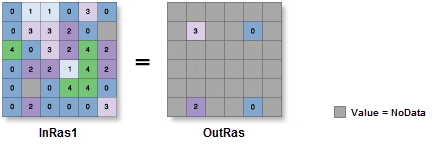
Usage
Additional attributes from the input raster, if any, will be carried over as-is to the output raster attribute table. Depending on the property being recorded, some of the attribute values may need to be recalculated.
When a multiband raster is specified as the Input Raster (
in_rasterin Python) value, all bands will be used.To process a selection of bands from a multiband raster, first create a raster dataset composed of those particular bands using the Composite Bands tool. Then use the result as the Input Raster (
in_rasterin Python) value.The default output format is a geodatabase raster. If an Esri Grid stack is specified as the output format, the name of the stack cannot start with a number, use spaces, or be more than nine characters in length.
Cell locations that are not selected are assigned a value of NoData.
If the input raster is integer, the output raster will be integer. If the input is floating point, the output will be floating point.
See Analysis environments and Spatial Analyst for additional details on the geoprocessing environments that apply to this tool.
Parameters
| Label | Explanation | Data type |
|---|---|---|
|
Input raster |
The input raster from which cells will be extracted. |
Raster Layer |
|
Input points |
The points where values will be extracted from the raster. The points are specified as x,y coordinate pairs in the same map units as the input raster. |
Point |
|
Extraction area (Optional) |
Identifies whether to extract cells based on the specified point locations (inside) or outside the point locations (outside) .
|
String |
Return value
| Label | Explanation | Data type |
|---|---|---|
|
Output raster |
The output raster containing the cell values extracted from the input raster. |
Raster |
Environments
Auto Commit, Cell Size, Cell Size Projection Method, Compression, Current Workspace, Extent, Geographic Transformations, Mask, Output CONFIG Keyword, Output Coordinate System, Scratch Workspace, Snap Raster, Tile Size
Licensing information
- Basic: Requires Spatial Analyst
- Standard: Requires Spatial Analyst
- Advanced: Requires Spatial Analyst