Point
Summary
A representation of an x,y pair, optionally with measure, height, and ID attributes.
Discussion
A Point object does not include spatial reference information and is frequently used to construct other geometry objects, including PointGeometry, Polyline, Polygon, and Multipoint objects. In the example below, a Point object is used to create a PointGeometry object.
pt = arcpy.Point(-12683890.6, 5811151.5)
pt_geometry = arcpy.PointGeometry(pt, spatial_reference=arcpy.SpatialReference(3857))
Syntax
Point({X}, {Y}, {Z}, {M}, {ID})
| Name | Explanation | Data type |
|---|---|---|
|
X (Optional) |
The x-coordinate of the point. The default value is 0.0. |
Double |
|
Y (Optional) |
The y-coordinate of the point. The default value is 0.0. |
Double |
|
Z (Optional) |
The z-coordinate of the point. The default value is None. |
Double |
|
M (Optional) |
The m-value of the point. The default value is None. |
Double |
|
ID (Optional) |
The shape ID of the point. The default value is 0. |
Integer |
Properties
| Name | Explanation | Data type |
|---|---|---|
|
ID (Read and Write) |
An integer used to uniquely identify the point. |
Integer |
|
M (Read and Write) |
The measure value of the point. |
Double |
|
X (Read and Write) |
The horizontal coordinate of the point. |
Double |
|
Y (Read and Write) |
The vertical coordinate of the point. |
Double |
|
Z (Read and Write) |
The elevation value of the point. |
Double |
Methods
clone(point_object)
Clone the Point object.
| Name | Explanation | Data type |
|---|---|---|
|
point_object |
A |
Point |
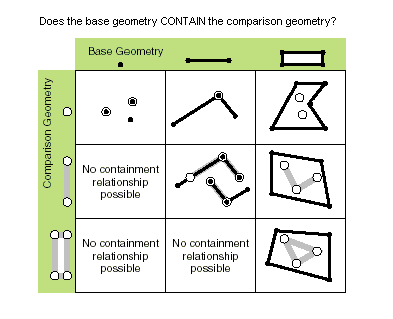
contains(second_geometry, {relation})
Specifies whether the base geometry contains the comparison geometry.
The contains method is the opposite of the within method.
Only True relationships are shown in this illustration.
| Name | Explanation | Data type |
|---|---|---|
|
second_geometry |
A second geometry. |
Object |
|
relation (Optional) |
Specifies the spatial relationship type that will be used.
The default value is None. |
String |
Return value
| Data type | Explanation |
|---|---|
|
Boolean |
Returns whether this geometry contains the second geometry. |
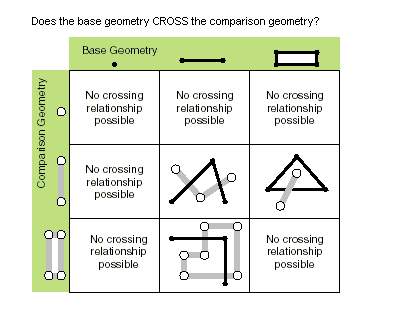
crosses(second_geometry)
Specifies whether the two geometries intersect in a geometry of a lesser shape type.
Two polylines cross if they share only points in common, at least one of which is not an endpoint. A polyline and a polygon cross if they share a polyline or a point (for a vertical line) in common on the interior of the polygon that is not equivalent to the entire polyline.
Only True relationships are shown in this illustration.
| Name | Explanation | Data type |
|---|---|---|
|
second_geometry |
A second geometry. |
Object |
Return value
| Data type | Explanation |
|---|---|
|
Boolean |
Returns whether the two geometries intersect in a geometry of a lesser shape type. |
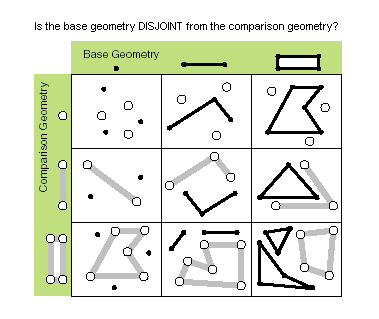
disjoint(second_geometry)
Specifies whether the base and comparison geometries have points in common.
Two geometries intersect when this method returns False.
Only True relationships are shown in this illustration.
| Name | Explanation | Data type |
|---|---|---|
|
second_geometry |
A second geometry. |
Object |
Return value
| Data type | Explanation |
|---|---|
|
Boolean |
Returns whether the two geometries have points in common. |
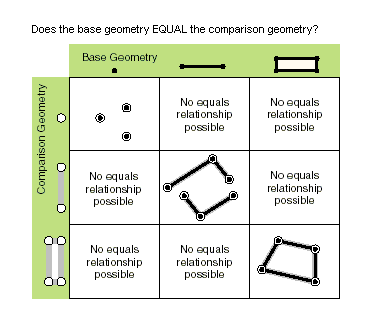
equals(second_geometry)
Specifies whether the base and comparison geometries are of the same shape type and define the same set of points in the plane. This is a 2D comparison only; m- and z-values are ignored.
Only True relationships are shown in this illustration.
| Name | Explanation | Data type |
|---|---|---|
|
second_geometry |
A second geometry. |
Object |
Return value
| Data type | Explanation |
|---|---|
|
Boolean |
Returns whether the two geometries are of the same shape type and define the same set of points in the plane. |
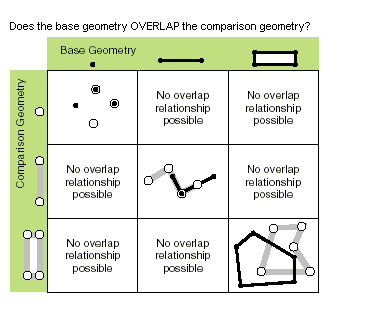
overlaps(second_geometry)
Specifies whether the intersection of the two geometries has the same shape type as one of the input geometries and is not equivalent to either of the input geometries.
Only True relationships are shown in this illustration.
| Name | Explanation | Data type |
|---|---|---|
|
second_geometry |
A second geometry. |
Object |
Return value
| Data type | Explanation |
|---|---|
|
Boolean |
Returns whether the intersection of the two geometries has the same dimension as one of the input geometries. |
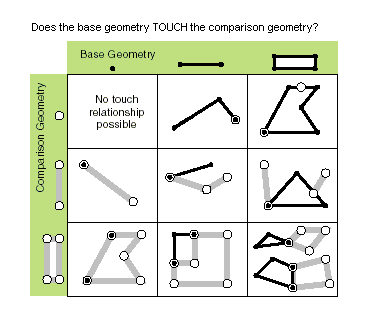
touches(second_geometry)
Specifies whether the boundaries of the geometries intersect.
Two geometries touch when the intersection of the geometries is not empty, but the intersection of their interiors is empty. For example, a point touches a polyline only if the point is coincident with one of the polyline end points.
Only True relationships are shown in this illustration.
| Name | Explanation | Data type |
|---|---|---|
|
second_geometry |
A second geometry. |
Object |
Return value
| Data type | Explanation |
|---|---|
|
Boolean |
Returns whether the boundaries of the geometries intersect. |
within(second_geometry, {relation})
Specifies whether the base geometry is within the comparison geometry.
The within method is the opposite operator of the contains method.
Only True relationships are shown in this illustration.
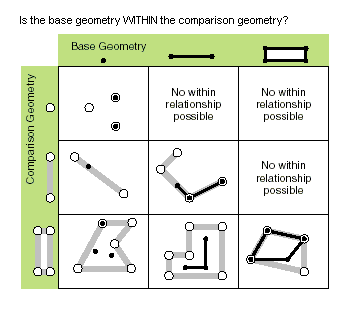
The base geometry is within the comparison geometry if the base geometry is the intersection of the geometries, and the intersection of their interiors is not empty. The within method is a Clementini operator, except in the case of an empty base geometry.
| Name | Explanation | Data type |
|---|---|---|
|
second_geometry |
A second geometry. |
Object |
|
relation (Optional) |
Specifies the spatial relationship type that will be used.
The default value is None. |
String |
Return value
| Data type | Explanation |
|---|---|
|
Boolean |
Returns whether the base geometry is within the comparison geometry. |
Code sample
Create a Point object and print some of its properties.
import arcpy

# Create point object
point = arcpy.Point(2000, 2500)

# Print point properties
print("Point properties:")
print(" X:  {0}".format(point.X))
print(" Y:  {0}".format(point.Y))
Examine Point objects returned from a Polygon object.
import arcpy

# Create cursor to retrieve Hawaii shape
feature_class = "c:/data/Hawaii.shp"
cursor = arcpy.da.SearchCursor(feature_class, ["SHAPE@"])

for row in cursor:
    # Get the geometry object from the shape field
    print("Number of Hawaiian islands: {0}".format(row[0].partCount))

    # GetPart returns an array of point objects for each part.
    for island in row[0].getPart():
        print("Vertices in island: {0}".format(island.count))
        for point in island:
            print("X: {0}, Y: {1})".format(point.X, point.Y))